Dataconomy
  • News
    • Artificial Intelligence
    • Cybersecurity
    • DeFi & Blockchain
    • Finance
    • Gaming
    • Startups
    • Tech
  • Industry
  • Research
  • Resources
    • Articles
    • Guides
    • Case Studies
    • Whitepapers
    • AI Models Leaderboard
  • AI toolsNEW
  • Newsletter
  • + More
    • Glossary
    • Conversations
    • Events
    • About
      • Who we are
      • Contact
      • Imprint
      • Legal & Privacy
      • Partner With Us
Subscribe
No Result
View All Result
  • AI
  • Tech
  • Cybersecurity
  • Finance
  • DeFi & Blockchain
  • Startups
  • Gaming
Dataconomy
  • News
    • Artificial Intelligence
    • Cybersecurity
    • DeFi & Blockchain
    • Finance
    • Gaming
    • Startups
    • Tech
  • Industry
  • Research
  • Resources
    • Articles
    • Guides
    • Case Studies
    • Whitepapers
    • AI Models Leaderboard
  • AI toolsNEW
  • Newsletter
  • + More
    • Glossary
    • Conversations
    • Events
    • About
      • Who we are
      • Contact
      • Imprint
      • Legal & Privacy
      • Partner With Us
Subscribe
No Result
View All Result
Dataconomy
No Result
View All Result

Google Messages hosts a private party and Gemini AI is the special guest

byEray Eliaçık
March 28, 2024
in Artificial Intelligence
Home News Artificial Intelligence
Share on FacebookShare on TwitterShare on LinkedInShare on WhatsAppShare on e-mail
Google Preferred Source

Gemini AI is Google’s new texting buddy! It’s like having a helpful sidekick in your Google Messages app. Gemini suggests replies, helps you write messages, and makes texting a breeze. But here’s the catch: Gemini’s guest list is as exclusive as it gets – beta testers only! That means if you’re not part of the elite club, you’ll have to wait to hang out with Gemini.

If you’re lucky enough to be part of the beta squad or just curious about what this private party is all about, you’re in the right place! We’ve got the lowdown on everything you need to know about Gemini in Google Messages. So, let’s start with the most important question.

Who can access Gemini AI?

While the rollout is currently limited to beta testers, certain criteria must be met to unlock the Gemini experience. Users must have RCS enabled, a personal Google Account (restricted from Family Link), and a compatible device.

Stay Ahead of the Curve!

Don't miss out on the latest insights, trends, and analysis in the world of data, technology, and startups. Subscribe to our newsletter and get exclusive content delivered straight to your inbox.

How to use Gemini AI in Google Messages: Unlock the power of Gemini's suggestions and messaging features. Explore now!
Gemini AI is here to revolutionize communication in Google Messages (Image credit)

After the One UI 6.1 update, Galaxy AI was brought to older Samsung smartphones, supported devices included:

  • Samsung Galaxy S24 series
  • Samsung Galaxy S23, S23 Plus, and S23 Ultra
  • Samsung Galaxy S23 FE
  • Samsung Galaxy Z Fold 5
  • Samsung Galaxy Z Flip 5
  • Samsung Galaxy Tab S9 Ultra
  • Samsung Galaxy Tab S9 Plus
  • Samsung Galaxy Tab S9 (specifically the Wi-Fi versions)
  • Pixel 6 or later
  • Pixel Fold

Also, your phone’s language setting should be in English (or French in Canada).

How does Gemini work?

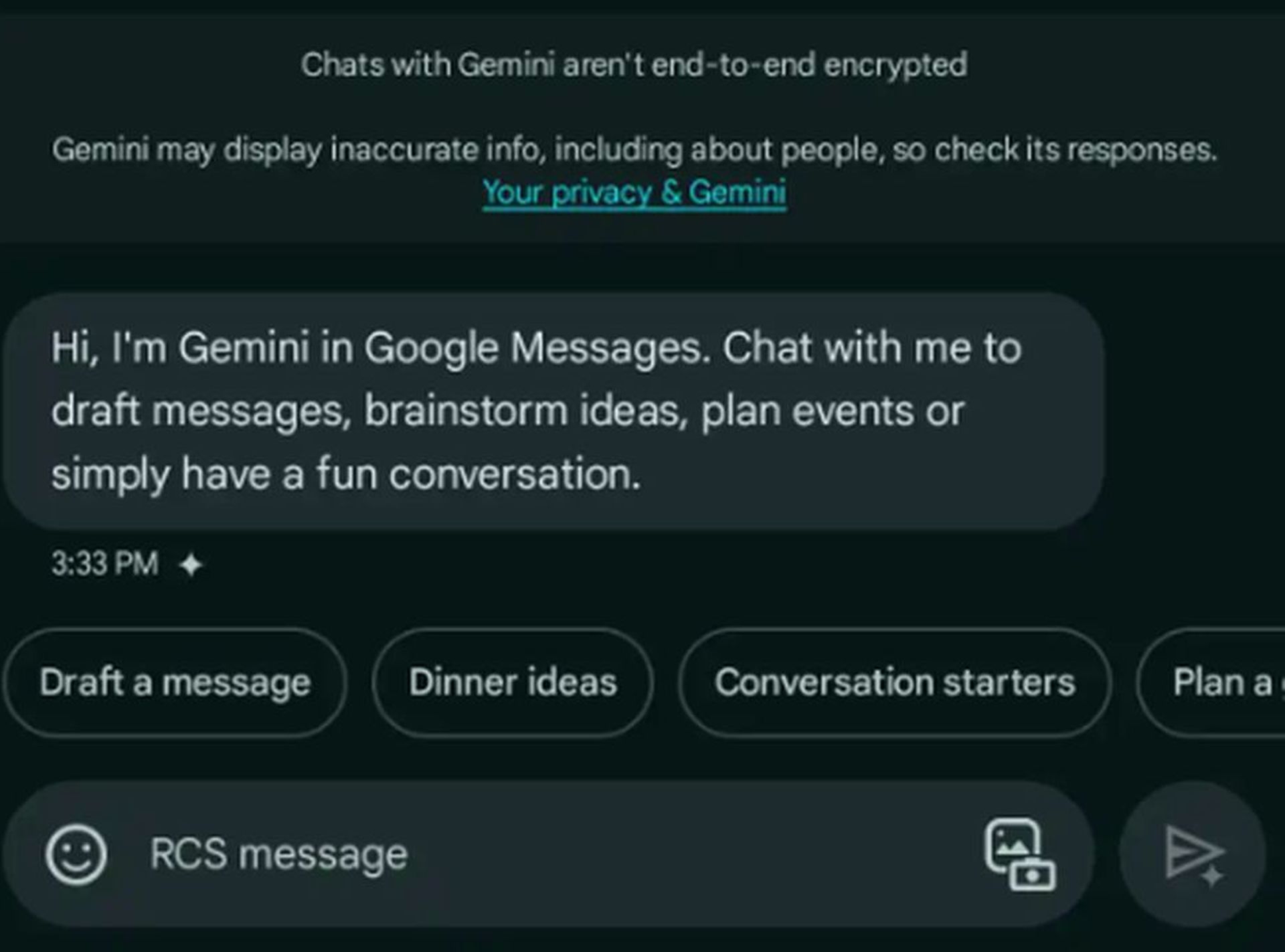
Once activated, accessing Gemini AI is as simple as tapping the Start chat button within Google Messages. From there, users are guided through a seamless setup process, culminating in the familiar messaging interface enhanced by Gemini’s capabilities. While voice messages are currently unavailable, users can still exchange images.
How to use Gemini AI in Google Messages: Unlock the power of Gemini's suggestions and messaging features. Explore now!
Gemini AI offers smart reply suggestions, message drafting assistance, and streamlines the texting process (Image credit)

Conversations with Gemini take place over RCS, although it’s important to note that they are not end-to-end encrypted. Users can customize their chat experience by changing bubble colors, but Gemini remains exclusive to the Google Messages app and cannot be accessed via Messages for web.

What can Gemini AI do?

Gemini’s potential extends far beyond basic messaging. Equipped with a version of Gemini 1.0 Pro, optimized for concise responses, users can harness its power for various tasks. Gemini Extensions offer seamless integration with Google Workspace, Maps, Flights, Hotels, YouTube, and more, making it a versatile tool for productivity and entertainment alike.

Google has provided examples of Gemini’s utility, ranging from drafting messages to planning events and even generating conversation starters for social gatherings. The possibilities with Gemini are limited only by one’s imagination.

How to use Gemini in Google Messages

Before chatting with Gemini AI, ensure that you meet the necessary requirements. Check your device’s compatibility, update Google Messages, and enable RCS. Oh, you’ve done all of them already? If so, follow this step-by-step guide to start a chat with Gemini:

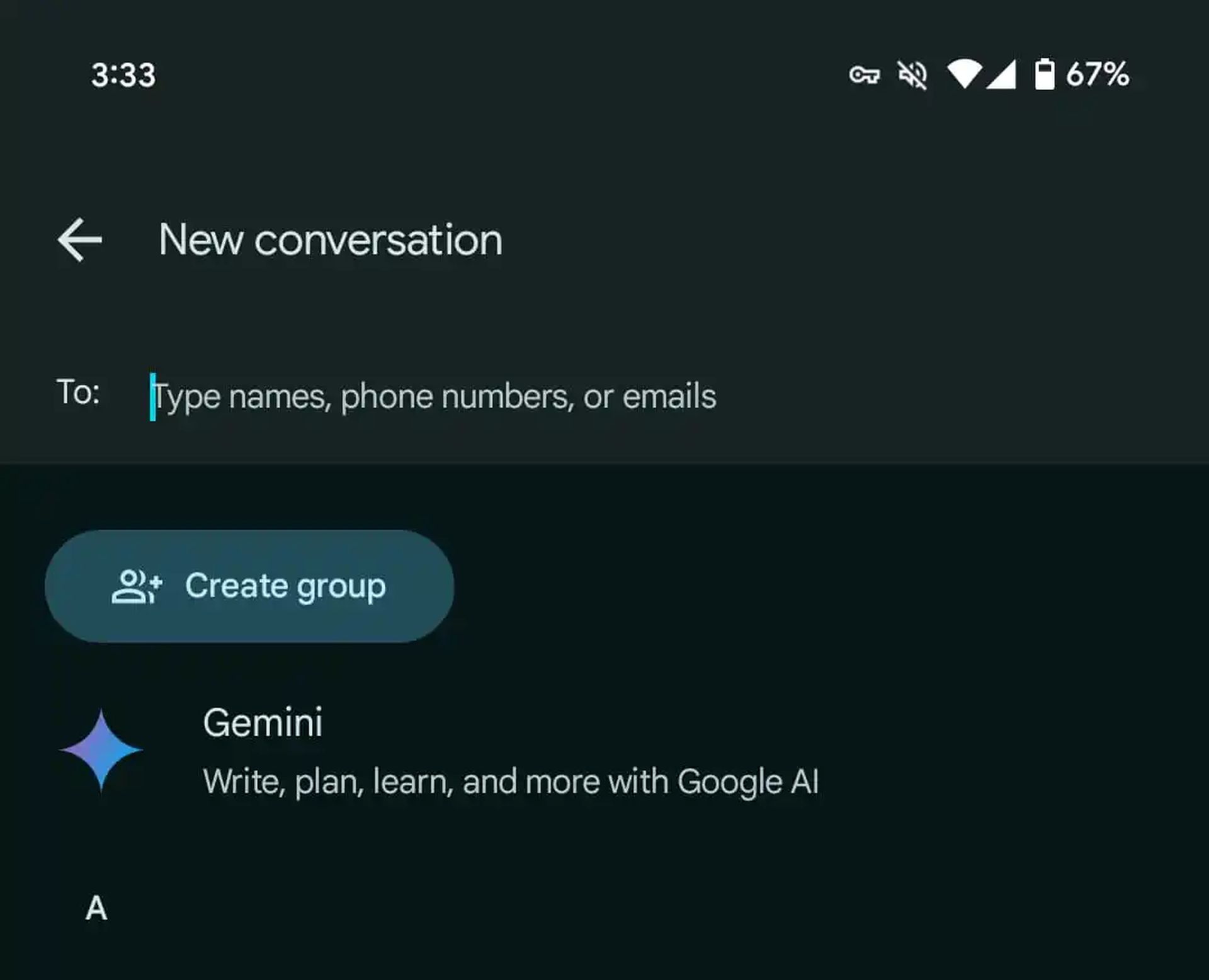
  • Open the Google Messages app on your Android device. Look for the chat with Gemini if it’s already available, or tap on “Start chat” and select Gemini from the options provided.
How to use Gemini AI in Google Messages: Unlock the power of Gemini's suggestions and messaging features. Explore now!
Exclusive to beta testers, Gemini AI enhances messaging experiences with its advanced capabilities (Image credit)
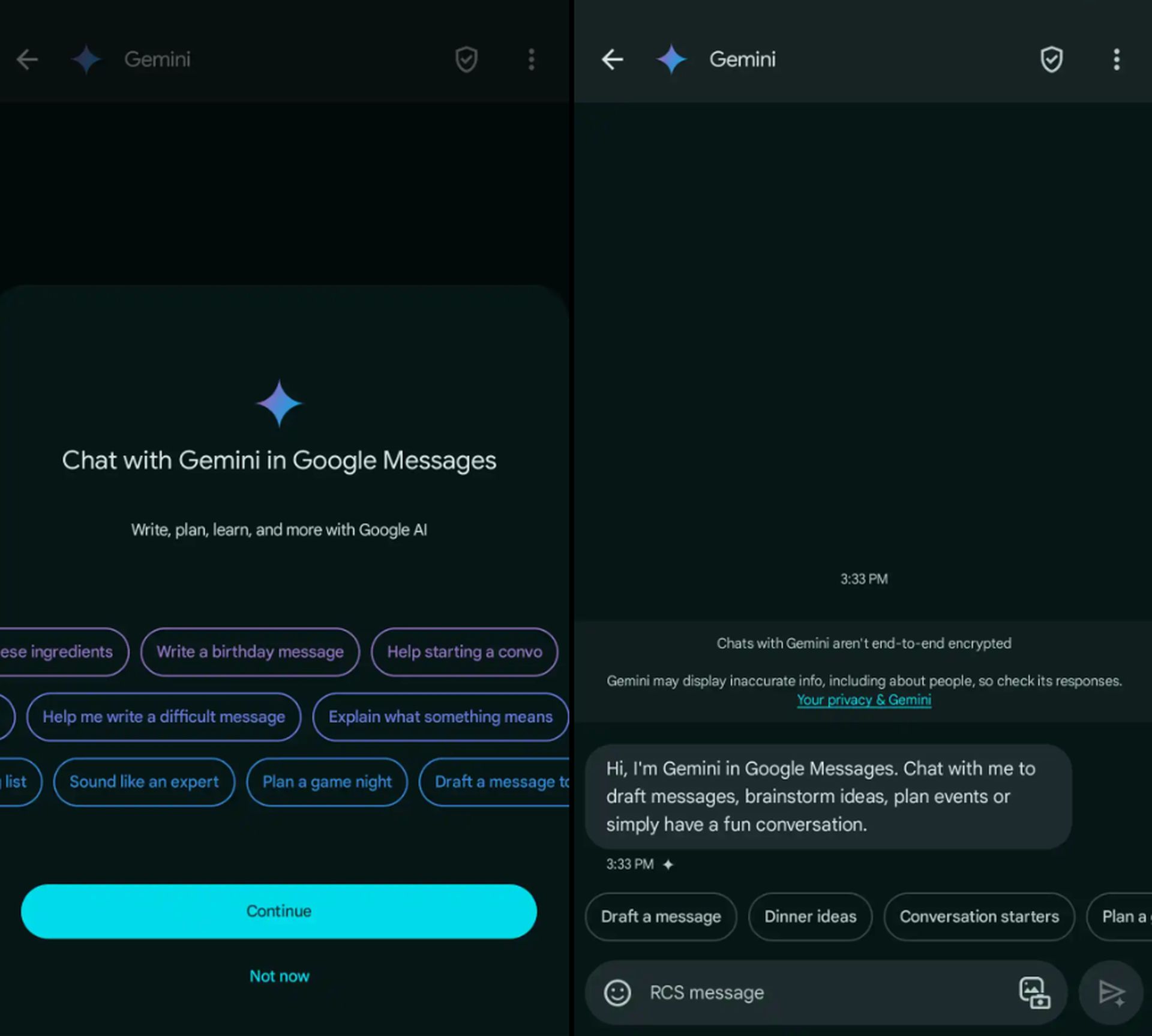
  • If it’s your first time chatting with Gemini, you’ll be guided through a brief setup process. Follow the on-screen instructions to familiarize yourself with Gemini’s capabilities and features.
  • Once you’re in the chat with Gemini AI, you can start interacting. Enter your prompt or question in the message field. This could be anything from drafting a message to brainstorming ideas or seeking assistance with various tasks. If your prompt requires visual elements, such as images, you can tap on “Show attach media screen” to add media files to your message. Once you’re satisfied with your prompt or question and any accompanying media, tap on “Send message” to communicate with Gemini.
How to use Gemini AI in Google Messages: Unlock the power of Gemini's suggestions and messaging features. Explore now!
Gemini’s potential extends beyond messaging, serving as a versatile tool for productivity and entertainment tasks (Image credit)

Gemini offers personalized suggestions based on your input. You can explore different conversation threads and tap on suggestions provided above the message field. Additionally, you can utilize Gemini Extensions to access Google Workspace, Maps, Flights, Hotels, YouTube, and more.

Gemini values user feedback. If you want to provide feedback on a response, simply touch and hold the message, then select “Good response” or “Bad response” to help improve Gemini’s performance.

Congratulations! You’ve successfully initiated a chat with Gemini AI in Google Messages. Whether you’re seeking assistance with drafting messages, brainstorming ideas, or simply engaging in conversation, Gemini is there to enhance your messaging experience.

Stay tuned for further updates and enhancements as Google continues to refine Gemini’s capabilities.


Featured image credit: Eray Eliaçık/Bing

Tags: AIFeaturedgeminigoogle messages

Related Posts

Google Gemini outage affects users reporting error 1076 and 1099

Google Gemini outage affects users reporting error 1076 and 1099

June 10, 2026
Geoffrey Hinton rethinks AI’s role in warfare after Ukraine conflict

Geoffrey Hinton rethinks AI’s role in warfare after Ukraine conflict

June 10, 2026
Anthropic launches Claude Fable 5 ahead of 5 billion IPO

Anthropic launches Claude Fable 5 ahead of $965 billion IPO

June 10, 2026
Hasbro launches AI licensing studio Sixth Wall for approved character use

Hasbro launches AI licensing studio Sixth Wall for approved character use

June 10, 2026
China launches 5 billion drive to boost AI self-reliance

China launches $295 billion drive to boost AI self-reliance

June 10, 2026
AI-ready infrastructure: The foundation for scalable AI workloads

AI-ready infrastructure: The foundation for scalable AI workloads

June 10, 2026

LATEST NEWS

Google Gemini outage affects users reporting error 1076 and 1099

Geoffrey Hinton rethinks AI’s role in warfare after Ukraine conflict

Logitech launches foldable Mobi Fold mouse for mobile workers

Anthropic launches Claude Fable 5 ahead of $965 billion IPO

Hasbro launches AI licensing studio Sixth Wall for approved character use

EU moves to ban transactions on 11 crypto platforms tied to Russia

BEST AI MODELS LEADERBOARD

See the best AI models, ranked by intelligence, benchmark results, speed and token price. Find the most suitable LLMs, Text-to-Image, Image Editing, Text-to-Speech, Text-to-Video and Image-to-Video  artificial intelligence model for your tasks and business.

LATEST TOOLS

Roboto AI

Pickaxe

Pfpmaker

MindPal

Syllaby

ScreenApp

FinanceBrain

GitHub Spark

Hints

VisionStory AI

Dataconomy

COPYRIGHT © DATACONOMY MEDIA GMBH, ALL RIGHTS RESERVED.

  • About
  • Imprint
  • Contact
  • Legal & Privacy

Follow Us

  • News
    • Artificial Intelligence
    • Cybersecurity
    • DeFi & Blockchain
    • Finance
    • Gaming
    • Startups
    • Tech
  • Industry
  • Research
  • Resources
    • Articles
    • Guides
    • Case Studies
    • Whitepapers
    • AI Models Leaderboard
  • AI tools
  • Newsletter
  • + More
    • Glossary
    • Conversations
    • Events
    • About
      • Who we are
      • Contact
      • Imprint
      • Legal & Privacy
      • Partner With Us
No Result
View All Result
Subscribe

This website uses cookies to improve your experience. You can choose to accept or reject them. Visit our Privacy Policy.