Dataconomy
  • News
    • Artificial Intelligence
    • Cybersecurity
    • DeFi & Blockchain
    • Finance
    • Gaming
    • Startups
    • Tech
  • Industry
  • Research
  • Resources
    • Articles
    • Guides
    • Case Studies
    • Whitepapers
    • AI Models Leaderboard
  • AI toolsNEW
  • Newsletter
  • + More
    • Glossary
    • Conversations
    • Events
    • About
      • Who we are
      • Contact
      • Imprint
      • Legal & Privacy
      • Partner With Us
Subscribe
No Result
View All Result
  • AI
  • Tech
  • Cybersecurity
  • Finance
  • DeFi & Blockchain
  • Startups
  • Gaming
Dataconomy
  • News
    • Artificial Intelligence
    • Cybersecurity
    • DeFi & Blockchain
    • Finance
    • Gaming
    • Startups
    • Tech
  • Industry
  • Research
  • Resources
    • Articles
    • Guides
    • Case Studies
    • Whitepapers
    • AI Models Leaderboard
  • AI toolsNEW
  • Newsletter
  • + More
    • Glossary
    • Conversations
    • Events
    • About
      • Who we are
      • Contact
      • Imprint
      • Legal & Privacy
      • Partner With Us
Subscribe
No Result
View All Result
Dataconomy
No Result
View All Result

Did you create your TikTok AI voice?

byEray Eliaçık
August 27, 2024
in Artificial Intelligence
Home News Artificial Intelligence
Share on FacebookShare on TwitterShare on LinkedInShare on WhatsAppShare on e-mail
Google Preferred Source

Yes, the TikTok AI voice feature is a thing now! TikTok continues to innovate and bring exciting new features to its platform, and the latest addition is sure to turn some heads! The app now allows users to create their own AI-generated voice, adding a unique and personalized touch to their videos.

Imagine being able to give your videos a unique sound without having to record every voiceover manually—or even translating your voice into different languages for a global audience! While this feature is currently rolling out and might not be available to everyone just yet, don’t worry—it will be soon. Ready to get started?

How to create your own TikTok AI voice

To create your own AI voice on TikTok, follow these steps:

Stay Ahead of the Curve!

Don't miss out on the latest insights, trends, and analysis in the world of data, technology, and startups. Subscribe to our newsletter and get exclusive content delivered straight to your inbox.

  • Open the TikTok app: Make sure you have the latest version of the TikTok app installed on your device. Open the app and log in to your account.
  • Start a new video: Tap the plus (+) button at the bottom of the screen to create a new video. Record your video as you normally would, or select an existing video from your gallery.

Explore new TikTok AI voice feature: create a unique voice for your videos, add personalization, and even translate for a global audience!

  • Access voiceover options: After recording or selecting your video, tap on the “Voiceover” option located on the right side of the editing screen. This will open the voiceover settings.
  • Choose “Create Your Own AI Voice”: In the voiceover menu, look for the option that says “Create Your Own AI Voice.” This option may be available under a specific section or tab within the voiceover settings.
  • Record your voice: Once you select the “Create Your Own AI Voice” option, you will be prompted to record a sample of your voice. Follow the instructions to speak into your device’s microphone. TikTok will likely ask for a series of phrases or sentences to capture enough data for the AI model.
  • Save your AI voice: After recording the necessary phrases, TikTok will process your voice sample and create a digital replica of your voice. This process may take a few moments. Once completed, you will have the option to save your AI voice to your account.
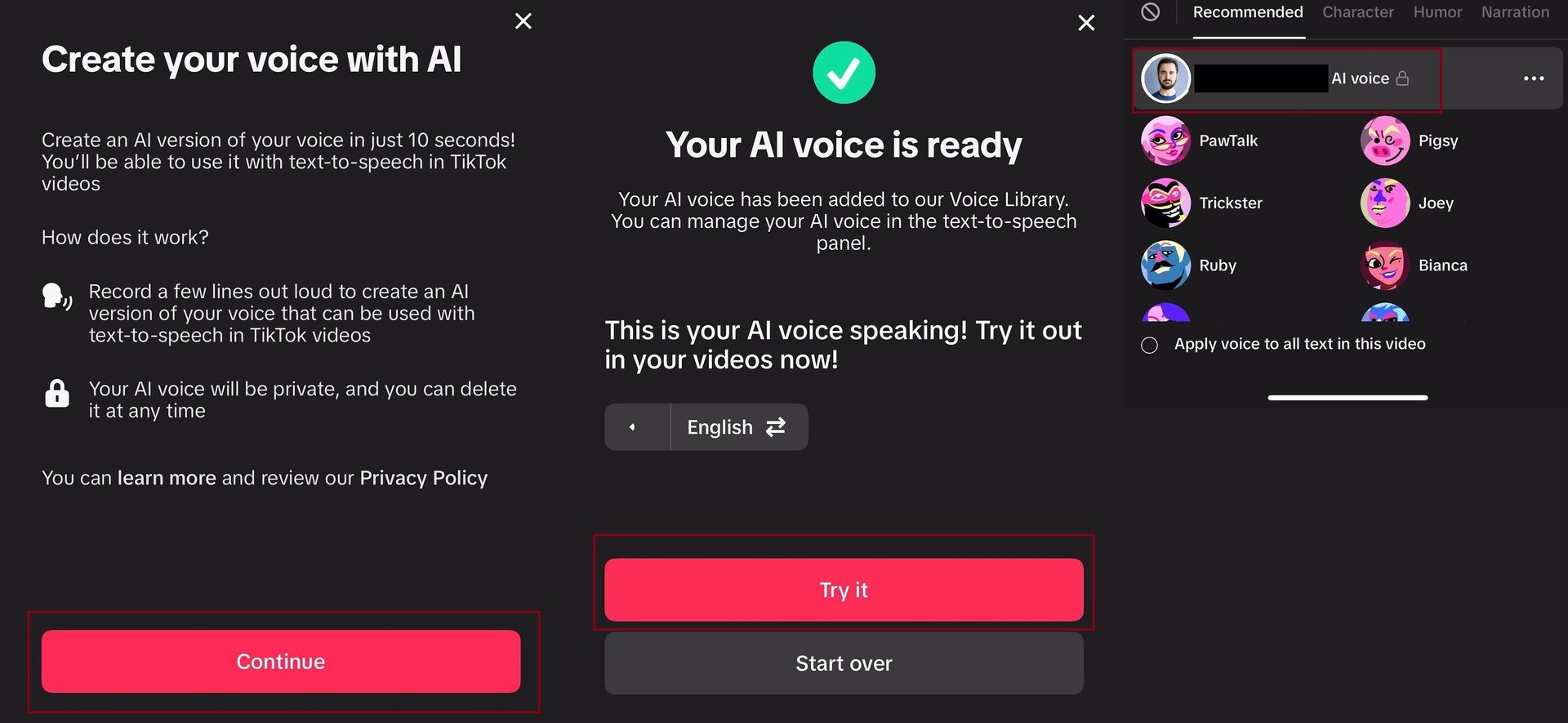
Explore new TikTok AI voice feature: create a unique voice for your videos, add personalization, and even translate for a global audience!After saving your AI voice, you can use it for voiceovers in future TikTok videos. Select your custom AI voice from the voiceover options, and it will be applied to your video. You can also use your AI-generated voice to translate your voiceovers into different languages, making your content accessible to a wider audience.

By following these steps, you can easily create and use your own AI voice on TikTok, adding a personal touch to your videos without manually recording each time.


The best AI voice generator you are looking for is in this list!


The technology behind the TikTok AI voices

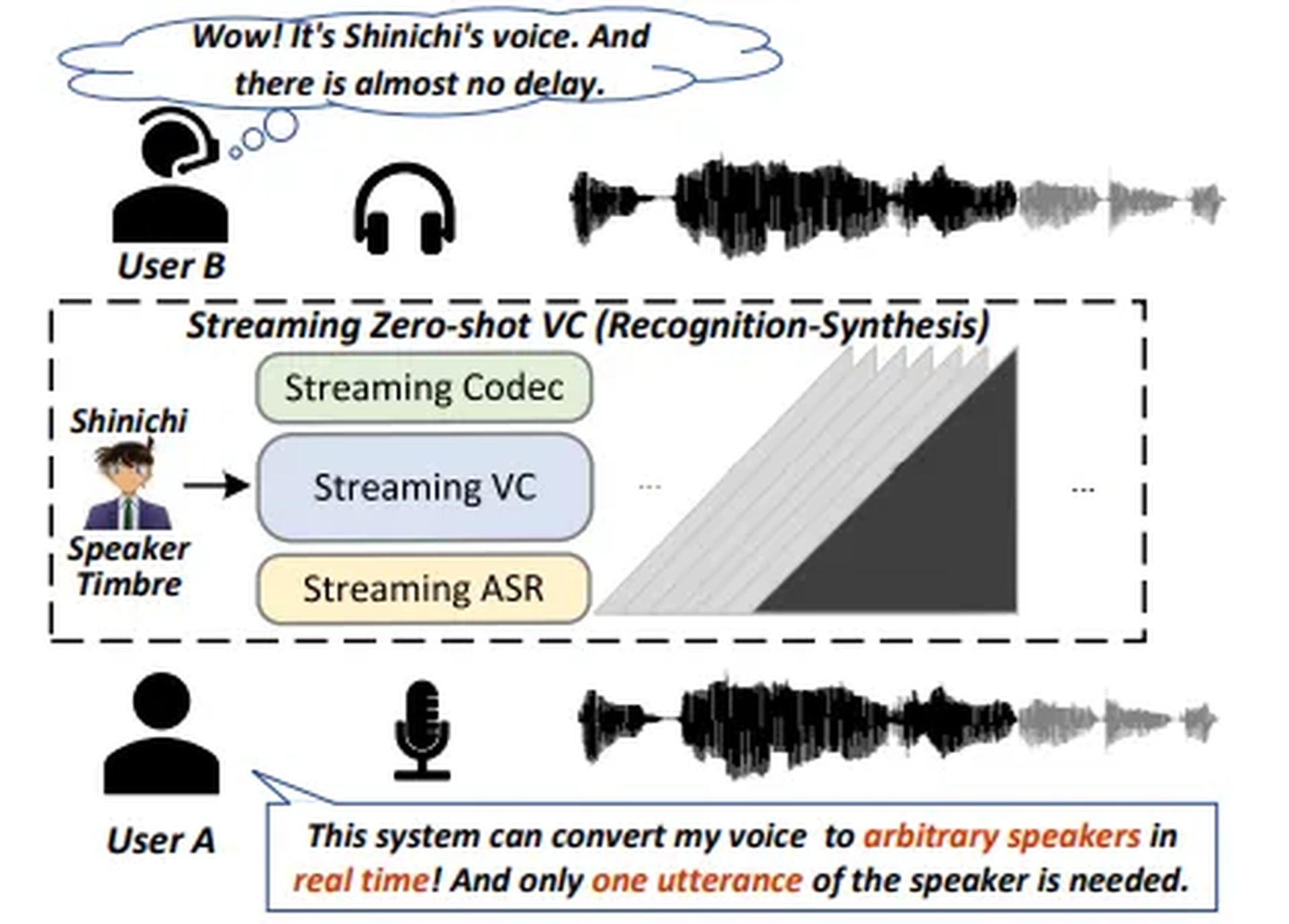
This development results from ByteDance, TikTok’s parent company, and its continued research into AI voice replication technology. Earlier this year, ByteDance’s “StreamVoice” system was highlighted for its ability to replicate any person’s voice with impressive accuracy based on minimal input. The system requires just a few utterances to mimic someone’s speech in real time.
Explore new TikTok AI voice feature: create a unique voice for your videos, add personalization, and even translate for a global audience!
TikTok AI Voice tech explained (Credit: ByteDance)

While the TikTok AI voice technology is undeniably innovative, it also raises ethical concerns about potential misuse, such as creating more convincing deepfakes or hoaxes using someone’s actual voice.


Featured image credit: Eray Eliaçık/Bing

Tags: tiktok

Related Posts

ChatGPT hits 1 billion users as global AI adoption surges despite backlash

ChatGPT hits 1 billion users as global AI adoption surges despite backlash

June 12, 2026
OpenAI Codex referral program rewards users with extra rate resets

OpenAI Codex referral program rewards users with extra rate resets

June 12, 2026
Zuckerberg says small elite teams can drive major AI breakthroughs

Zuckerberg says small elite teams can drive major AI breakthroughs

June 12, 2026
Google says AI Overviews reach 2.5 billion monthly users

Google says AI Overviews reach 2.5 billion monthly users

June 12, 2026
Anthropic apologizes for hidden Fable throttling, pledges transparency

Anthropic apologizes for hidden Fable throttling, pledges transparency

June 11, 2026
Reco builds momentum to secure the enterprise AI agent sprawl

Reco builds momentum to secure the enterprise AI agent sprawl

June 11, 2026

LATEST NEWS

“Free robots are an illusion”: Why we’ll pay for system intelligence, not delivery workers

How Henrique Schmaiske led Meteor.js through its biggest transformation

Proven privacy: Why ‘no-log’ claims need real evidence today

ChatGPT hits 1 billion users as global AI adoption surges despite backlash

Huawei launches HarmonyOS 7 developer beta with upgraded API 26

OpenAI Codex referral program rewards users with extra rate resets

BEST AI MODELS LEADERBOARD

See the best AI models, ranked by intelligence, benchmark results, speed and token price. Find the most suitable LLMs, Text-to-Image, Image Editing, Text-to-Speech, Text-to-Video and Image-to-Video  artificial intelligence model for your tasks and business.

LATEST TOOLS

Roboto AI

Pickaxe

Pfpmaker

MindPal

Syllaby

ScreenApp

FinanceBrain

GitHub Spark

Hints

VisionStory AI

Dataconomy

COPYRIGHT © DATACONOMY MEDIA GMBH, ALL RIGHTS RESERVED.

  • About
  • Imprint
  • Contact
  • Legal & Privacy

Follow Us

  • News
    • Artificial Intelligence
    • Cybersecurity
    • DeFi & Blockchain
    • Finance
    • Gaming
    • Startups
    • Tech
  • Industry
  • Research
  • Resources
    • Articles
    • Guides
    • Case Studies
    • Whitepapers
    • AI Models Leaderboard
  • AI tools
  • Newsletter
  • + More
    • Glossary
    • Conversations
    • Events
    • About
      • Who we are
      • Contact
      • Imprint
      • Legal & Privacy
      • Partner With Us
No Result
View All Result
Subscribe

This website uses cookies to improve your experience. You can choose to accept or reject them. Visit our Privacy Policy.