Dataconomy
  • News
    • Artificial Intelligence
    • Cybersecurity
    • DeFi & Blockchain
    • Finance
    • Gaming
    • Startups
    • Tech
  • Industry
  • Research
  • Resources
    • Articles
    • Guides
    • Case Studies
    • Whitepapers
    • AI Models Leaderboard
  • AI toolsNEW
  • Newsletter
  • + More
    • Glossary
    • Conversations
    • Events
    • About
      • Who we are
      • Contact
      • Imprint
      • Legal & Privacy
      • Partner With Us
Subscribe
No Result
View All Result
  • AI
  • Tech
  • Cybersecurity
  • Finance
  • DeFi & Blockchain
  • Startups
  • Gaming
Dataconomy
  • News
    • Artificial Intelligence
    • Cybersecurity
    • DeFi & Blockchain
    • Finance
    • Gaming
    • Startups
    • Tech
  • Industry
  • Research
  • Resources
    • Articles
    • Guides
    • Case Studies
    • Whitepapers
    • AI Models Leaderboard
  • AI toolsNEW
  • Newsletter
  • + More
    • Glossary
    • Conversations
    • Events
    • About
      • Who we are
      • Contact
      • Imprint
      • Legal & Privacy
      • Partner With Us
Subscribe
No Result
View All Result
Dataconomy
No Result
View All Result

Bring your ideas to life with Samsung’s Sketch to image feature

byEray Eliaçık
July 18, 2024
in Artificial Intelligence
Home News Artificial Intelligence
Share on FacebookShare on TwitterShare on LinkedInShare on WhatsAppShare on e-mail
Google Preferred Source

The Samsung Samsung Sketch to image Drawing assist feature, announced at Galaxy Unpacked, is a remarkable tool that uses AI to convert your sketches into visually appealing images in various artistic styles. This guide will walk you through the process of using this feature step by step. But first, you should know these:

  • Samsung account: Ensure you are signed into your Samsung Account to access this feature.
  • AI watermark: Images generated by AI will have an AI watermark in the bottom left corner.
  • Data processing: Your drawings are sent to a server for processing and not stored by Samsung.
  • Compatibility: Based on One UI 6.1.1, this feature is available on the Galaxy Z Flip6 and Z Fold6.
  • Activation: Enable the Drawing Assist feature in Settings.

How to use Samsung Sketch to image Drawing assist feature

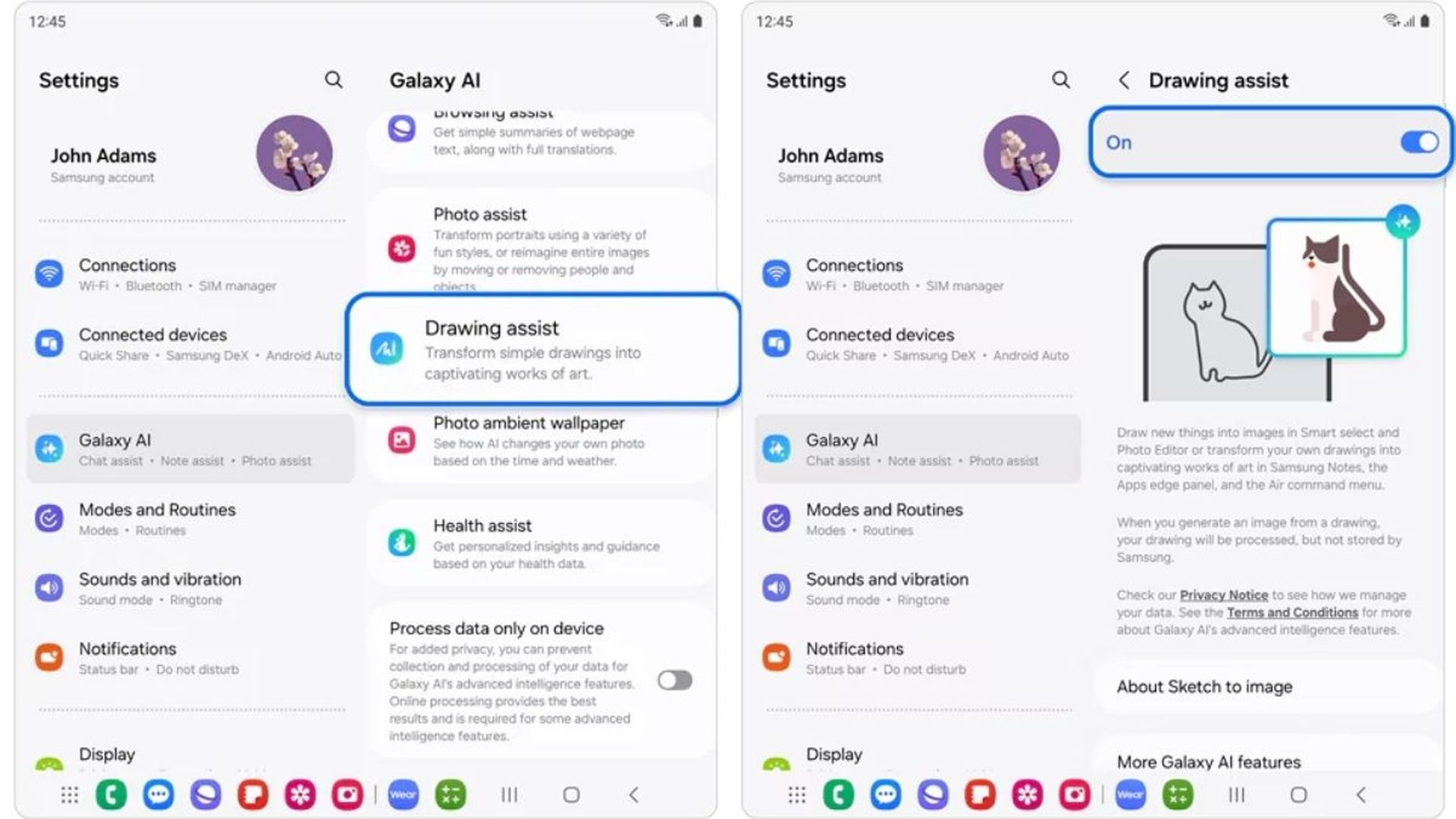
To use the Samsung Sketch to image feature, you should first enable Drawing assist:

  • Open Settings: Start by navigating to your device’s home screen and opening the Settings app.
  • Galaxy AI: Scroll down and tap on Galaxy AI.
  • Drawing Assist: Tap on Drawing assist and switch it to on.
How to use Samsung Sketch to image Drawing assist feature
To enable Drawing Assist, navigate to Settings > Galaxy AI > Drawing Assist and switch it on (Credit: Samsung)

Now, it’s time to access the Samsung Sketch to image AI feature:

Stay Ahead of the Curve!

Don't miss out on the latest insights, trends, and analysis in the world of data, technology, and startups. Subscribe to our newsletter and get exclusive content delivered straight to your inbox.

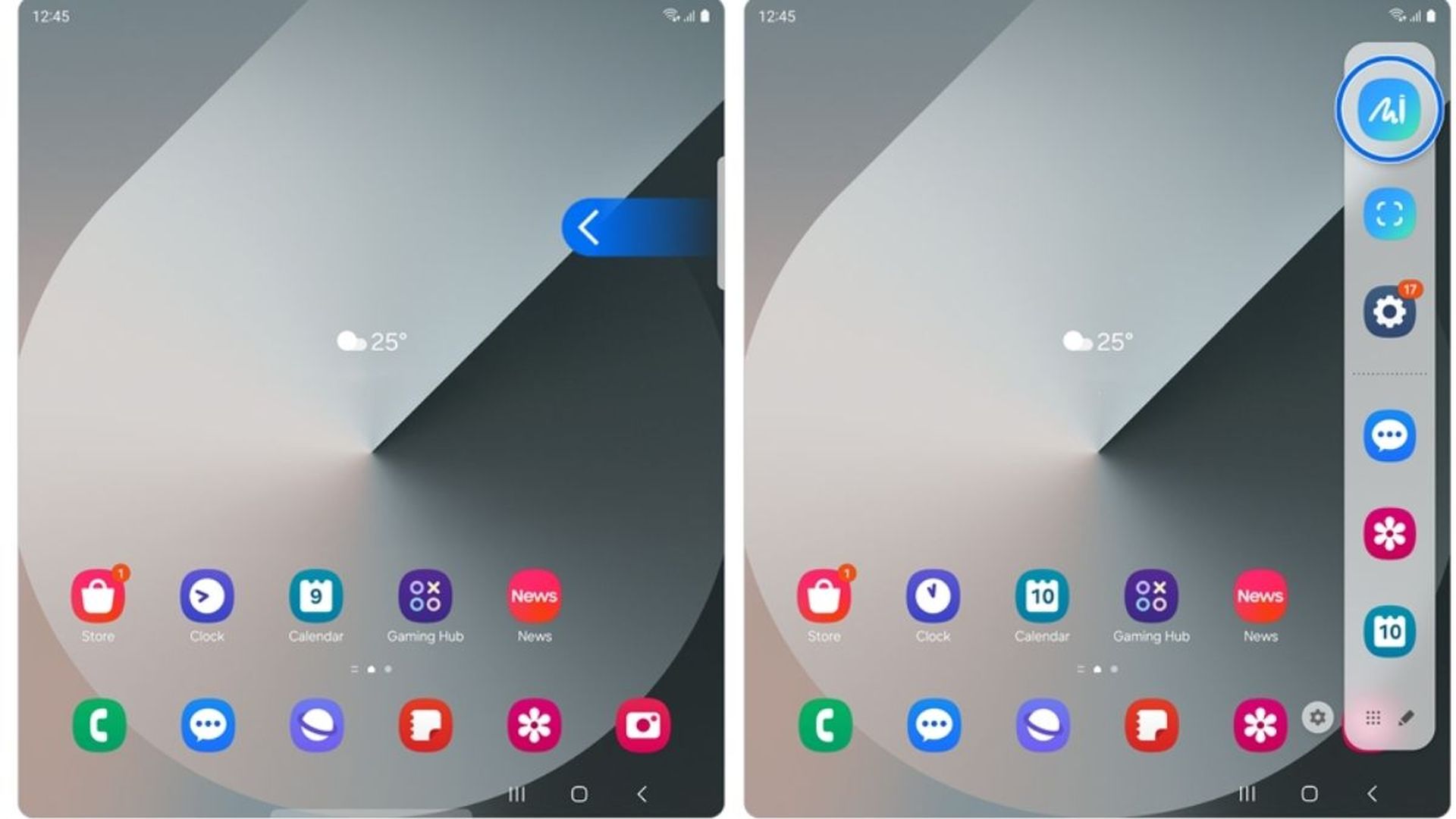
  • Swipe left: Swipe left from the top-right side of the screen to open the Edge panels. If the Edge panels are not active, go to Settings > Display > Edge Panels and enable them.
  • Icon selection: In the Edge panels menu, locate and tap on the Sketch to Image icon.
How to use Samsung Sketch to image Drawing assist feature
Samsung Sketch to image Drawing assist feature is available on the Galaxy Z Flip6 and Z Fold6 and requires you to be signed into your Samsung Account to use it (Credit: Samsung)
  • Alternative access: You can also access Sketch to image from the S Pen’s Air command menu by selecting the appropriate option.

Let’s bring some sketches to life:

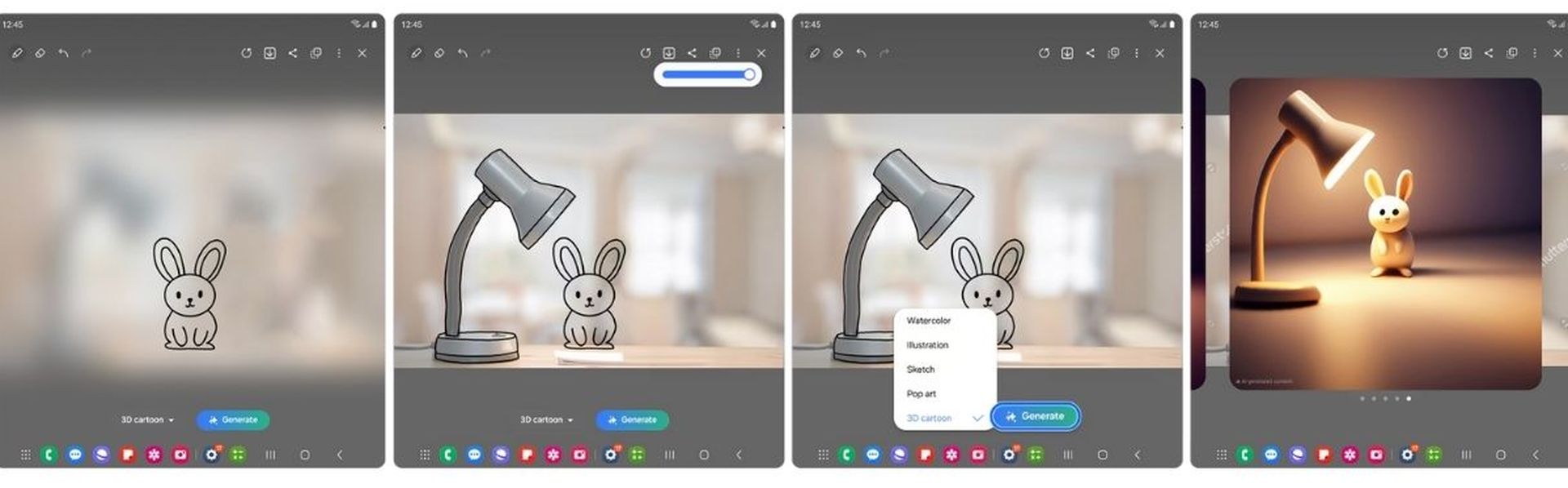
  • Drawing: Use your finger or S Pen to draw your desired sketch on the canvas. For example, you can draw a rabbit or any other subject of your choice.
  • Adjust background transparency: You can adjust the transparency of the background screen to help align your drawing with any object or reference image.
  • Style options: After completing your sketch, you can choose from various drawing styles such as Watercolor, Illustrations, Sketch, Pop Art, and 3D Cartoon.
  • Generate image: Tap Generate to convert your sketch into an image using the selected style.
How to use Samsung Sketch to image Drawing assist feature
The Samsung Sketch to Image Drawing Assist feature uses AI to convert your sketches into stunning images with various artistic styles such as Watercolor, Illustrations, Sketch, Pop Art, and 3D Cartoon (Credit: Samsung)
  • Swipe to review: Swipe left or right to review different generated image options.
  • Save or copy: You can copy or save the generated image using the options available in the top menu.
  • Edit and re-generate: If you wish to make changes, swipe right to return to the drawing screen, edit your sketch, or select a different style and tap Generate again.

Unpacked 2024: New Galaxy AI features you should know


Using the Samsung Sketch to image Drawing assist feature is an innovative way to transform simple sketches into stunning artworks with ease. By following these detailed steps, you can explore various artistic styles and create impressive images right from your Samsung Galaxy device. Enjoy unleashing your creativity and enhancing your digital art with this powerful tool!


Featured image credit: Samsung

Tags: galaxy aiSamsungtrend

Related Posts

Meta releases Pocket app for generative AI games

Meta releases Pocket app for generative AI games

July 3, 2026
Android Halo will place AI agent updates in status bar

Android Halo will place AI agent updates in status bar

July 2, 2026
Anthropic launches Claude Science workbench for researchers

Anthropic launches Claude Science workbench for researchers

July 1, 2026
ChatGPT Plus users can now connect financial accounts

ChatGPT Plus users can now connect financial accounts

July 1, 2026
Google rolls out Gemini Spark for macOS subscribers in the US

Google rolls out Gemini Spark for macOS subscribers in the US

July 1, 2026
Google expands Gemini’s personalized image generation to all U.S. users

Google expands Gemini’s personalized image generation to all U.S. users

June 30, 2026

LATEST NEWS

Samsung confirms One UI 9 Beta 4 release for next week

Sony to keep producing discs for pre-2028 PlayStation games

$TRUMP memecoin investors face $3.8 billion in losses

Tesla brings long-wheelbase Model Y to the US

Opera adds protection against copy-paste ClickFix attacks

Cloudflare will block AI crawlers unless sites opt in

BEST AI MODELS LEADERBOARD

See the best AI models, ranked by intelligence, benchmark results, speed and token price. Find the most suitable LLMs, Text-to-Image, Image Editing, Text-to-Speech, Text-to-Video and Image-to-Video  artificial intelligence model for your tasks and business.

LATEST TOOLS

Kaiber

KitchenGPT

Dupdub

Solvely

Typecast

Swimm

Instantchapters

Intellectia

ZipWP

Copyleaks – Plagiarism detector

Dataconomy

COPYRIGHT © DATACONOMY MEDIA GMBH, ALL RIGHTS RESERVED.

  • About
  • Imprint
  • Contact
  • Legal & Privacy

Follow Us

  • News
    • Artificial Intelligence
    • Cybersecurity
    • DeFi & Blockchain
    • Finance
    • Gaming
    • Startups
    • Tech
  • Industry
  • Research
  • Resources
    • Articles
    • Guides
    • Case Studies
    • Whitepapers
    • AI Models Leaderboard
  • AI tools
  • Newsletter
  • + More
    • Glossary
    • Conversations
    • Events
    • About
      • Who we are
      • Contact
      • Imprint
      • Legal & Privacy
      • Partner With Us
No Result
View All Result
Subscribe

This website uses cookies to improve your experience. You can choose to accept or reject them. Visit our Privacy Policy.