Dataconomy
  • News
    • Artificial Intelligence
    • Cybersecurity
    • DeFi & Blockchain
    • Finance
    • Gaming
    • Startups
    • Tech
  • Industry
  • Research
  • Resources
    • Articles
    • Guides
    • Case Studies
    • Whitepapers
    • AI Models Leaderboard
  • AI toolsNEW
  • Newsletter
  • + More
    • Glossary
    • Conversations
    • Events
    • About
      • Who we are
      • Contact
      • Imprint
      • Legal & Privacy
      • Partner With Us
Subscribe
No Result
View All Result
  • AI
  • Tech
  • Cybersecurity
  • Finance
  • DeFi & Blockchain
  • Startups
  • Gaming
Dataconomy
  • News
    • Artificial Intelligence
    • Cybersecurity
    • DeFi & Blockchain
    • Finance
    • Gaming
    • Startups
    • Tech
  • Industry
  • Research
  • Resources
    • Articles
    • Guides
    • Case Studies
    • Whitepapers
    • AI Models Leaderboard
  • AI toolsNEW
  • Newsletter
  • + More
    • Glossary
    • Conversations
    • Events
    • About
      • Who we are
      • Contact
      • Imprint
      • Legal & Privacy
      • Partner With Us
Subscribe
No Result
View All Result
Dataconomy
No Result
View All Result

Master Midjourney’s /describe command to unlock diverse creations

The Midjourney /describe command is a feature within the Midjourney platform, designed to analyze images and generate a set of descriptive prompts based on the visual content

byKerem Gülen
March 25, 2024
in Artificial Intelligence
Home News Artificial Intelligence
Share on FacebookShare on TwitterShare on LinkedInShare on WhatsAppShare on e-mail
Google Preferred Source

The Midjourney /describe command offers a unique approach to creative exploration, transforming images into descriptive prompts to inspire new vocabularies and aesthetic movements. This article delves into the functionalities and applications of the /describe command, highlighting its potential to enrich creative endeavors by bridging the gap between visual inspiration and verbal expression.

What is the Midjourney /describe command?

The Midjourney /describe command is a feature within the Midjourney platform, designed to analyze images and generate a set of descriptive prompts based on the visual content. This tool leverages advanced algorithms to interpret the elements within an image, suggesting various ways to describe and conceptualize the visual input. It serves as a creative aid, providing users with multiple perspectives and vocabulary that may not have been immediately apparent, thereby facilitating a deeper exploration of aesthetic movements and themes.

Utilizing the /describe command, creators can upload any image and receive four distinct prompts that offer different angles of interpretation. These prompts can range from direct descriptions to more abstract and conceptual articulations, enabling users to explore a wide range of creative directions. Whether for academic research, artistic inspiration, or professional projects, the /describe command provides a valuable resource for expanding one’s linguistic and aesthetic horizons.

Stay Ahead of the Curve!

Don't miss out on the latest insights, trends, and analysis in the world of data, technology, and startups. Subscribe to our newsletter and get exclusive content delivered straight to your inbox.

By offering a new way to engage with visual content, the /describe command addresses the challenge of translating visual experiences into verbal expression.


Midjourney prompts for characters, logos… well everything


How to use the /describe command on Midjourney?

The process of utilizing the Midjourney /describe command is straightforward, yet its impact on creative exploration is profound. If you don’t know how to use Midjourney on Discord to create unique images, head in there first!

To illustrate this functionality, we’ll walk through the steps using a previously generated image from Midjourney as our example, which you can see below:

midjourney describe command
Sample image

With your image at hand, navigate to the Midjourney platform. Here, instead of using the /imagine command, which is typically utilized for generating new images, you’ll type /describe. This command shifts the focus from image creation to exploration and analysis.

midjourney describe command
Step 1

Upon typing /describe, the platform prompts you to add an image. This is where the simplicity of the tool shines – simply drag and drop your selected image into the chat interface. Unlike other processes that might require you to manually copy and paste the image address, the Midjourney platform automatically recognizes and adds the image URL for you, streamlining the workflow and saving time.

midjourney describe command
Step 2

After dropping your image into the interface, press Enter and await the results. Within moments, the Midjourney /describe command processes your image and presents you with four unique prompts.
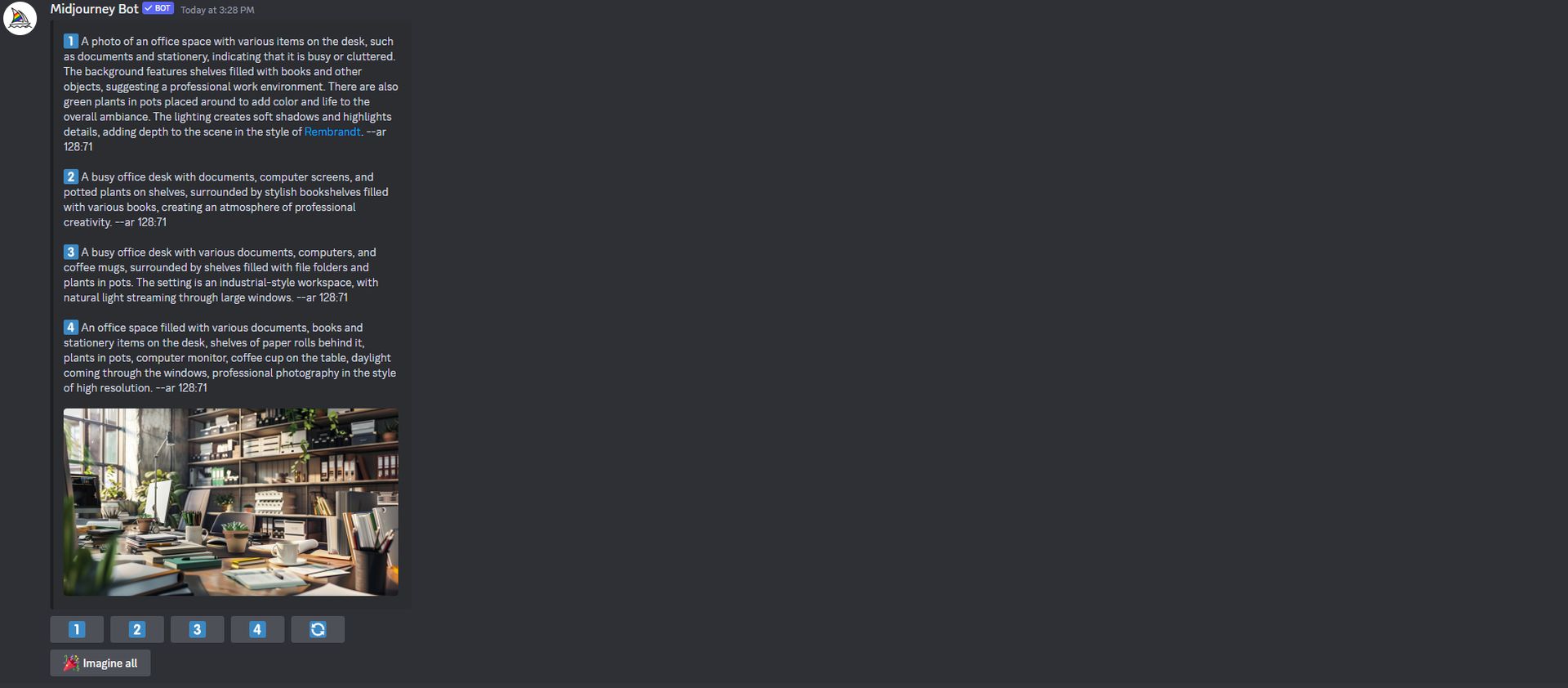
midjourney describe command
Step 3

Once you’ve observed the initial prompts generated by the /describe command, you have the option to delve even deeper into the creative analysis of your image. By selecting the “Imagine all” button, the platform will proceed to generate all possible descriptions based on the image’s analysis.
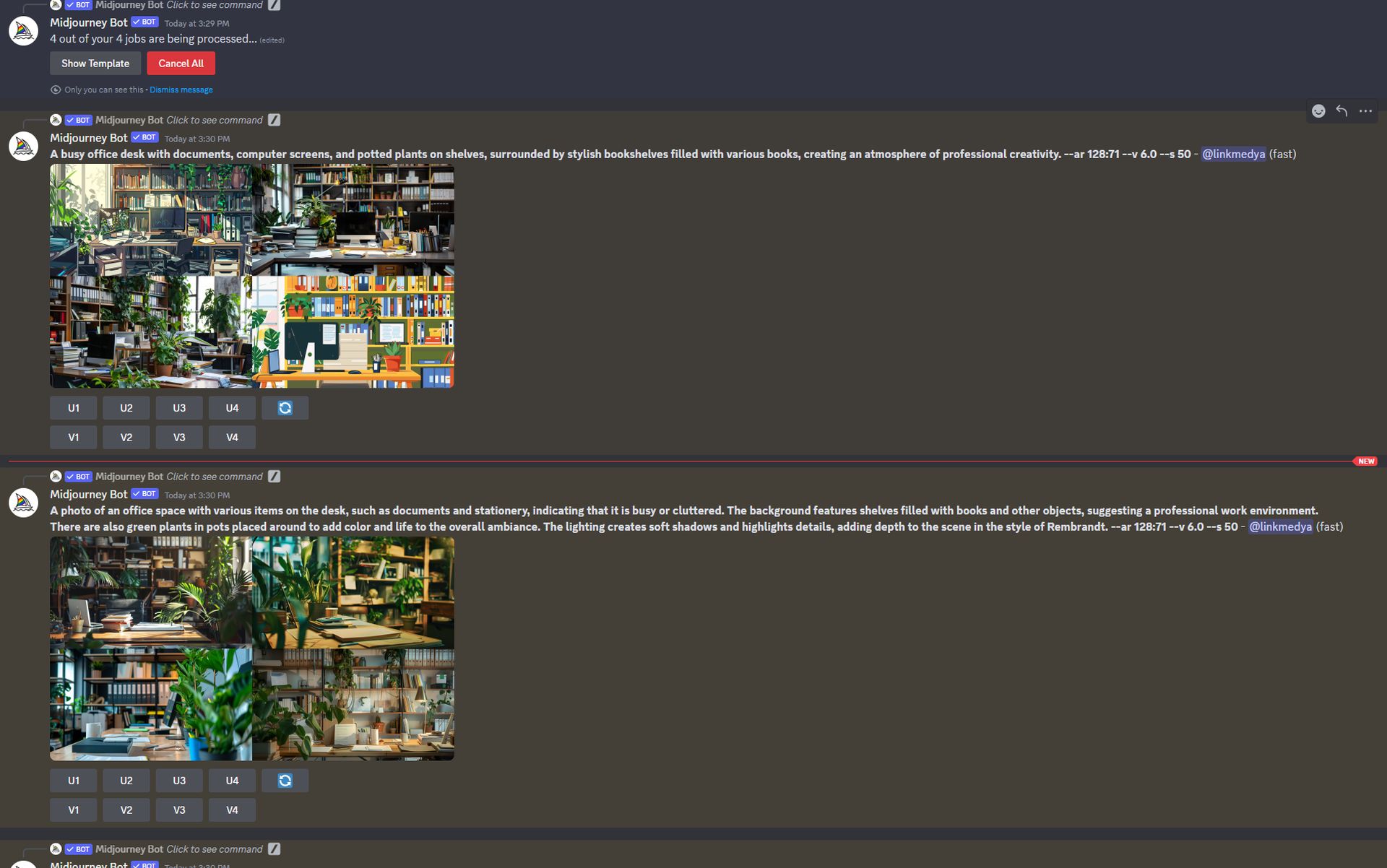
midjourney describe command
Step 4

Final remarks

Whether you’re an artist, writer, designer, or simply a creative soul in search of inspiration, the Midjourney /describe command equips you with the means to translate the visual world into verbal expression. Its simplicity and efficiency in bridging the gap between these two realms make it an invaluable resource for anyone looking to enhance their creative projects or explore the potential of their ideas.

As we’ve seen through the step-by-step guide, utilizing the /describe command is straightforward, yet the outcomes can profoundly impact your creative process. By inviting you to view images through various lenses—be it style, lighting, color, or surroundings—it challenges you to think differently and more deeply about your creative work.


Featured image credit: Swello/Unsplash
Tags: MidjourneyPrompt

Related Posts

Meta debuts AI-powered Creator Studio app to help Facebook creators grow

Meta debuts AI-powered Creator Studio app to help Facebook creators grow

June 25, 2026
Figma adds code layers to collaborative design canvas

Figma adds code layers to collaborative design canvas

June 25, 2026
US reportedly urges Meta to submit AI models

US reportedly urges Meta to submit AI models

June 25, 2026
OpenAI upgrades GPT-5.5 Instant for stronger context awareness

OpenAI upgrades GPT-5.5 Instant for stronger context awareness

June 25, 2026
ByteDance launches Doubao 2.1 Pro language model

ByteDance launches Doubao 2.1 Pro language model

June 24, 2026
OpenAI expands cybersecurity efforts with Patch the Planet

OpenAI expands cybersecurity efforts with Patch the Planet

June 24, 2026

LATEST NEWS

Meta debuts AI-powered Creator Studio app to help Facebook creators grow

OpenAI unveils first custom inference chip named Jalapeño

Figma adds code layers to collaborative design canvas

US reportedly urges Meta to submit AI models

Euclid data could reveal isolated Milky Way black holes

OpenAI upgrades GPT-5.5 Instant for stronger context awareness

BEST AI MODELS LEADERBOARD

See the best AI models, ranked by intelligence, benchmark results, speed and token price. Find the most suitable LLMs, Text-to-Image, Image Editing, Text-to-Speech, Text-to-Video and Image-to-Video  artificial intelligence model for your tasks and business.

LATEST TOOLS

Vrew

Fireflies

SpeedLegal

Teachable Machine

Unriddle

VidAU

Qualified

character.ai

Interview Coder

Moonbeam

Dataconomy

COPYRIGHT © DATACONOMY MEDIA GMBH, ALL RIGHTS RESERVED.

  • About
  • Imprint
  • Contact
  • Legal & Privacy

Follow Us

  • News
    • Artificial Intelligence
    • Cybersecurity
    • DeFi & Blockchain
    • Finance
    • Gaming
    • Startups
    • Tech
  • Industry
  • Research
  • Resources
    • Articles
    • Guides
    • Case Studies
    • Whitepapers
    • AI Models Leaderboard
  • AI tools
  • Newsletter
  • + More
    • Glossary
    • Conversations
    • Events
    • About
      • Who we are
      • Contact
      • Imprint
      • Legal & Privacy
      • Partner With Us
No Result
View All Result
Subscribe

This website uses cookies to improve your experience. You can choose to accept or reject them. Visit our Privacy Policy.