Dataconomy
  • News
    • Artificial Intelligence
    • Cybersecurity
    • DeFi & Blockchain
    • Finance
    • Gaming
    • Startups
    • Tech
  • Industry
  • Research
  • Resources
    • Articles
    • Guides
    • Case Studies
    • Whitepapers
    • AI Models Leaderboard
  • AI toolsNEW
  • Newsletter
  • + More
    • Glossary
    • Conversations
    • Events
    • About
      • Who we are
      • Contact
      • Imprint
      • Legal & Privacy
      • Partner With Us
Subscribe
No Result
View All Result
  • AI
  • Tech
  • Cybersecurity
  • Finance
  • DeFi & Blockchain
  • Startups
  • Gaming
Dataconomy
  • News
    • Artificial Intelligence
    • Cybersecurity
    • DeFi & Blockchain
    • Finance
    • Gaming
    • Startups
    • Tech
  • Industry
  • Research
  • Resources
    • Articles
    • Guides
    • Case Studies
    • Whitepapers
    • AI Models Leaderboard
  • AI toolsNEW
  • Newsletter
  • + More
    • Glossary
    • Conversations
    • Events
    • About
      • Who we are
      • Contact
      • Imprint
      • Legal & Privacy
      • Partner With Us
Subscribe
No Result
View All Result
Dataconomy
No Result
View All Result

How to use DALL-E 3 (2 free, 1 paid method)

In order to use DALL-E 3 in ChatGPT you need a Plus or Enterprise account.

byKerem Gülen
October 24, 2023
in Artificial Intelligence
Home News Artificial Intelligence
Share on FacebookShare on TwitterShare on LinkedInShare on WhatsAppShare on e-mail
Google Preferred Source

If you are an old Midjourney fan like us and want to learn how to use DALL-E 3 on ChatGPT or Bing Chat, we are here to help!

OpenAI and Microsoft are making strides in the AI image generation nowadays. After OpenAI released DALL-E 3 for ChatGPT Plus and Enterprise, Microsoft was not too late to join the party by integrating it to the Bing Chat.

For those who might not be in the loop, OpenAI is a leading research organization that has consistently pushed the boundaries of AI advancements. DALL-E is one of its remarkable creations, a generative AI model designed to craft images based on textual prompts. Essentially, it’s a neural network with the capability to produce images in a plethora of styles.

Stay Ahead of the Curve!

Don't miss out on the latest insights, trends, and analysis in the world of data, technology, and startups. Subscribe to our newsletter and get exclusive content delivered straight to your inbox.

In the competitive landscape, DALL-E 3 faces stiff competition. Names like Midjourney and Stable Diffusion are also vying for attention in the AI image generation arena. Additionally, Google’s Search Generative Experience, which is currently available in a limited number of countries, is making significant inroads in the domain.

However, what sets DALL-E 3 apart is its seamless integration with platforms like Bing and ChatGPT. This integration marks a pivotal moment, bridging the divide between intricate AI tools and the general internet populace.


Comparison: DALL-E 3 vs Midjourney


How to use DALL-E 3 in ChatGPT?

In order to use DALL-E 3 in ChatGPT you need a Plus or Enterprise account. Then, the rest is very easy. Follow these steps:

  • Go to ChatGPT or just click on this link.
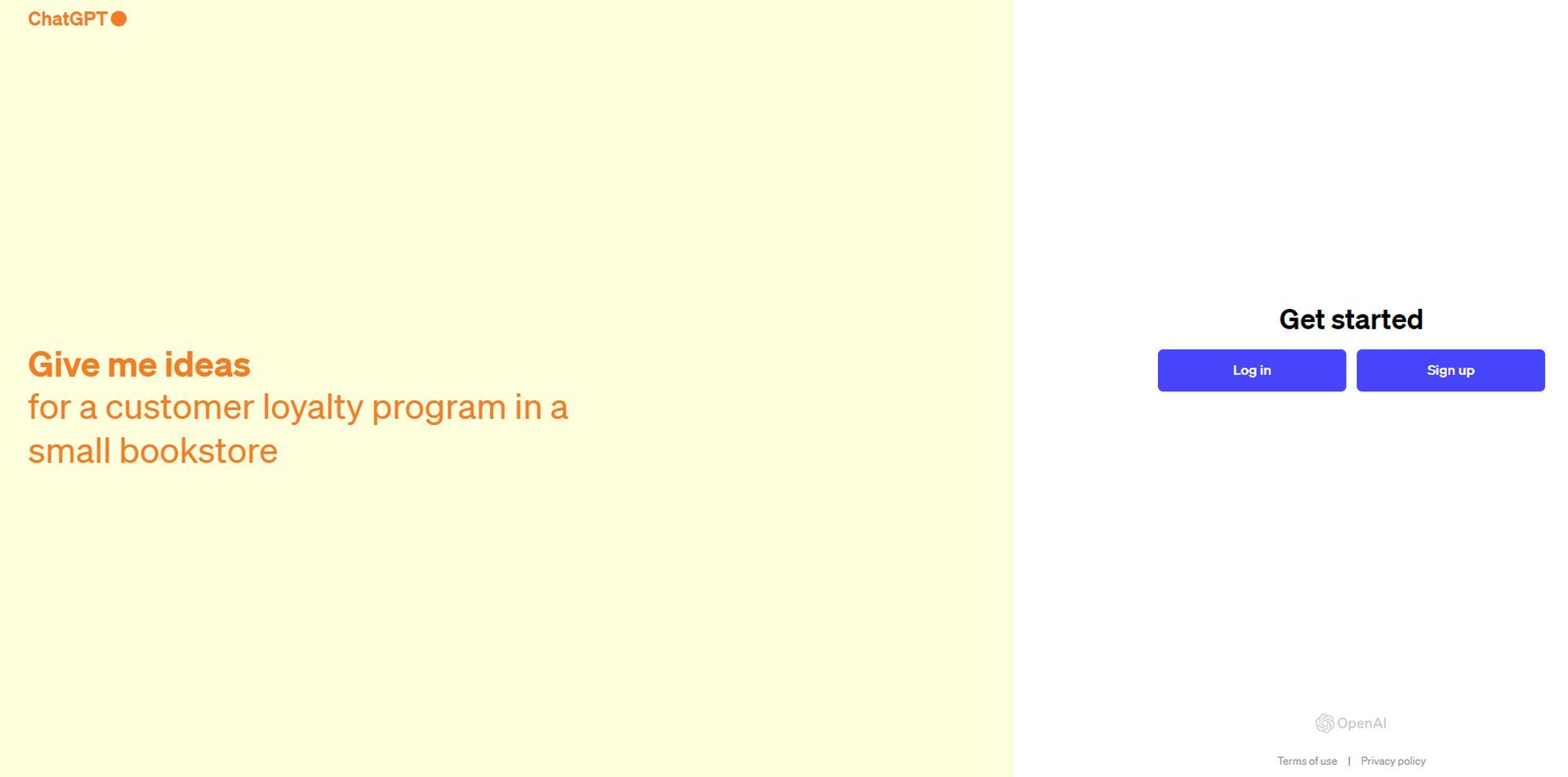
how to use dall-e 3
Step 1 (Image credit)
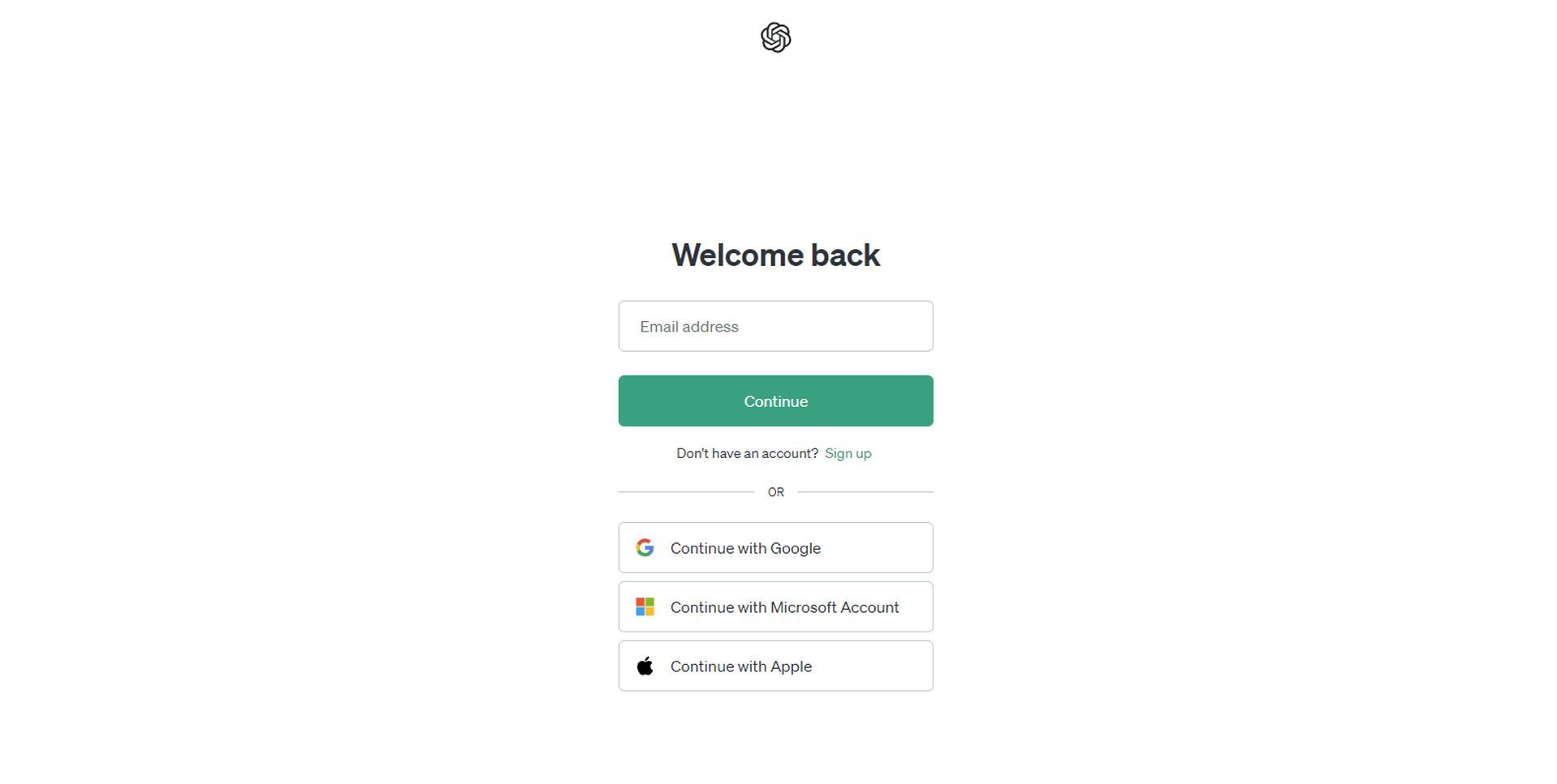
  • Click on “Log in.”
how to use dall-e 3
Step 2 (Image credit)
  • Enter your credentials.
  • Open a new chat, by clicking the relevant button located in the upper right corner.
  • When you hover your mouse on top of “GPT-4” you’ll notice a drop-down menu. Select “DALL-E 3” from that menu and you are good to go.
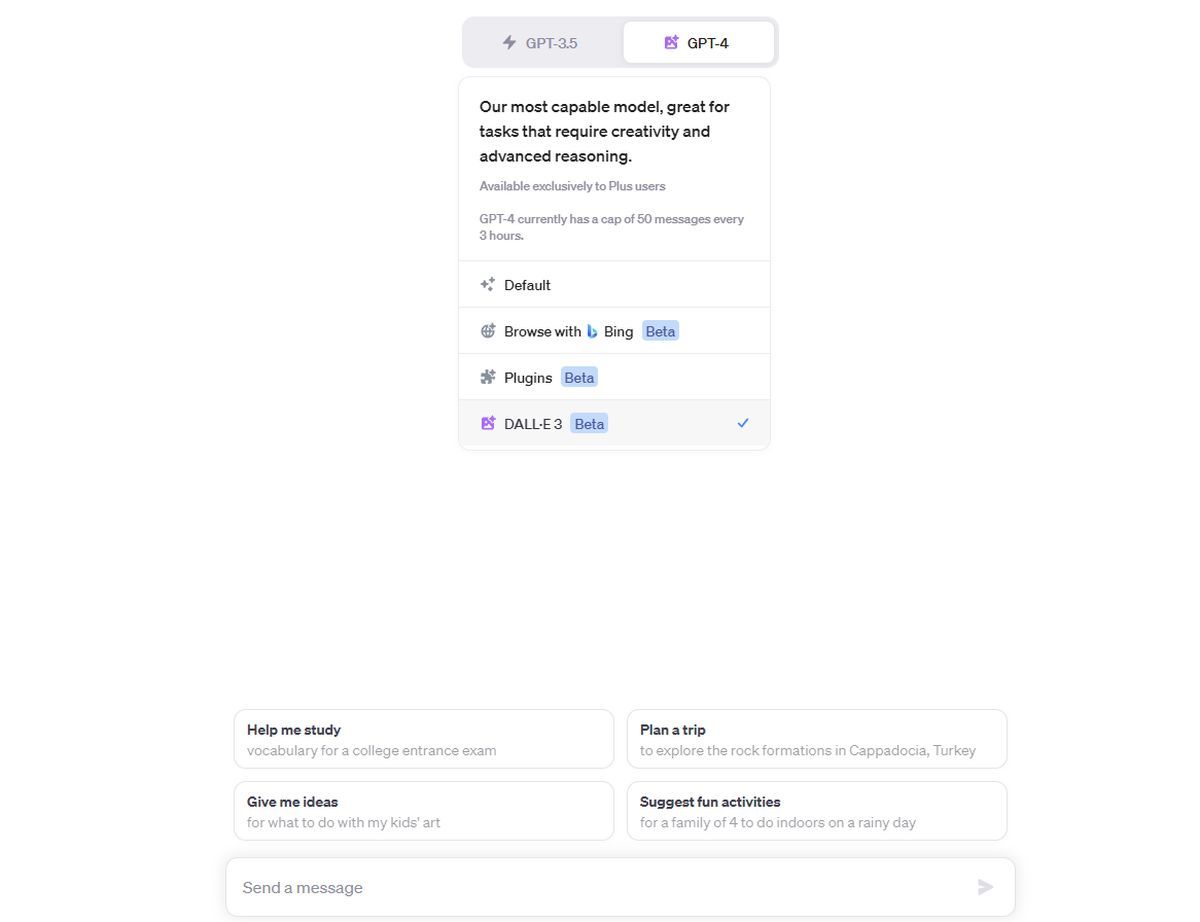
how to use dall-e 3
Step 3 (Image credit)
  • Now it’s time to generate some images, enter your prompt!
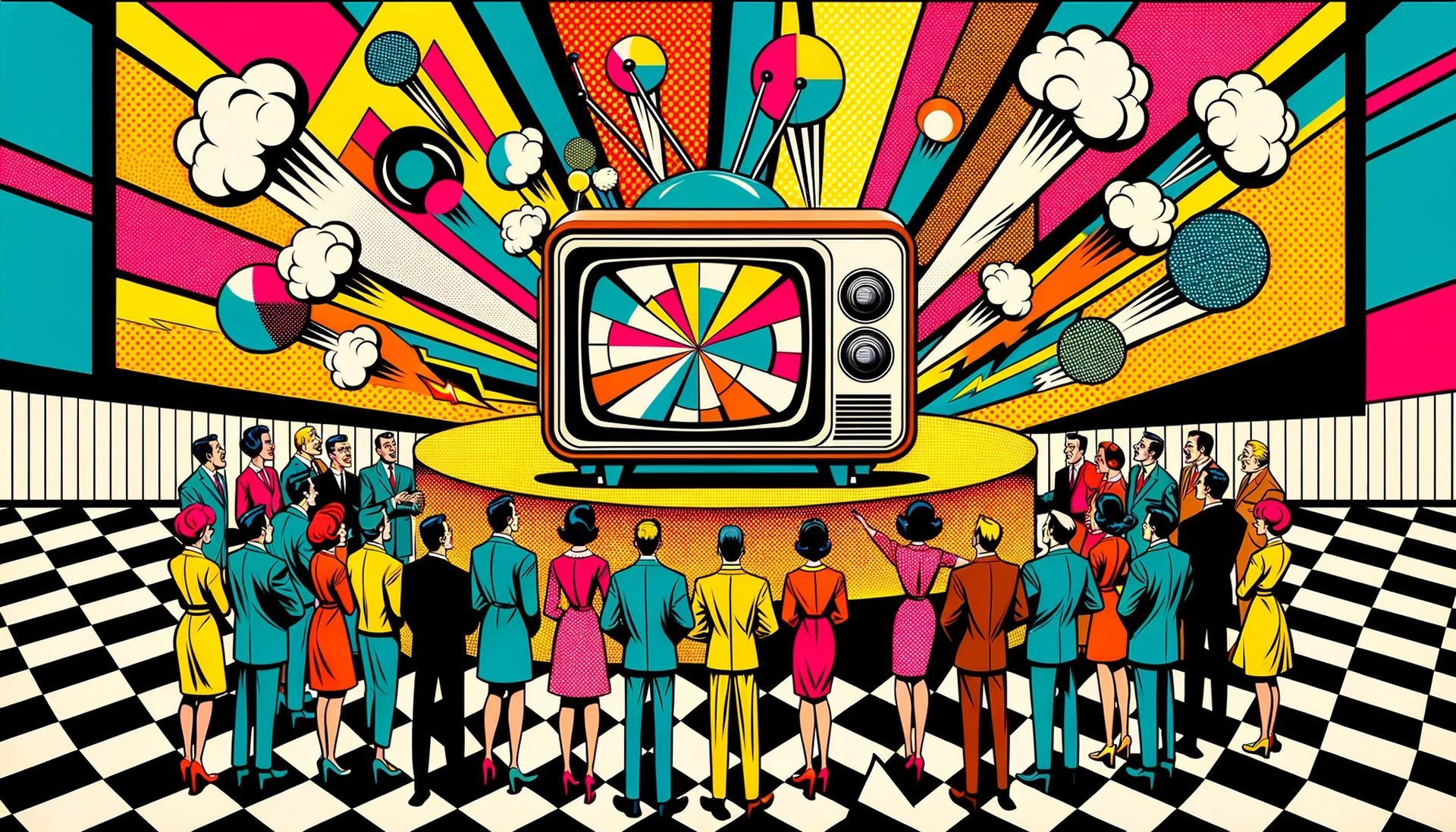
  • For the sake of this guide, we tried the following prompt: “A retro TV commercial scene in pop art style, 16:9 aspect ratio”
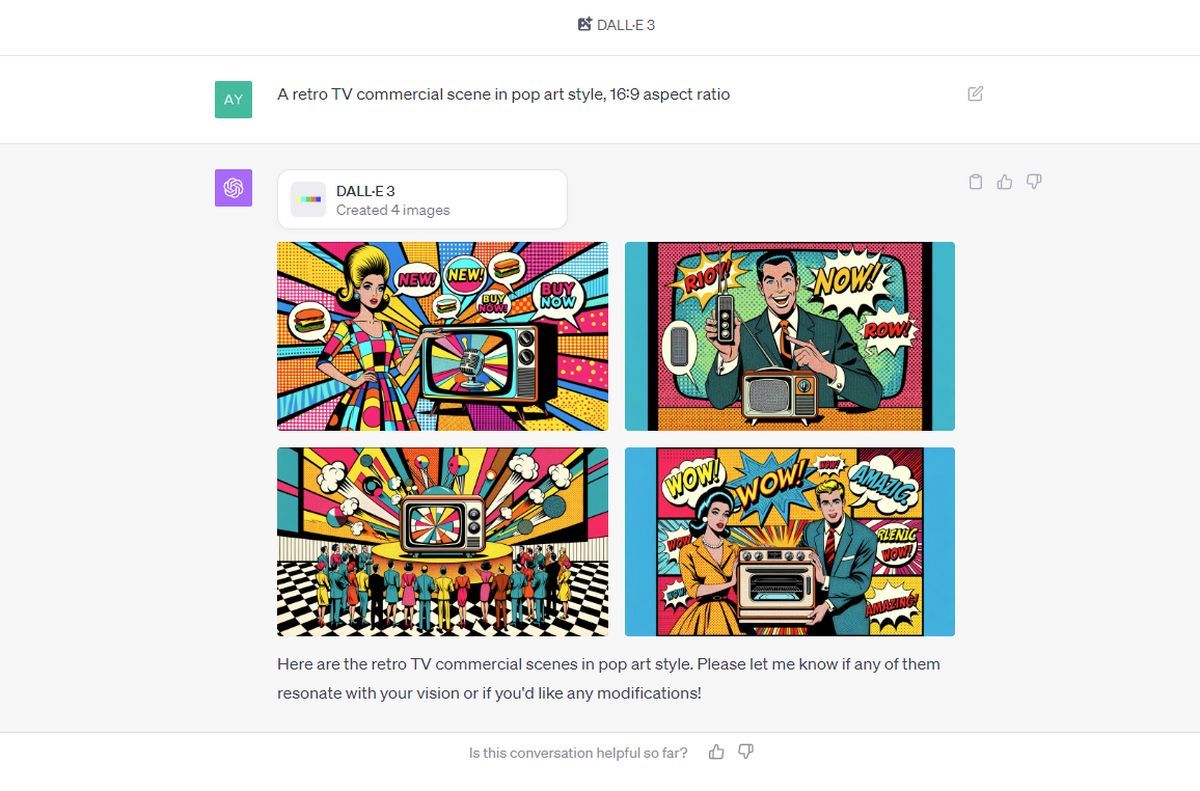
how to use dall-e 3
Step 4 (Image credit)
Pro tip: Thanks to ChatGPT, you don’t have to enter prompts like a pro when using DALL-E 3 here, just explain the image in your head to ChatGPT as if you were explaining it to your friend.
  • As you can see our AI-generated images are ready! We loved the third one, you can check it out here:
how to use dall-e 3
A retro TV commercial scene in pop art style, 16:9 aspect ratio (Image: Kerem Gülen/DALL-E 3)

How to use DALL-E 3 in Bing Chat?

Just follow these steps:

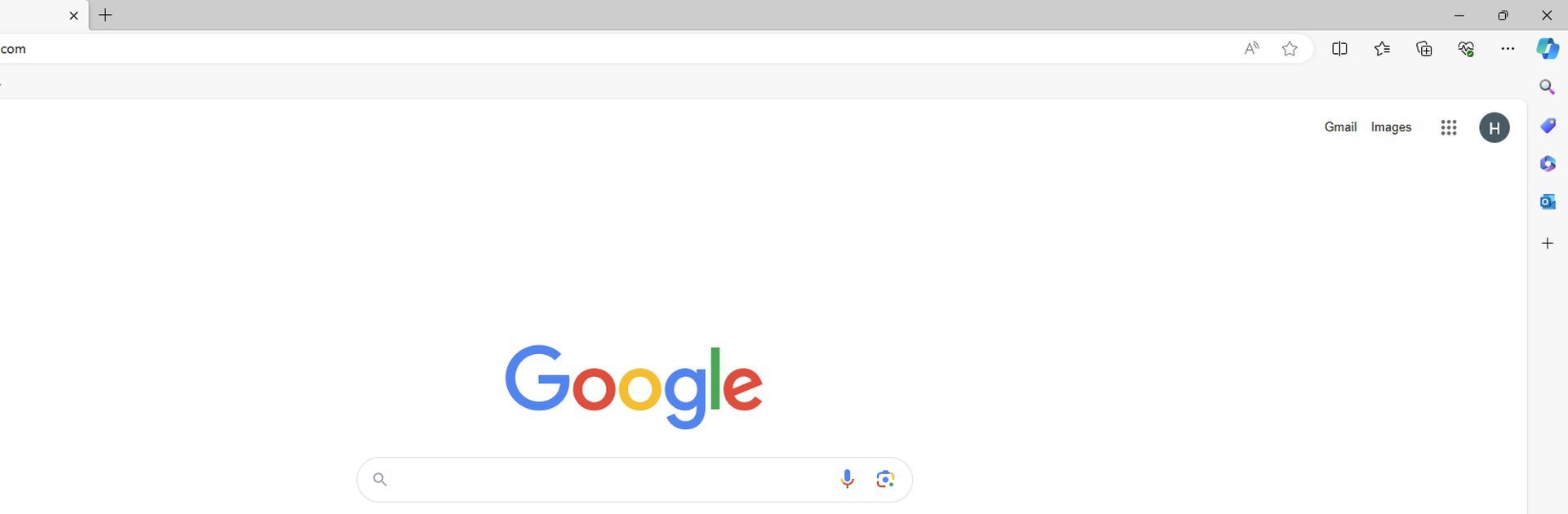
  • Open Microsoft Edge.
how to use dall-e 3
Step 1 (Image credit)
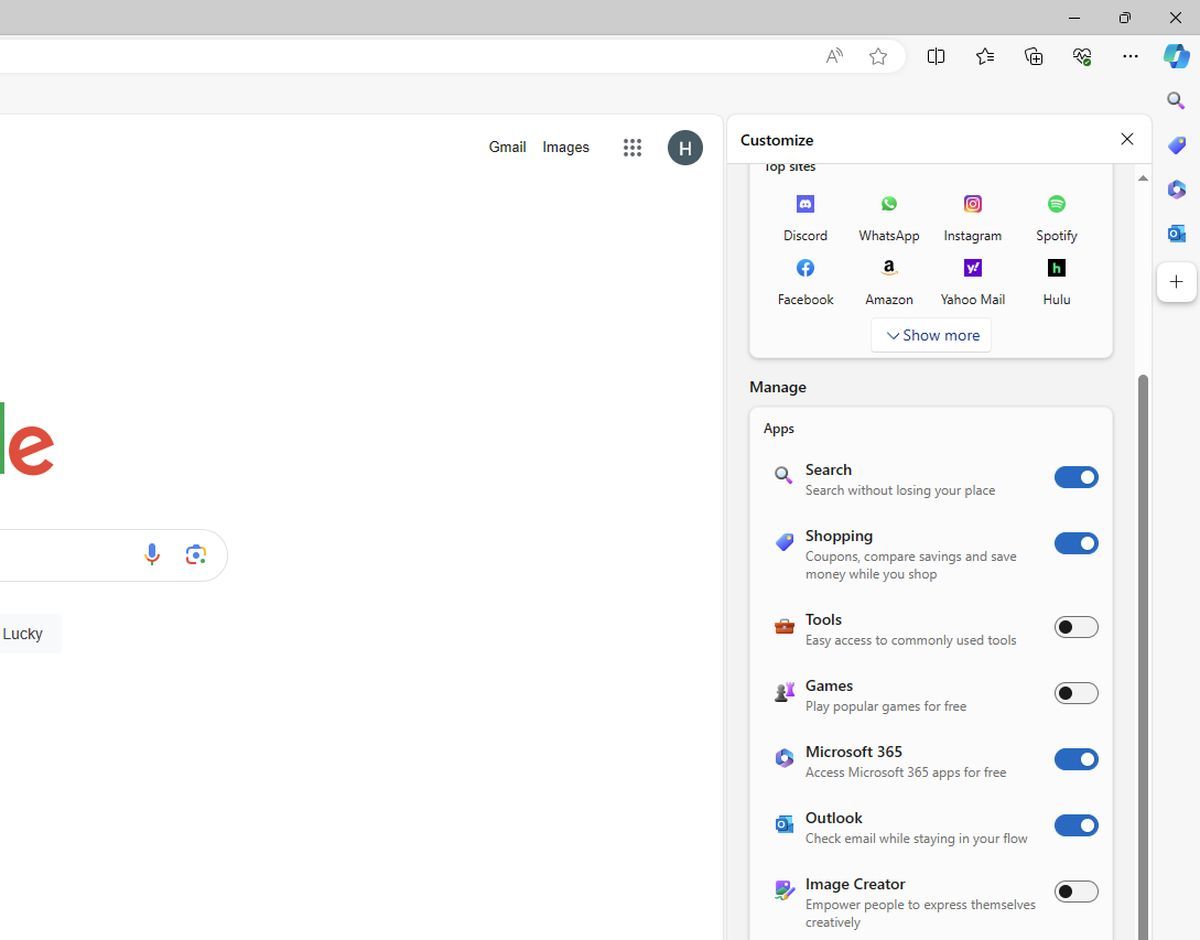
  • Click on the “+” icon, located on the right pane.
  • Activate “Image Creator.”
how to use dall-e 3
Step 2 (Image credit)
  • Now open the tool by clicking on its icon.
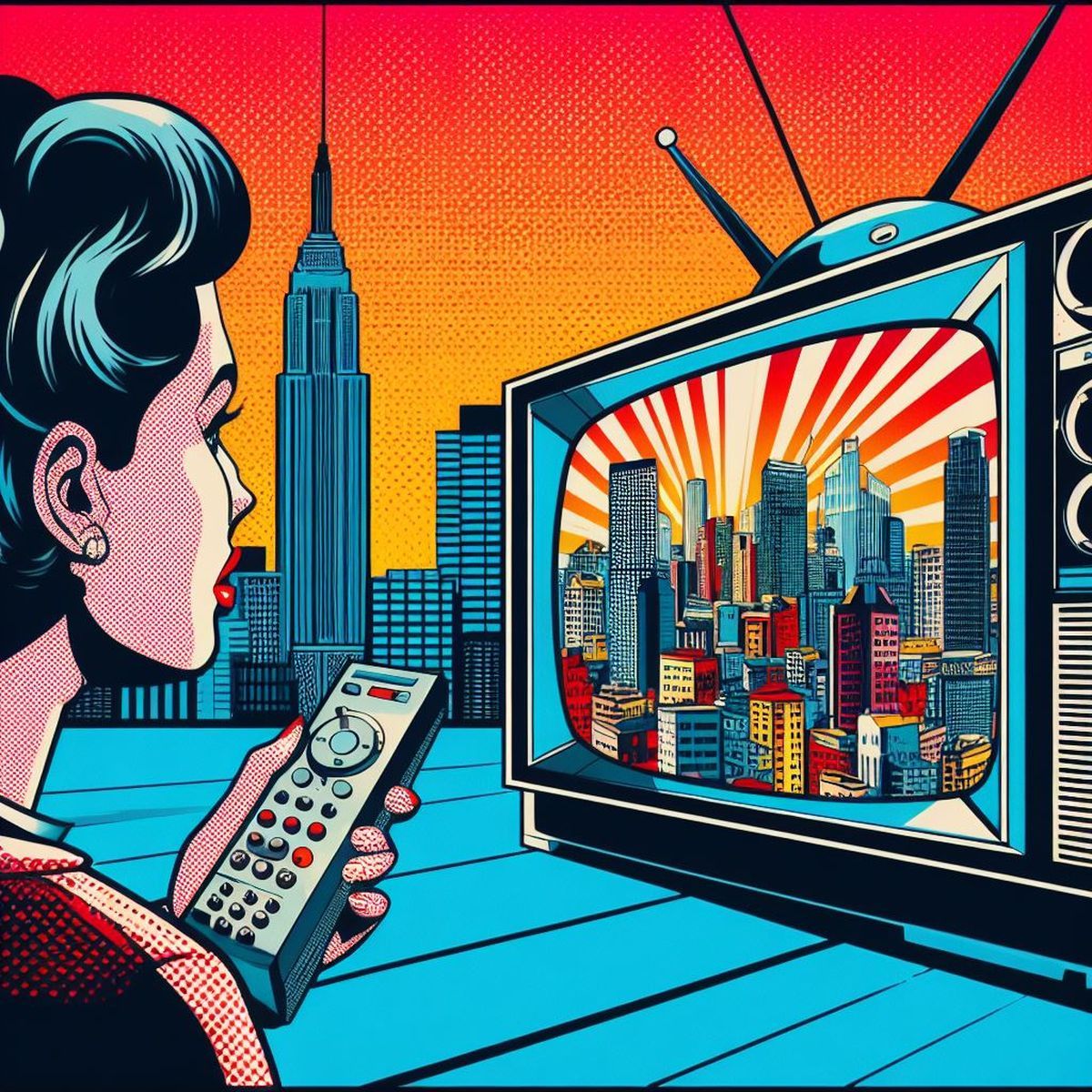
  • Enter your prompt. Let’s try the same prompt here: “A retro TV commercial scene in pop art style, 16:9 aspect ratio”
how to use dall-e 3
Step 3 (Image credit)
  • Unfortunately, Bing Chat version of the DALL-E 3 wasn’t able to give the image in 16:9 aspect ratio, but hey, we’ll take that:
how to use dall-e 3
A retro TV commercial scene in pop art style, 16:9 aspect ratio (Image: Kerem Gülen/DALL-E 3)

How to use DALL-E 3 in Bing Image Creator?

There’s actually a third way. You can try DALL-E 3 now with Bing Image Creator.

You can directly go to the Bing Image Creator and generate your images there.

  • Go to this link.
  • Log in with your Microsoft account.
  • Enter your prompt.
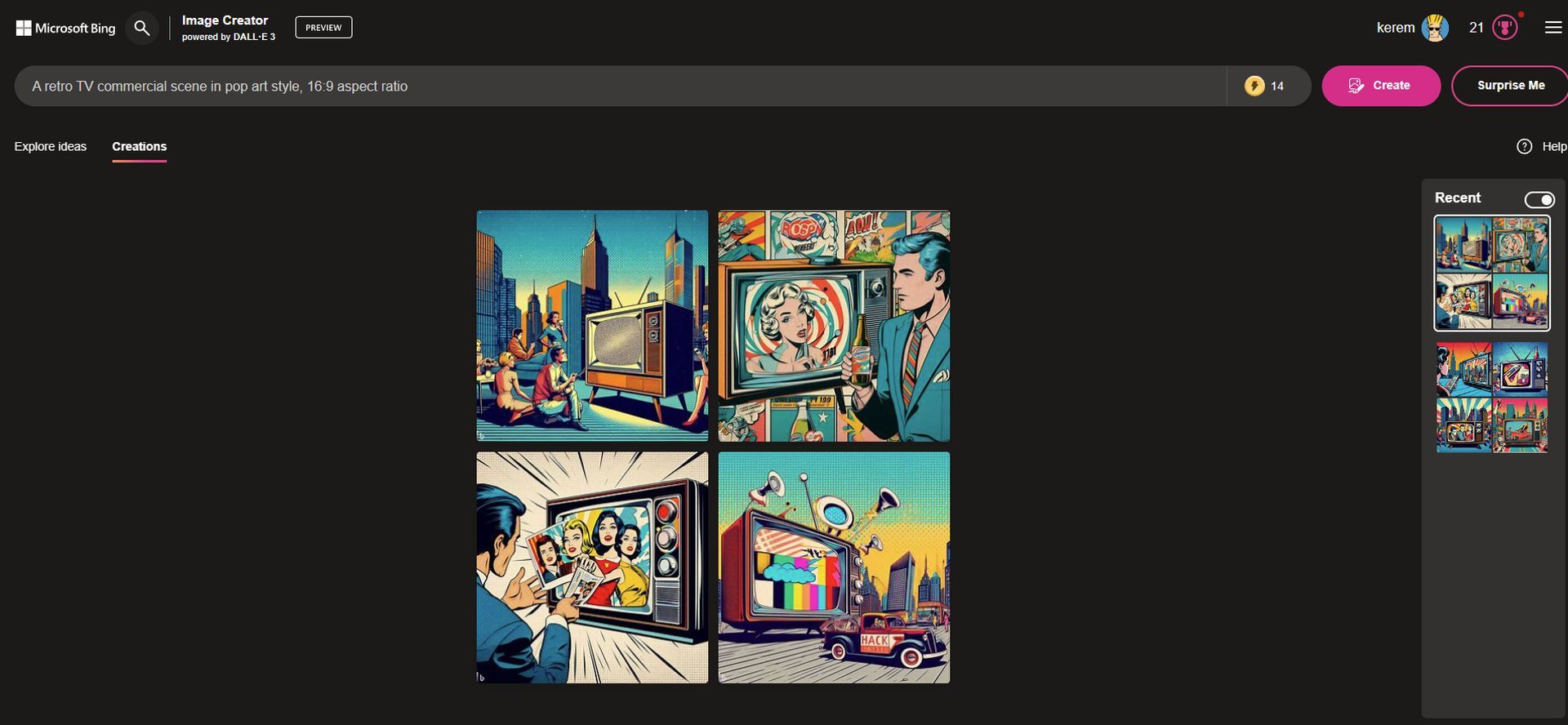
  • Let’s try the same prompt again: “A retro TV commercial scene in pop art style, 16:9 aspect ratio”
how to use dall-e 3
Step 1 (Image credit)
  • Again, the aspect ratio didn’t work here too. But images are more than fine:

how to use dall-e 3
A retro TV commercial scene in pop art style, 16:9 aspect ratio (Image: Kerem Gülen/DALL-E 3)

Final words

Exploring the capabilities of DALL-E 3 across various platforms can unlock a world of creative potential. Whether you’re a professional seeking innovative solutions or a curious individual eager to dive into the realm of AI-driven artistry, mastering DALL-E 3 can be a game-changer. These three methods offer just a glimpse into its vast potential. Embracing this technology not only enhances your creative toolkit but also positions you at the forefront of AI advancements. Don’t miss out on this opportunity, learn how to use DALL-E 3 immediately!

Tags: bing image creatordall-e 3FeaturedMicrosoft

Related Posts

OpenAI improves health responses for free ChatGPT users

OpenAI improves health responses for free ChatGPT users

June 19, 2026
Steam Next Fest sees one in five demos labeled for generative AI

Steam Next Fest sees one in five demos labeled for generative AI

June 17, 2026
Anthropic adds multilingual and push-to-talk features to Claude Voice Mode

Anthropic adds multilingual and push-to-talk features to Claude Voice Mode

June 17, 2026
Is Gemini down? Users report problems with Google Gemini

Is Gemini down? Users report problems with Google Gemini

June 17, 2026
The Atlantic uncovers millions of copyrighted songs in AI training data

The Atlantic uncovers millions of copyrighted songs in AI training data

June 16, 2026
Meta brings AI-powered photo editing and chat features to Facebook

Meta brings AI-powered photo editing and chat features to Facebook

June 16, 2026

LATEST NEWS

OpenAI improves health responses for free ChatGPT users

Adobe expands Firefly AI across Premiere, Illustrator, InDesign and Frame.io

Spotify launches Reserved to give superfans early ticket access

Google discontinues Nest Home Mini and Nest Audio

Instagram adds unique captions for each carousel slide

Steam Next Fest sees one in five demos labeled for generative AI

BEST AI MODELS LEADERBOARD

See the best AI models, ranked by intelligence, benchmark results, speed and token price. Find the most suitable LLMs, Text-to-Image, Image Editing, Text-to-Speech, Text-to-Video and Image-to-Video  artificial intelligence model for your tasks and business.

LATEST TOOLS

Novoresume

PolyAI

SeaArt

H2O.ai

Techpresso

Namecheap Free Logo Maker

Binaural Beats Factory

Lyricallabs

Jobscan

Vsub

Dataconomy

COPYRIGHT © DATACONOMY MEDIA GMBH, ALL RIGHTS RESERVED.

  • About
  • Imprint
  • Contact
  • Legal & Privacy

Follow Us

  • News
    • Artificial Intelligence
    • Cybersecurity
    • DeFi & Blockchain
    • Finance
    • Gaming
    • Startups
    • Tech
  • Industry
  • Research
  • Resources
    • Articles
    • Guides
    • Case Studies
    • Whitepapers
    • AI Models Leaderboard
  • AI tools
  • Newsletter
  • + More
    • Glossary
    • Conversations
    • Events
    • About
      • Who we are
      • Contact
      • Imprint
      • Legal & Privacy
      • Partner With Us
No Result
View All Result
Subscribe

This website uses cookies to improve your experience. You can choose to accept or reject them. Visit our Privacy Policy.