Dataconomy
  • News
    • Artificial Intelligence
    • Cybersecurity
    • DeFi & Blockchain
    • Finance
    • Gaming
    • Startups
    • Tech
  • Industry
  • Research
  • Resources
    • Articles
    • Guides
    • Case Studies
    • Whitepapers
    • AI Models Leaderboard
  • AI toolsNEW
  • Newsletter
  • + More
    • Glossary
    • Conversations
    • Events
    • About
      • Who we are
      • Contact
      • Imprint
      • Legal & Privacy
      • Partner With Us
Subscribe
No Result
View All Result
  • AI
  • Tech
  • Cybersecurity
  • Finance
  • DeFi & Blockchain
  • Startups
  • Gaming
Dataconomy
  • News
    • Artificial Intelligence
    • Cybersecurity
    • DeFi & Blockchain
    • Finance
    • Gaming
    • Startups
    • Tech
  • Industry
  • Research
  • Resources
    • Articles
    • Guides
    • Case Studies
    • Whitepapers
    • AI Models Leaderboard
  • AI toolsNEW
  • Newsletter
  • + More
    • Glossary
    • Conversations
    • Events
    • About
      • Who we are
      • Contact
      • Imprint
      • Legal & Privacy
      • Partner With Us
Subscribe
No Result
View All Result
Dataconomy
No Result
View All Result

Here is the best way for Happy Rose Day AI photo editing

Celebrate this beautiful day by making your loved ones smile with this Happy Rose Day AI photo editing guide

byEmre Çıtak
February 7, 2024
in Artificial Intelligence
Home News Artificial Intelligence
Share on FacebookShare on TwitterShare on LinkedInShare on WhatsAppShare on e-mail
Google Preferred Source

February 7th marks the beginning of Valentine’s Week with Happy Rose Day and it’s time for a Happy Rose Day AI photo editing guide!

Happy Rose Day is a day dedicated to expressing love and affection through the timeless symbol of love – the rose. Artificial intelligence is today’s most important and impressive technology, and we’ve prepared a special Happy Rose Day AI photo editing guide to help you celebrate this wonderful day in a unique and memorable way.

With our guide, you’ll be able to create stunning images that will put a smile on the faces of your loved ones. Imagine being able to turn a simple photo of a rose into a work of art that will be cherished for years to come!

Stay Ahead of the Curve!

Don't miss out on the latest insights, trends, and analysis in the world of data, technology, and startups. Subscribe to our newsletter and get exclusive content delivered straight to your inbox.

Happy Rose Day AI photo editing
Happy Rose Day marks the beginning of Valentine’s Week, a week-long celebration of love leading up to Valentine’s Day on February 14th (Image credit)

How to make Happy Rose Day AI photo editing

There are two main approaches for creating Happy Rose Day AI photo edits with free tools:

  • Using AI image generators
  • Using photo editing apps

Using AI image generators for Happy Rose Day AI photo editing

There are multiple AI image generator alternatives available for Happy Rose Day AI photo editing. In our experience, the best AI tools for this purpose are Bing Image Generator and Dream by WOMBO.

Here’s how to use both of them for Happy Rose Day AI photo editing:

Bing Image Creator:

  1. Access Bing Image Creator through its website
  2. Type your prompt describing the desired image. Here are some example prompts to use for Happy Rose Day AI photo editing:
    1. “A person holding a single red rose against a sunset background, with ‘Happy Rose Day’ written in the sky”
    2. “A couple holding hands, surrounded by a field of colorful roses, with a heart-shaped frame around them”
    3. “A photorealistic image of a bouquet of roses with dewdrops and a Happy Rose Day greeting card beside it”
  3. Click “Join & Create” and sign in with your Microsoft account (free)
  4. Choose your favorite image from the four generated options and download it
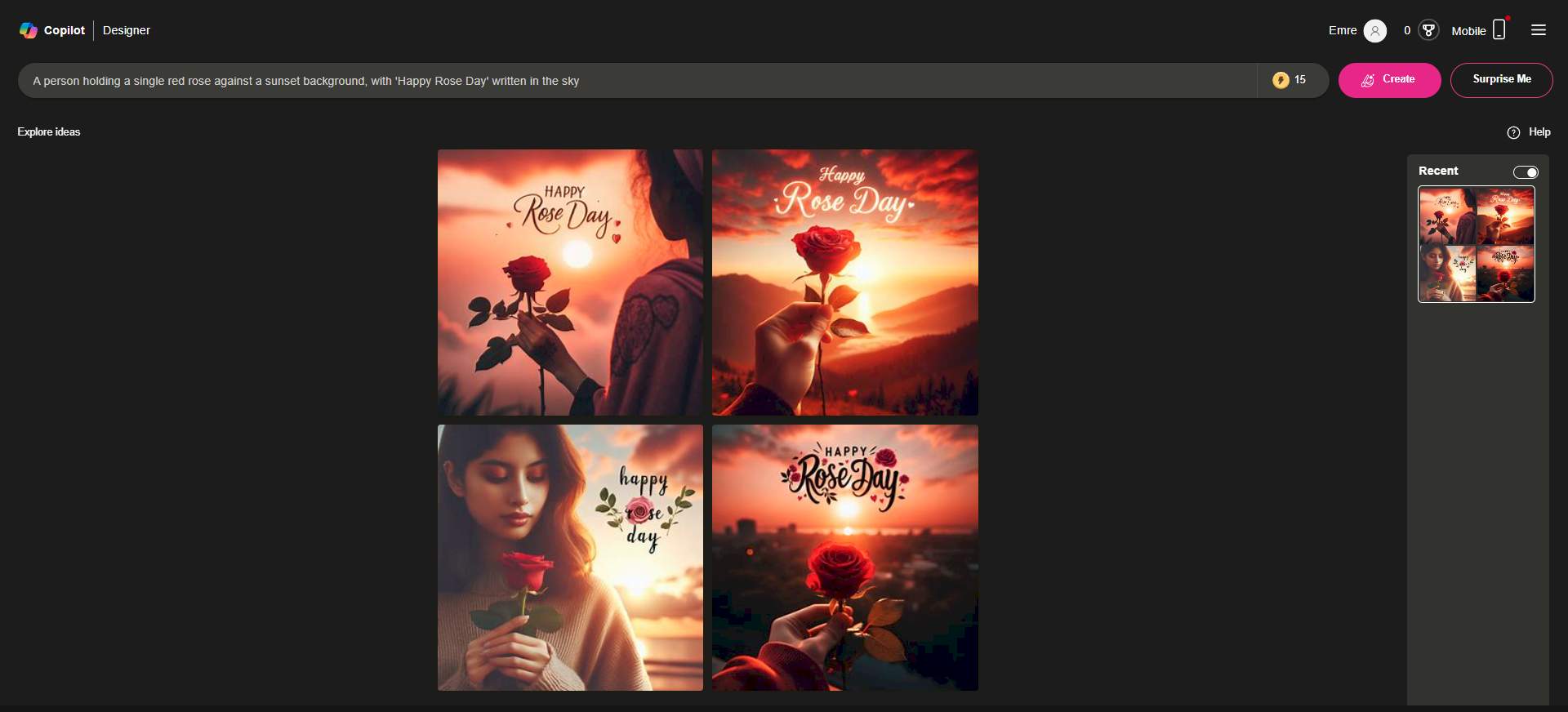
Happy Rose Day AI photo editing
Users can use Bing Image Creator for their Happy Rose Day AI photo editing purposes (Image credit)

Dream by WOMBO:

  1. Download the Dream by WOMBO app using the links below
    • Dream by WOMBO for Android
    • Dream by WOMBO for iOS
  2. Tap the “Create” button and choose “Text to Image”
  3. Enter your prompt and adjust the style settings
  4. Tap “Create” and wait for the AI to generate images
  5. Choose your favorite image and save it

Using photo editing apps for Happy Rose Day AI photo editing

Your second option to celebrate this special day with Happy Rose Day AI photo editing is using photo editing apps.

Many free photo editing apps offer tools to add stickers, text, and filters to your existing photos. Here are some ideas:

  1. Download a free photo editing app: PicsArt, Canva, Snapseed, etc
  2. Choose a photo you want to edit
  3. Add rose-themed stickers or overlays from the app’s library
  4. Write “Happy Rose Day” using decorative fonts and colors
  5. Apply filters and effects to enhance the mood
  6. Save your edited photo and share it
Happy Rose Day AI photo editing
The rose is a timeless symbol of love, with each color conveying a specific meaning. Red signifies passionate love, yellow represents friendship and joy, pink embodies appreciation and admiration, white symbolizes purity and innocence, and so on (Image credit)

Remember to use specific details in your prompts for better results (e.g., rose color, type of person, background setting).

With these free photo editing apps, you can easily create beautiful Happy Rose Day AI photo edits that will make your loved ones feel special. Get creative and show your love in a unique and memorable way!


Featured image credit: Freepik.

Tags: AIhow to

Related Posts

OpenAI retires Atlas browser to focus on new ChatGPT superapp

OpenAI retires Atlas browser to focus on new ChatGPT superapp

July 14, 2026
Microsoft tests Copilot’s new PC insights feature in Windows 11

Microsoft tests Copilot’s new PC insights feature in Windows 11

July 14, 2026
Claude Fable 5 free access extended until July 19

Claude Fable 5 free access extended until July 19

July 13, 2026
OpenAI lifts GPT-5.6 Sol usage limits temporarily

OpenAI lifts GPT-5.6 Sol usage limits temporarily

July 13, 2026
OpenAI launches ChatGPT Work productivity app

OpenAI launches ChatGPT Work productivity app

July 10, 2026
Meta files patent for AI-powered emotional monitoring device

Meta files patent for AI-powered emotional monitoring device

July 10, 2026

LATEST NEWS

OpenAI retires Atlas browser to focus on new ChatGPT superapp

Microsoft tests Copilot’s new PC insights feature in Windows 11

Xiaomi unveils SkyNomad N90 range-extender SUV

X algorithm update aims to make replies feel friendlier

Windows 11 Search Box gets less clutter and more control

Pixel 11 leak shows bold magenta and peach colors

BEST AI MODELS LEADERBOARD

See the best AI models, ranked by intelligence, benchmark results, speed and token price. Find the most suitable LLMs, Text-to-Image, Image Editing, Text-to-Speech, Text-to-Video and Image-to-Video  artificial intelligence model for your tasks and business.

LATEST TOOLS

Mootion

Legacy AI

Copyseeker

ProPhotos

Kuki AI

Create

RemodelAI

AItwitch

Vadoo AI

Greptile AI

Dataconomy

COPYRIGHT © DATACONOMY MEDIA GMBH, ALL RIGHTS RESERVED.

  • About
  • Imprint
  • Contact
  • Legal & Privacy

Follow Us

  • News
    • Artificial Intelligence
    • Cybersecurity
    • DeFi & Blockchain
    • Finance
    • Gaming
    • Startups
    • Tech
  • Industry
  • Research
  • Resources
    • Articles
    • Guides
    • Case Studies
    • Whitepapers
    • AI Models Leaderboard
  • AI tools
  • Newsletter
  • + More
    • Glossary
    • Conversations
    • Events
    • About
      • Who we are
      • Contact
      • Imprint
      • Legal & Privacy
      • Partner With Us
No Result
View All Result
Subscribe

This website uses cookies to improve your experience. You can choose to accept or reject them. Visit our Privacy Policy.