Dataconomy
  • News
    • Artificial Intelligence
    • Cybersecurity
    • DeFi & Blockchain
    • Finance
    • Gaming
    • Startups
    • Tech
  • Industry
  • Research
  • Resources
    • Articles
    • Guides
    • Case Studies
    • Whitepapers
  • AI toolsNEW
  • Newsletter
  • + More
    • Glossary
    • Conversations
    • Events
    • About
      • About
      • Contact
      • Imprint
      • Legal & Privacy
      • Partner With Us
Subscribe
No Result
View All Result
  • AI
  • Tech
  • Cybersecurity
  • Finance
  • DeFi & Blockchain
  • Startups
  • Gaming
Dataconomy
  • News
    • Artificial Intelligence
    • Cybersecurity
    • DeFi & Blockchain
    • Finance
    • Gaming
    • Startups
    • Tech
  • Industry
  • Research
  • Resources
    • Articles
    • Guides
    • Case Studies
    • Whitepapers
  • AI toolsNEW
  • Newsletter
  • + More
    • Glossary
    • Conversations
    • Events
    • About
      • About
      • Contact
      • Imprint
      • Legal & Privacy
      • Partner With Us
Subscribe
No Result
View All Result
Dataconomy
No Result
View All Result

ChatGPT listens your background conversations, but you can disable it now

Didn't you know that ChatGPT was listening to you?

byEray Eliaçık
June 5, 2024
in Artificial Intelligence
Home News Artificial Intelligence
Share on FacebookShare on TwitterShare on LinkedInShare on WhatsAppShare on e-mail

Have you ever worried that your AI assistant might be listening to you even when you’re not using it? With ChatGPT’s Voice Mode, that concern might be more valid than you think. This is because the ChatGPT mobile app runs in the background even when closed. Until recently, the Voice Mode feature on the ChatGPT app for Android and iOS ran in the background, keeping conversations going even when the app was closed or your screen was off.

This raised serious privacy concerns, as it seemed like ChatGPT was spying on you while you used other apps on your phone. Fortunately, OpenAI has introduced a new feature to address these concerns, like as if it actually heard us!

You can choose when ChatGPT can hear

ChatGPT’s Voice Mode is a feature that allows the app to continue conversations even when you’re using other apps or when your screen is off. Essentially, it keeps running in the background, which means it could be listening or tracking your behavior even when the app itself is closed.

Stay Ahead of the Curve!

Don't miss out on the latest insights, trends, and analysis in the world of data, technology, and startups. Subscribe to our newsletter and get exclusive content delivered straight to your inbox.

ChatGPT with voice is now available to all free users. Download the app on your phone and tap the headphones icon to start a conversation.

Sound on 🔊 pic.twitter.com/c5sCFDAWU6

— OpenAI (@OpenAI) November 21, 2023

This functionality is designed to provide a sleek user experience by allowing you to interact with ChatGPT without needing to actively keep the app open. It aims to make the AI assistant more convenient and accessible, ensuring that it can respond to your voice commands at any time. However, this capability raises privacy concerns.

The idea that the app might be listening even when it is not in use can be unsettling for many users. Recognizing this, OpenAI has introduced, spotted by Redditors, a new feature that lets you disable “Background Conversations,” giving you more control over when and how ChatGPT listens.

How to turn off ChatGPT background conversations

Turning off ChatGTP background conversations is easy. Just go to the Voice Mode section in your ChatGPT settings on your Android or iOS device and toggle the setting off.
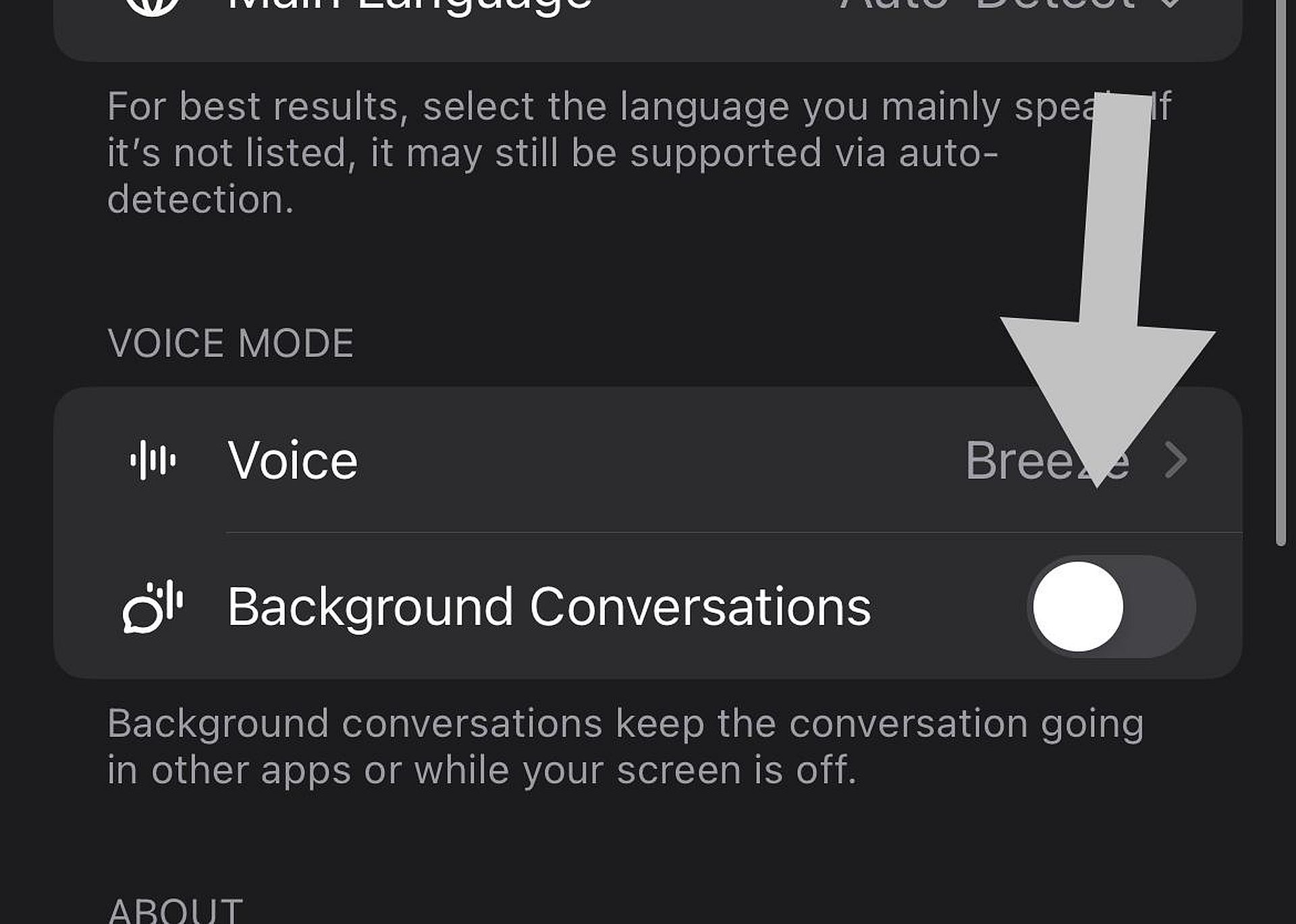
ChatGPT listens your background conversations, but you can disable it now

This feature is gradually rolling out, so if you don’t see it yet, it should appear soon.

Why does this matter?

Voice Mode has been part of ChatGPT since last year, but it recently received more attention with the integration of GPT-4o, which combines various voice features into one model. This update also raised concerns about the types of voices used, including one that sounded too much like actress Scarlett Johansson. OpenAI quickly addressed this issue after receiving complaints.

Take control of your privacy

If you’re concerned about privacy with ChatGPT’s Voice Mode, now you have the power to turn off Background Conversations.

Your privacy matters, and with this new setting, you can make sure ChatGPT isn’t listening when you don’t want it to.


Featured image credit: Eray Eliaçık/Bing

Tags: chatgptopenAI

Related Posts

Beyond the Hallucination: How AI is Rebuilding AAA Production Pipelines from a Vacuum

Beyond the Hallucination: How AI is Rebuilding AAA Production Pipelines from a Vacuum

January 8, 2026
Google Classroom turns lessons into podcasts with Gemini

Google Classroom turns lessons into podcasts with Gemini

January 8, 2026
Skylight unveils Calendar 2 with AI organization tools at CES 2026

Skylight unveils Calendar 2 with AI organization tools at CES 2026

January 8, 2026
OpenAI launches dedicated ChatGPT Health space

OpenAI launches dedicated ChatGPT Health space

January 8, 2026
Ford announces AI assistant and next-gen BlueCruise at CES 2026

Ford announces AI assistant and next-gen BlueCruise at CES 2026

January 8, 2026
Lenovo and Motorola introduce Qira cross-device AI assistant

Lenovo and Motorola introduce Qira cross-device AI assistant

January 7, 2026

LATEST NEWS

CES 2026: Samsung Display announcements in a nutshell

Bluetti unveils Charger 2 with dual engine-solar inputs at CES 2026

Tone Outdoors unveils silent T1 leaf blower at CES 2026

Roblox mandates facial verification for global chat access

Spotify challenges YouTube with easier video monetization

Spotify adds real-time listening activity to Messages

Dataconomy

COPYRIGHT © DATACONOMY MEDIA GMBH, ALL RIGHTS RESERVED.

  • About
  • Imprint
  • Contact
  • Legal & Privacy

Follow Us

  • News
    • Artificial Intelligence
    • Cybersecurity
    • DeFi & Blockchain
    • Finance
    • Gaming
    • Startups
    • Tech
  • Industry
  • Research
  • Resources
    • Articles
    • Guides
    • Case Studies
    • Whitepapers
  • AI tools
  • Newsletter
  • + More
    • Glossary
    • Conversations
    • Events
    • About
      • About
      • Contact
      • Imprint
      • Legal & Privacy
      • Partner With Us
No Result
View All Result
Subscribe

This website uses cookies. By continuing to use this website you are giving consent to cookies being used. Visit our Privacy Policy.