Dataconomy
  • News
    • Artificial Intelligence
    • Cybersecurity
    • DeFi & Blockchain
    • Finance
    • Gaming
    • Startups
    • Tech
  • Industry
  • Research
  • Resources
    • Articles
    • Guides
    • Case Studies
    • Whitepapers
    • AI Models Leaderboard
  • AI toolsNEW
  • Newsletter
  • + More
    • Glossary
    • Conversations
    • Events
    • About
      • Who we are
      • Contact
      • Imprint
      • Legal & Privacy
      • Partner With Us
Subscribe
No Result
View All Result
  • AI
  • Tech
  • Cybersecurity
  • Finance
  • DeFi & Blockchain
  • Startups
  • Gaming
Dataconomy
  • News
    • Artificial Intelligence
    • Cybersecurity
    • DeFi & Blockchain
    • Finance
    • Gaming
    • Startups
    • Tech
  • Industry
  • Research
  • Resources
    • Articles
    • Guides
    • Case Studies
    • Whitepapers
    • AI Models Leaderboard
  • AI toolsNEW
  • Newsletter
  • + More
    • Glossary
    • Conversations
    • Events
    • About
      • Who we are
      • Contact
      • Imprint
      • Legal & Privacy
      • Partner With Us
Subscribe
No Result
View All Result
Dataconomy
No Result
View All Result

ChatGPT temporary chat feature keeps your conversations confidential

Looking for confidential conversations with chatbots? ChatGPT temporary chat update allows just that

byEmre Çıtak
May 2, 2024
in Artificial Intelligence
Home News Artificial Intelligence
Share on FacebookShare on TwitterShare on LinkedInShare on WhatsAppShare on e-mail
Google Preferred Source

OpenAI’s ChatGPT has carved a niche for itself with its constant updates and the ChatGPT temporary chat feature is the latest addition to the most popular chatbot of all time.

Known for its ability to generate human-quality text and carry on conversations, ChatGPT is a popular tool for writers, researchers, and anyone curious about the potential of AI. However, some users might desire a space for conversations that are confidential and don’t contribute to the model’s learning process.

This is where the ChatGPT temporary chat feature comes in, offering a unique way to interact with the popular chatbot.

Stay Ahead of the Curve!

Don't miss out on the latest insights, trends, and analysis in the world of data, technology, and startups. Subscribe to our newsletter and get exclusive content delivered straight to your inbox.

What is ChatGPT temporary chat feature?

Temporary Chat is a feature within ChatGPT that allows users to have conversations that vanish without a trace. Unlike standard interactions, these chats are not saved in the history and don’t influence the model’s future responses. This creates a “forgetful zone” where users can discuss sensitive topics, brainstorm freely, or simply explore ideas without leaving a digital footprint. So if you were asking yourself “Is it impossible to stop your data being used to train AI“, there is now a way!

Technically, temporary chat disables ChatGPT’s memory function for the duration of the conversation. This means the model won’t remember anything discussed previously in the session or any information gleaned from past interactions with other users. It essentially starts with a clean slate for each ChatGPT Temporary Chat session, ensuring the conversation remains isolated and confidential.

How to use ChatGPT temporary chat feature

As we mentioned before OpenAI’s recent update empowers users with greater control over their ChatGPT experience, particularly regarding data privacy.

Here’s a step-by-step guide to utilizing this feature:

  1. Go to the ChatGPT website
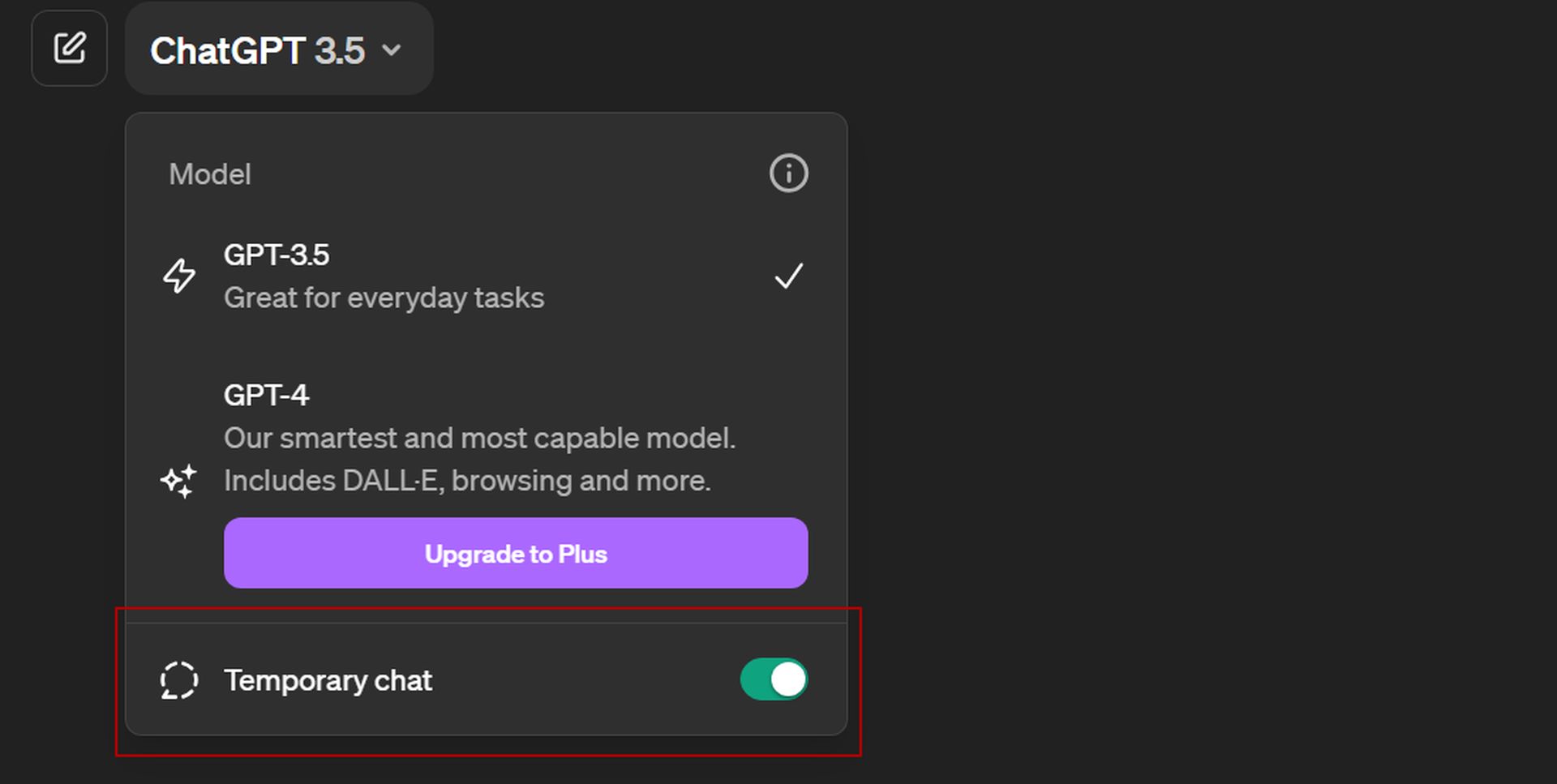
  2. Click the model selection drop-down menu on the top-left corner of your screen
  3. Enable “Temporary chat”
How to use ChatGPT Temporary Chat
Personal information shared during the ChatGPT temporary chat sessions will not be used for the training of the chatbot

Feel free to discuss sensitive topics, brainstorm freely, or simply explore ideas without leaving a digital footprint.

Remember, anything you type will be processed by ChatGPT in real-time, but it won’t be stored for future reference, but OpenAI states:

“For safety purposes, we may keep a copy of this chat for up to 30 days.”

Once you’ve finished your private conversation, simply close the chat window. Your next interaction with ChatGPT will function in the standard mode, where conversations are saved in the chat history and contribute to the model’s learning process.

Currently, the update is only live on the ChatGPT web version, with the mobile app rollout coming soon. This update is a testament to OpenAI’s commitment to user-centricity, offering greater control over chat history and introducing features like Temporary Chats for enhanced privacy.


Featured image credit: Emre Çıtak

Tags: chatgpthow to

Related Posts

Anthropic apologizes for hidden Fable throttling, pledges transparency

Anthropic apologizes for hidden Fable throttling, pledges transparency

June 11, 2026
Reco builds momentum to secure the enterprise AI agent sprawl

Reco builds momentum to secure the enterprise AI agent sprawl

June 11, 2026
Google Gemini outage affects users reporting error 1076 and 1099

Google Gemini outage affects users reporting error 1076 and 1099

June 10, 2026
Geoffrey Hinton rethinks AI’s role in warfare after Ukraine conflict

Geoffrey Hinton rethinks AI’s role in warfare after Ukraine conflict

June 10, 2026
Anthropic launches Claude Fable 5 ahead of 5 billion IPO

Anthropic launches Claude Fable 5 ahead of $965 billion IPO

June 10, 2026
Hasbro launches AI licensing studio Sixth Wall for approved character use

Hasbro launches AI licensing studio Sixth Wall for approved character use

June 10, 2026

LATEST NEWS

Critical UpdraftPlus flaw puts 3 million WordPress sites at risk

Instagram adds new feature letting users personalize their feed algorithm

YouTube brings back direct messages after six-year hiatus

iOS 27 adds Mac-like recovery mode for iPhone and iPad

Ubisoft to close Winnipeg and Belgrade studios, cutting 380 jobs

Windows 11 June update boosts speed, adds AI tools and critical fixes

BEST AI MODELS LEADERBOARD

See the best AI models, ranked by intelligence, benchmark results, speed and token price. Find the most suitable LLMs, Text-to-Image, Image Editing, Text-to-Speech, Text-to-Video and Image-to-Video  artificial intelligence model for your tasks and business.

LATEST TOOLS

Roboto AI

Pickaxe

Pfpmaker

MindPal

Syllaby

ScreenApp

FinanceBrain

GitHub Spark

Hints

VisionStory AI

Dataconomy

COPYRIGHT © DATACONOMY MEDIA GMBH, ALL RIGHTS RESERVED.

  • About
  • Imprint
  • Contact
  • Legal & Privacy

Follow Us

  • News
    • Artificial Intelligence
    • Cybersecurity
    • DeFi & Blockchain
    • Finance
    • Gaming
    • Startups
    • Tech
  • Industry
  • Research
  • Resources
    • Articles
    • Guides
    • Case Studies
    • Whitepapers
    • AI Models Leaderboard
  • AI tools
  • Newsletter
  • + More
    • Glossary
    • Conversations
    • Events
    • About
      • Who we are
      • Contact
      • Imprint
      • Legal & Privacy
      • Partner With Us
No Result
View All Result
Subscribe

This website uses cookies to improve your experience. You can choose to accept or reject them. Visit our Privacy Policy.