hCursor AI is an advanced code editor that leverages artificial intelligence to streamline coding processes, making it a powerful tool for developers. Here’s a detailed guide to understanding and using this AI:
What is Cursor AI?
Cursor AI is a code editor designed to improve productivity by integrating AI features directly into the coding environment. It supports code predictions, natural language editing, and interactive coding, enhancing both the speed and quality of coding projects. Whether you’re a seasoned developer or just starting, Cursor can help you write cleaner, more efficient code in less time. With its AI-driven approach, it also offers a unique coding experience by understanding natural language inputs.
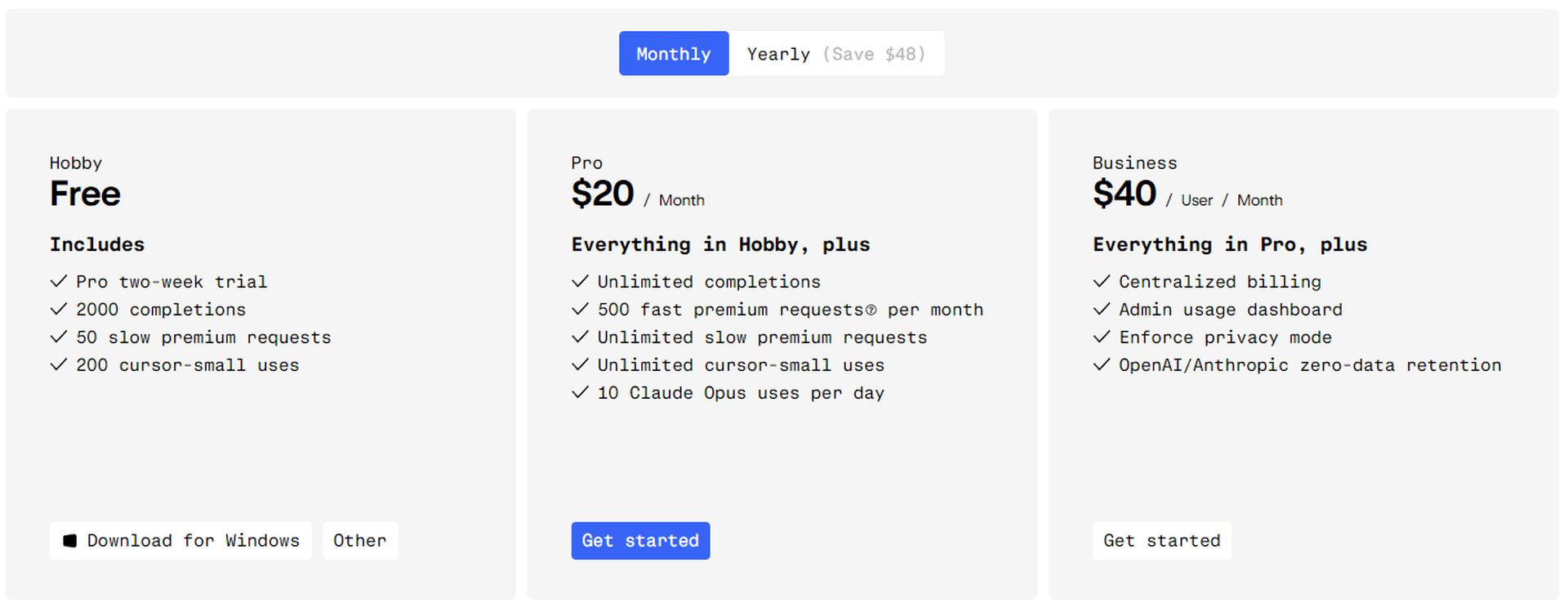
This tool is available in paid and free versions. Of course, the paid options provide more possibilities, here is a table for you:
How to download and install Cursor AI
Before diving into coding with Cursor AI, you’ll need to get it set up on your machine. The installation process is straightforward, ensuring that you can start using its features without any hassle. Follow these steps to download and install this AI:
- Visit the official website: Go to Cursor AI‘s website.
- Download the editor: Cursor is available for various operating systems. Choose the appropriate version for your OS and download it.
- Installation: Run the installer and follow the on-screen instructions. You don’t need any extra software beyond Cursor AI itself.
- API key setup: During installation, you’ll be prompted to enter an API key, which you can get from OpenAI or another AI service provider. (not necessary for free users)
How to use Cursor AI
Once Cursor AI is installed, you can start using it to enhance your coding experience. Its AI-driven features are designed to make coding faster and more intuitive. Whether you need help with code suggestions or want to write code using natural language, the AI has you covered. Here’s how you can make the most of it:
- Coding with AI assistance: Cursor AI offers code suggestions, autocompletion, and error checking as you type, speeding up your development process.
- Natural language editing: You can describe what you want to do in plain English, and Cursor AI will generate the corresponding code.
- Integration with VS Code: Cursor is compatible with Visual Studio Code extensions, themes, and keybindings, so you can customize it to your liking.
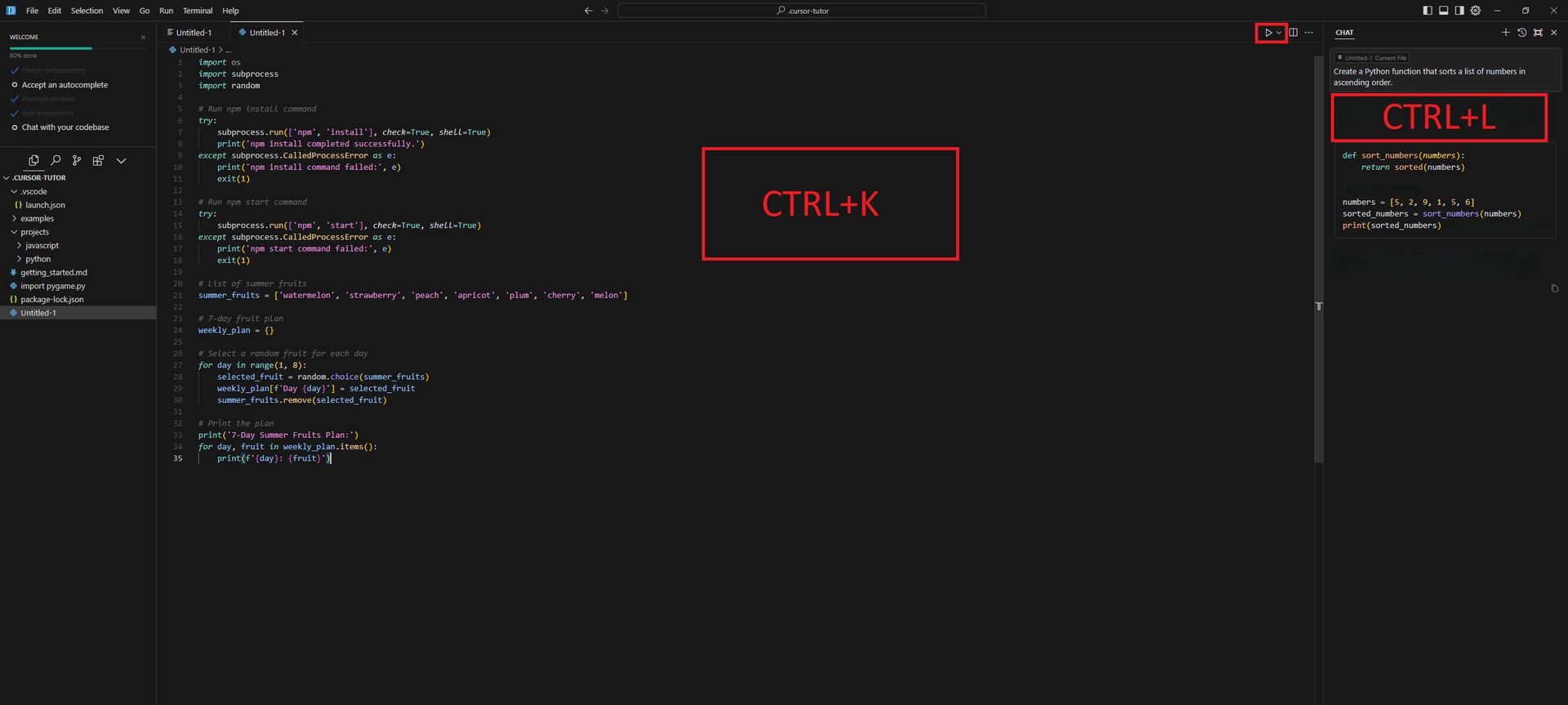
- Open File: You have created a new project in the “File” section on the top left.
- Talk to AI: Then you can talk to the AI by doing CTRL+L and write code for CTRL+K.
- Alternatives: You can see the AI options with the small arrow at the bottom left of the speech text.
Here are the following options;
- GPT-4o (unlimited use if you have an API / a certain number of prompt rights if not)
- Claude-3.5 Sonnet (unlimited use if you have API / a certain number of prompts if not)
- GPT-4o-mini (Free)
- Cursor-small (Free)
- GPT-3.5 (Free)
- Ready to go: After selecting the model you want, explain the code you want to write as if you were explaining it to a friend.
Example use case: Writing code with Cursor AI
Cursor AI can simplify complex coding tasks with its AI-powered features. For example, let’s say you want to generate a Python function that sorts a list of numbers. You can easily create this function by interacting with the AI, which will provide you with a quick and efficient solution. Here’s how to do it
- Open Cursor AI
- Describe the task: Type a prompt like, “Create a Python function that sorts a list of numbers in ascending order.”
- Review and edit: Cursor AI will generate the function code. You can review, edit, or ask the AI to refine the code.
What makes Cursor AI special?
Cursor AI stands out because it combines privacy, customization, and efficiency in one powerful tool. By using your API key, you maintain full control over your data, ensuring that your code remains private. Additionally, Cursor AI seamlessly integrates with Visual Studio Code, allowing you to continue using your favorite extensions and themes. This customization ensures that your coding environment is both familiar and highly productive. Furthermore, by automating repetitive tasks and providing instant feedback, this AI boosts your coding speed and reduces errors, making it an indispensable tool for developers.
Common questions
Before wrapping up, let’s address some common questions that users may have when starting with AI. Understanding these aspects can help you make the most of the tool and avoid any potential confusion.
- Do I need internet access?
- Yes, for initial setup and AI functionality.
- Can I use AI for all programming languages?
- Cursor supports many popular languages, but its performance may vary depending on the language.
This article can serve as a comprehensive guide for anyone curious about Cursor, providing all the essential information they need to get started.
Featured image credit: Furkan Demirkaya / Google ImageFX