Dataconomy
  • News
    • Artificial Intelligence
    • Cybersecurity
    • DeFi & Blockchain
    • Finance
    • Gaming
    • Startups
    • Tech
  • Industry
  • Research
  • Resources
    • Articles
    • Guides
    • Case Studies
    • Whitepapers
    • AI Models Leaderboard
  • AI toolsNEW
  • Newsletter
  • + More
    • Glossary
    • Conversations
    • Events
    • About
      • Who we are
      • Contact
      • Imprint
      • Legal & Privacy
      • Partner With Us
Subscribe
No Result
View All Result
  • AI
  • Tech
  • Cybersecurity
  • Finance
  • DeFi & Blockchain
  • Startups
  • Gaming
Dataconomy
  • News
    • Artificial Intelligence
    • Cybersecurity
    • DeFi & Blockchain
    • Finance
    • Gaming
    • Startups
    • Tech
  • Industry
  • Research
  • Resources
    • Articles
    • Guides
    • Case Studies
    • Whitepapers
    • AI Models Leaderboard
  • AI toolsNEW
  • Newsletter
  • + More
    • Glossary
    • Conversations
    • Events
    • About
      • Who we are
      • Contact
      • Imprint
      • Legal & Privacy
      • Partner With Us
Subscribe
No Result
View All Result
Dataconomy
No Result
View All Result

How to create a private room on Midjourney?

Midjourney has introduced a new feature allowing users to create private creation rooms on their website

byKerem Gülen
June 10, 2024
in Artificial Intelligence
Home News Artificial Intelligence
Share on FacebookShare on TwitterShare on LinkedInShare on WhatsAppShare on e-mail
Google Preferred Source

Midjourney private rooms have been introduced as a new feature on the platform, providing users with the ability to create exclusive, secure spaces for collaborative creation.

“We’re now testing ‘private creation rooms’ on our website! For all MJ members with >100 images, just click ‘rooms’ and then ‘create room’. This lets you make private spaces to create and explore with friends or coworkers. Have fun and let us know what you think!”

–Midjourney/X

How to make a Midjourney private room?

Midjourney has introduced a new feature allowing users to create private creation rooms on their website. This feature is available for all MJ members with more than 100 images. Here are the steps and features associated with this new functionality.

Steps to create a private room:

Stay Ahead of the Curve!

Don't miss out on the latest insights, trends, and analysis in the world of data, technology, and startups. Subscribe to our newsletter and get exclusive content delivered straight to your inbox.

  • Log in to Midjourney:
    • Open the Midjourney website and log in using your Discord account credentials.
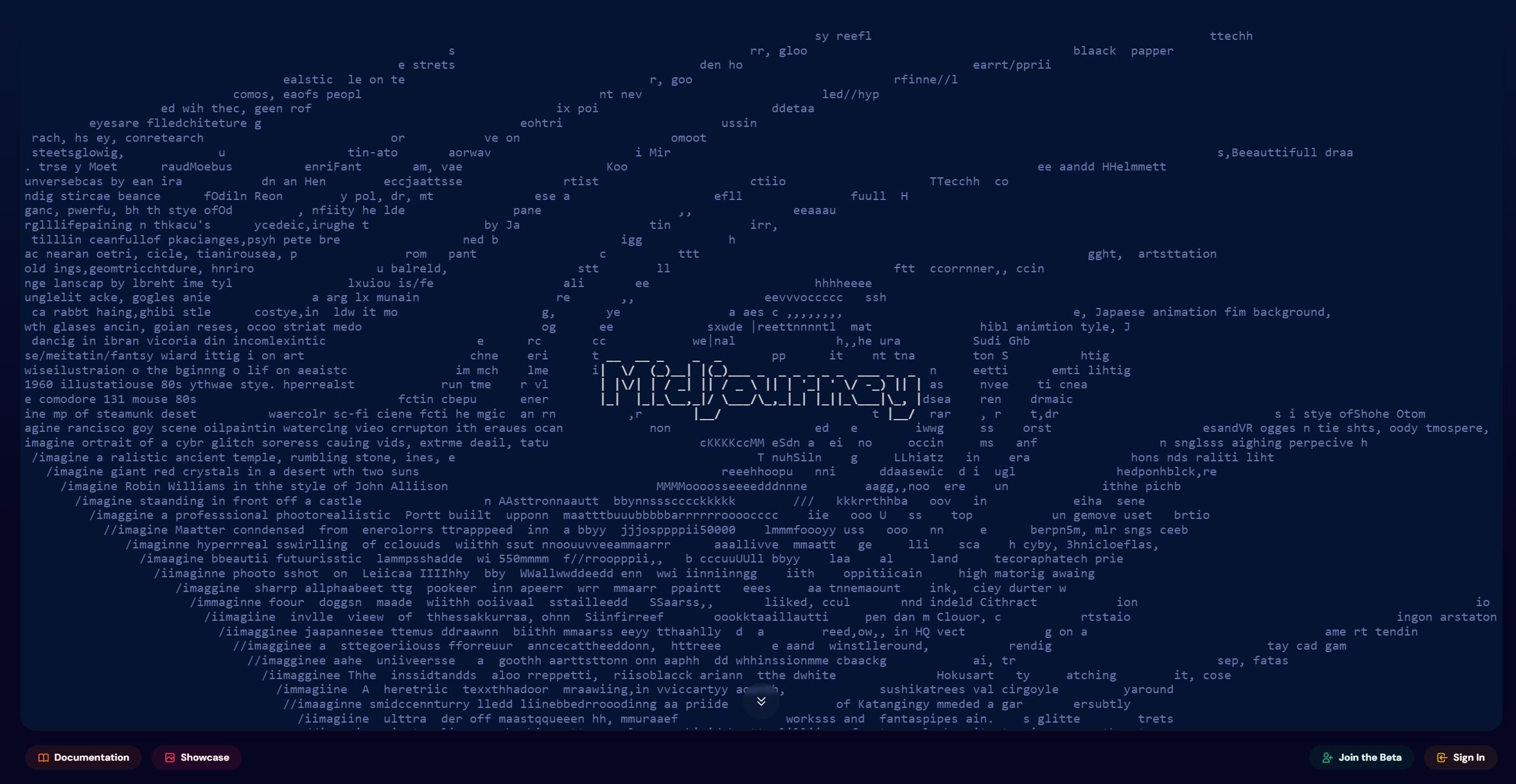
Midjourney private room
Step 1 (Image: Midjourney)
  • Access the rooms feature:
    • On the left sidebar, click on the “Rooms” button to navigate to the rooms section.
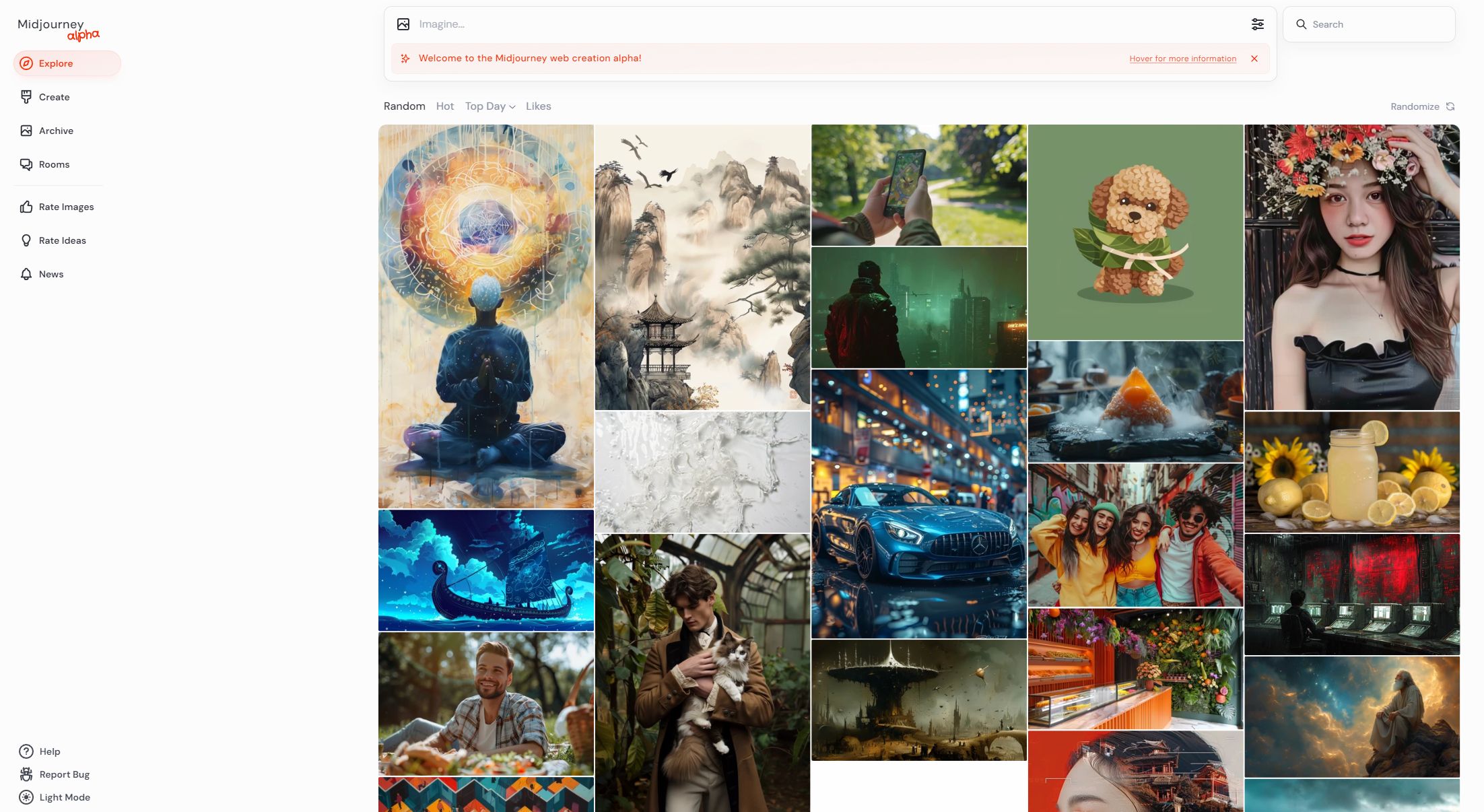
Midjourney private room
Step 2 (Image: Midjourney private rooms)
  • Create a new room:
    • Click on the “Create Room” button.
    • A dialog box will appear prompting you to enter the necessary information for your new room.
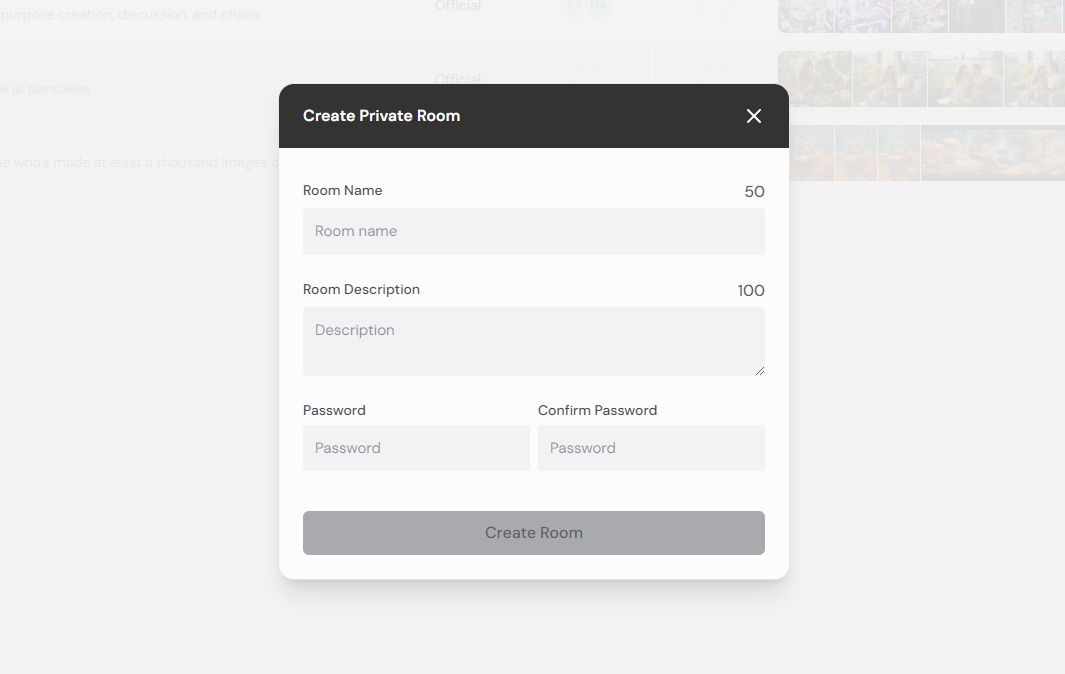
Midjourney private room
Step 3 (Image: Midjourney private rooms)
  • Enter room details:
    • Fill in the following fields:
      • Room name: Enter a name for your room.
      • Room description: Provide a brief description of what the room is for.
      • Password: Set a password for your room to control access.
      • Confirm password: Re-enter the password to confirm it.
    • Once all fields are filled, click the “Create Room” button to create your private room.
  • Interact in the room:
    • After creating the room, you can enter it to start your private session. You can invite friends or coworkers to join and collaborate.

Midjourney private room features

  • Private spaces: The private rooms allow users to create a secluded environment where they can work on their projects without outside interruptions.
  • Collaborative environment: These rooms enable users to collaborate with friends or coworkers, making it easier to share ideas and work together on creative projects.
  • Security: By setting a password, users can ensure that only authorized individuals can access the room, providing a secure space for private discussions and creations.
  • Room management: Users have control over the room settings, including the ability to edit the room name and description, change the password, and manage participants.

Midjourney’s private rooms offer collaborative capabilities, this makes it an excellent tool for teams and creative groups who want to work together in a controlled, private environment.

In the Midjourney private rooms, the settings for creating images are designed to be more user-friendly and less complicated compared to the Discord version.

Here’s an overview of the available settings.

Midjourney private room
Settings (Image: Midjourney private rooms)

Image size:

  • Portrait: Select this option for a vertically oriented image.
  • Square: Select this option for a square-shaped image.
  • Landscape: Select this option for a horizontally oriented image.

Aesthetics:

  • Stylization: Adjust the level of artistic stylization applied to the image.
  • Weirdness: Control the degree of unconventional or abstract elements in the image.
  • Variety: Determine the diversity of elements and themes within the generated image.

Model:

  • Mode: Choose between “Standard” and “Raw” modes for image generation.
  • Version: Select the version of the AI model to use, currently set to version 6.
  • Speed: Options include “Relax” for slower generation, “Fast” for quicker results, and “Turbo” for the fastest processing.

These settings are clearly laid out and easy to adjust, allowing users to customize their image generation process efficiently.

However, it might be easier to create the initial 100 images required for accessing private rooms on Discord. For detailed instructions on how to do this, check out our guide for creating images on Discord.


Featured image credit: Jonathan Kemper/Unsplash

Tags: AIartificial intelligenceMidjourney

Related Posts

Samsung adopts ChatGPT Enterprise and Codex across global workforce

Samsung adopts ChatGPT Enterprise and Codex across global workforce

June 22, 2026
OpenAI improves health responses for free ChatGPT users

OpenAI improves health responses for free ChatGPT users

June 19, 2026
Steam Next Fest sees one in five demos labeled for generative AI

Steam Next Fest sees one in five demos labeled for generative AI

June 17, 2026
Anthropic adds multilingual and push-to-talk features to Claude Voice Mode

Anthropic adds multilingual and push-to-talk features to Claude Voice Mode

June 17, 2026
Is Gemini down? Users report problems with Google Gemini

Is Gemini down? Users report problems with Google Gemini

June 17, 2026
The Atlantic uncovers millions of copyrighted songs in AI training data

The Atlantic uncovers millions of copyrighted songs in AI training data

June 16, 2026

LATEST NEWS

Samsung adopts ChatGPT Enterprise and Codex across global workforce

Samsung Galaxy S27 Pro leak points to built-in Privacy Display

Perseverance rover completes a marathon on Mars

Polymarket accused of paying creators to post misleading TikTok bet videos

OpenAI improves health responses for free ChatGPT users

Adobe expands Firefly AI across Premiere, Illustrator, InDesign and Frame.io

BEST AI MODELS LEADERBOARD

See the best AI models, ranked by intelligence, benchmark results, speed and token price. Find the most suitable LLMs, Text-to-Image, Image Editing, Text-to-Speech, Text-to-Video and Image-to-Video  artificial intelligence model for your tasks and business.

LATEST TOOLS

Moonbeam

Charisma AI

Essay Writer by Papertyper

Slite

Wonderin AI

Spur

Stenography

Calldesk

MaxAI.me

PhotoRestore

Dataconomy

COPYRIGHT © DATACONOMY MEDIA GMBH, ALL RIGHTS RESERVED.

  • About
  • Imprint
  • Contact
  • Legal & Privacy

Follow Us

  • News
    • Artificial Intelligence
    • Cybersecurity
    • DeFi & Blockchain
    • Finance
    • Gaming
    • Startups
    • Tech
  • Industry
  • Research
  • Resources
    • Articles
    • Guides
    • Case Studies
    • Whitepapers
    • AI Models Leaderboard
  • AI tools
  • Newsletter
  • + More
    • Glossary
    • Conversations
    • Events
    • About
      • Who we are
      • Contact
      • Imprint
      • Legal & Privacy
      • Partner With Us
No Result
View All Result
Subscribe

This website uses cookies to improve your experience. You can choose to accept or reject them. Visit our Privacy Policy.