Google’s chatbot Bard just got updated and now users can generate images with Bard!
In an effort to continuously improve the image creation process, the team at Bard has recently released an update that promises to revolutionize the way we create images. With the latest update, Bard now utilizes natural language processing (NLP) and Google Gemini AI to generate images based on text prompts.
This innovative tool allows users to create custom graphics in seconds, without the need for complex software or expensive design services. In this blog post, we’ll dive deeper into the updated features of Bard and explore how it can benefit entrepreneurs, small business owners, marketers, and anyone else in need of high-quality images.
How to generate images with Bard
The latest update to Bard brings a new level of convenience and efficiency to the image creation process. With the power of NLP and computer vision technology, users can now describe the image they have in mind using simple English prompts. Bard will then generate a variety of options for the user to choose from, ensuring that the final product matches the user’s vision.
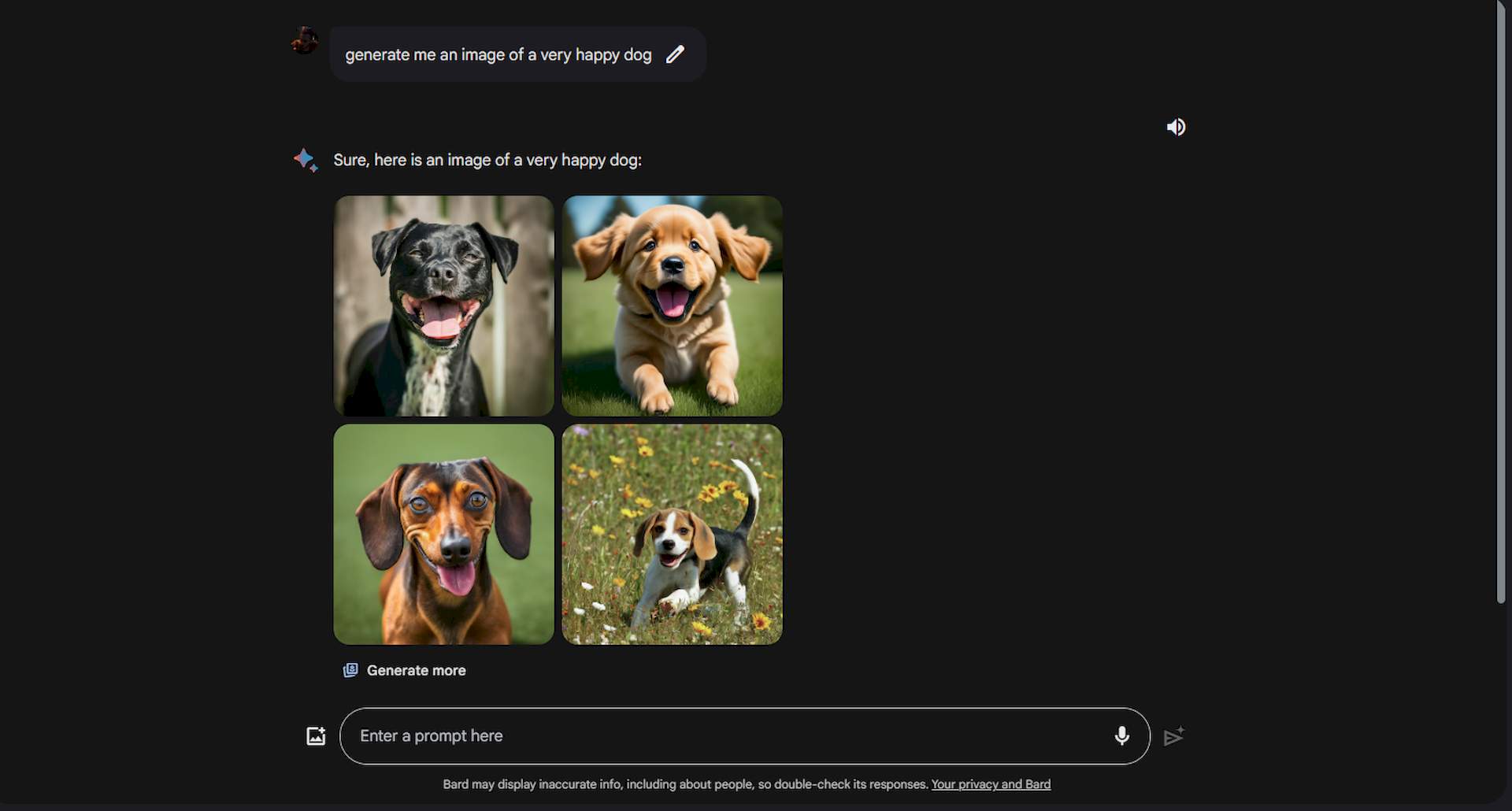
Generating images with Bard is pretty easy and straightforward. All you have to do to generate images with Bard is:
- Open Google Bard
- Type ”Generate image of” followed by your prompt
- Hit enter
After your Prompt, Bard will create two 1536×1536 pixel images. As with the Midjourney prompts, being as detailed as possible in these prompts will give more detailed and accurate results.
If you don’t like the image that Bard generated, Google has also added a “Generate more” button. With this button, which you can see under the images, it is possible to run the same prompt once again and create different images.
What model does Bard use to generate images?
Now that you know how to generate images with Bard, it is time to speak about its technical aspects too.
Bard’s image generation capabilities are powered by Google’s Gemini AI, a state-of-the-art artificial intelligence model that utilizes natural language processing (NLP) and computer vision technology. Gemini AI is trained on a massive dataset of images and their corresponding text descriptions, allowing it to learn the intricacies of visual representation and language understanding.
With this training, Gemini AI can generate images that accurately reflect the text prompts inputted by users, resulting in visually stunning and contextually relevant graphics.
One of the key advantages of using Gemini AI is its ability to understand complex language and generate images that match the user’s intended meaning. For example, if a user inputs a prompt like “Create an image of a happy dog wearing sunglasses,” Gemini AI can understand the nuances of the language and generate an image that accurately represents the user’s vision.
This level of accuracy and understanding is what sets Bard apart from other image generation tools and makes it a valuable asset for anyone looking to create high-quality images without the need for complex design software or expensive design services.
What’s more in the update?
The update brought many improvements besides Generate Images with Bard. Bard, the revolutionary AI language model, is set to receive a significant upgrade with the integration of Gemini Pro. This advancement will expand Bard’s capabilities, enabling it to understand, summarize, reason, brainstorm, write, and plan with even greater precision and effectiveness.
The upgrade will be available worldwide, in all languages where Bard is currently offered. This means that users from diverse backgrounds and regions will have access to the enhanced features of Bard with Gemini Pro, taking their learning experiences to new heights.
With Gemini Pro, users will discover new ways to interact and collaborate with Bard. The upgrade will offer a more engaging and personalized learning experience, empowering users to achieve their educational and professional goals.
Another significant development
In addition to the Gemini Pro upgrade, the double-check feature is now available for Bard responses in most supported languages. This feature allows users to evaluate Bard’s responses, further enhancing the learning experience.
The double-check feature is an essential tool for users who want to ensure the accuracy and reliability of Bard’s responses. By enabling this feature, users can verify the responses and make any necessary adjustments, ensuring that their learning is precise and effective.
Featured image credit: Emre Citak/Google Bard.