Dataconomy
  • News
    • Artificial Intelligence
    • Cybersecurity
    • DeFi & Blockchain
    • Finance
    • Gaming
    • Startups
    • Tech
  • Industry
  • Research
  • Resources
    • Articles
    • Guides
    • Case Studies
    • Whitepapers
    • AI Models Leaderboard
  • AI toolsNEW
  • Newsletter
  • + More
    • Glossary
    • Conversations
    • Events
    • About
      • Who we are
      • Contact
      • Imprint
      • Legal & Privacy
      • Partner With Us
Subscribe
No Result
View All Result
  • AI
  • Tech
  • Cybersecurity
  • Finance
  • DeFi & Blockchain
  • Startups
  • Gaming
Dataconomy
  • News
    • Artificial Intelligence
    • Cybersecurity
    • DeFi & Blockchain
    • Finance
    • Gaming
    • Startups
    • Tech
  • Industry
  • Research
  • Resources
    • Articles
    • Guides
    • Case Studies
    • Whitepapers
    • AI Models Leaderboard
  • AI toolsNEW
  • Newsletter
  • + More
    • Glossary
    • Conversations
    • Events
    • About
      • Who we are
      • Contact
      • Imprint
      • Legal & Privacy
      • Partner With Us
Subscribe
No Result
View All Result
Dataconomy
No Result
View All Result

ChatGPT Canva hack explained: Viral posts with just a few clicks

With the ChatGPT Canva hack that went viral in one evening, creating a viral social media account will only take seconds

byEmre Çıtak
January 31, 2024
in Artificial Intelligence
Home News Artificial Intelligence
Share on FacebookShare on TwitterShare on LinkedInShare on WhatsAppShare on e-mail
Google Preferred Source

Need a quick way to create engaging social media posts in bulk? Look no further than the ChatGPT Canva hack! Simply provide your content ideas and keywords, and ChatGPT will generate inspiring quotes, thought-provoking captions, and witty one-liners in seconds. Then, use Canva’s intuitive design tools to turn your quotes into visually stunning posts.

Choose from thousands of pre-designed templates or customize your own design with ease. In just a few minutes, you’ll have transformed your text into captivating social media gems!
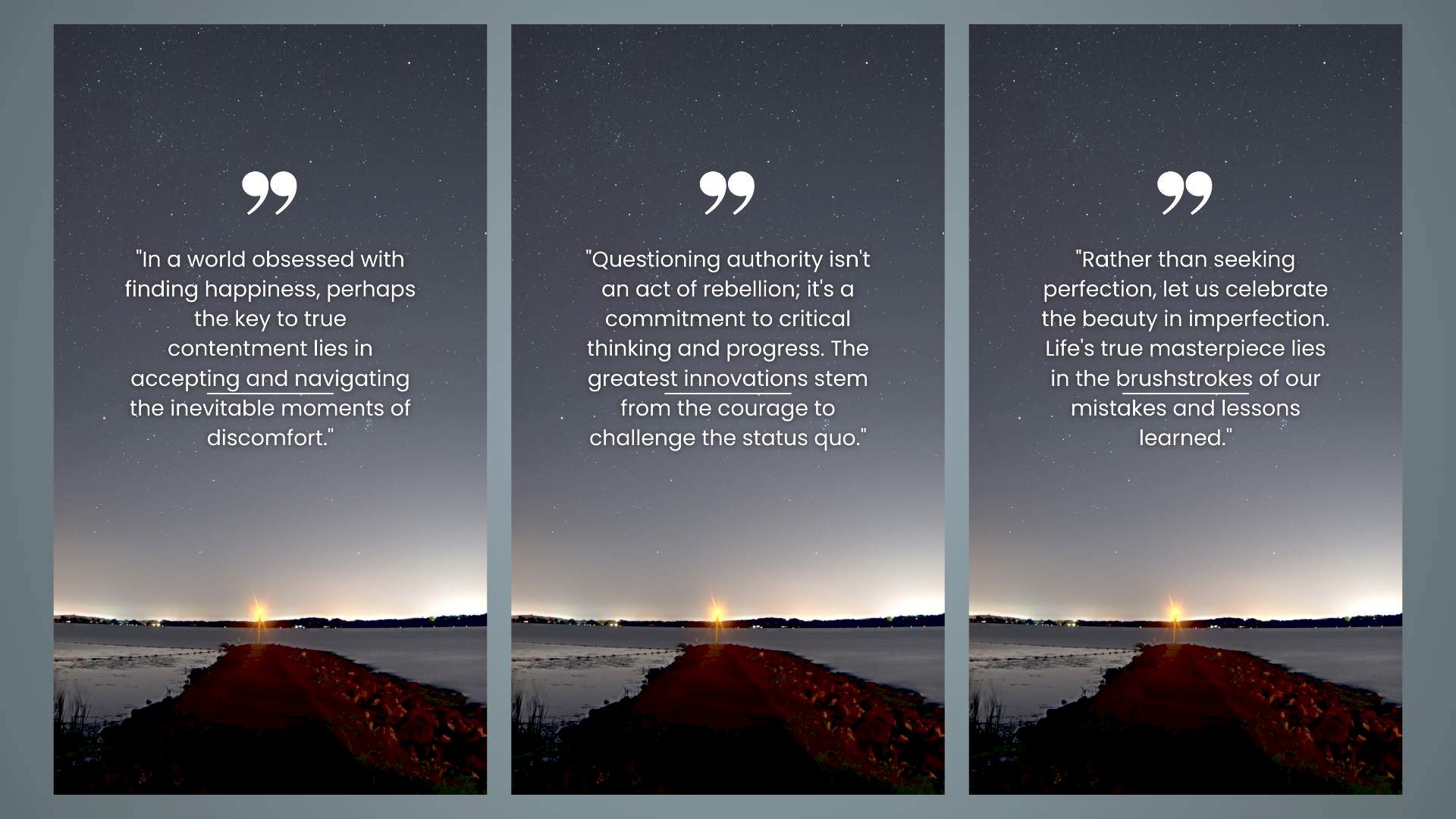
ChatGPT Canva hack
ChatGPT Canva hack allows you to create multiple quote-like visuals in seconds

How to generate posts in bulk with ChatGPT Canva hack

Want to create thousands of posts in seconds? The ChatGPT Canva hack has got you covered! All you need is a free ChatGPT account, Google Sheets, and a free premium Canva account. With these tools, you can generate engaging videos in no time.

Stay Ahead of the Curve!

Don't miss out on the latest insights, trends, and analysis in the world of data, technology, and startups. Subscribe to our newsletter and get exclusive content delivered straight to your inbox.

Here are the steps:

  1. Generate captions with ChatGPT
  2. Get CSV file with Google Sheets
  3. Do the Canva magic

Generate captions with ChatGPT

The first step in using the ChatGPT Canva hack is to choose your topic and create a prompt. Think about what you want your quotes to be about and what message you want to convey. Do you want to challenge conventional beliefs and offer a new perspective? Encourage someone facing a difficult situation? Poke fun at a common human behavior with a sarcastic quote? Or focus on a specific theme like love, loss, friendship, or nature?

Once you have your topic and prompt in mind, it’s time to start generating quotes. And that’s where ChatGPT comes in. This AI chatbot from OpenAI is completely free to use, and it can generate text in a wide range of styles and formats. Simply copy and paste your prompt into the chat window, and ChatGPT will do the rest.
In just a few seconds, ChatGPT will generate a quote that fits your prompt perfectly. You can then use Canva’s design tools to turn your quote into a visually stunning graphic.
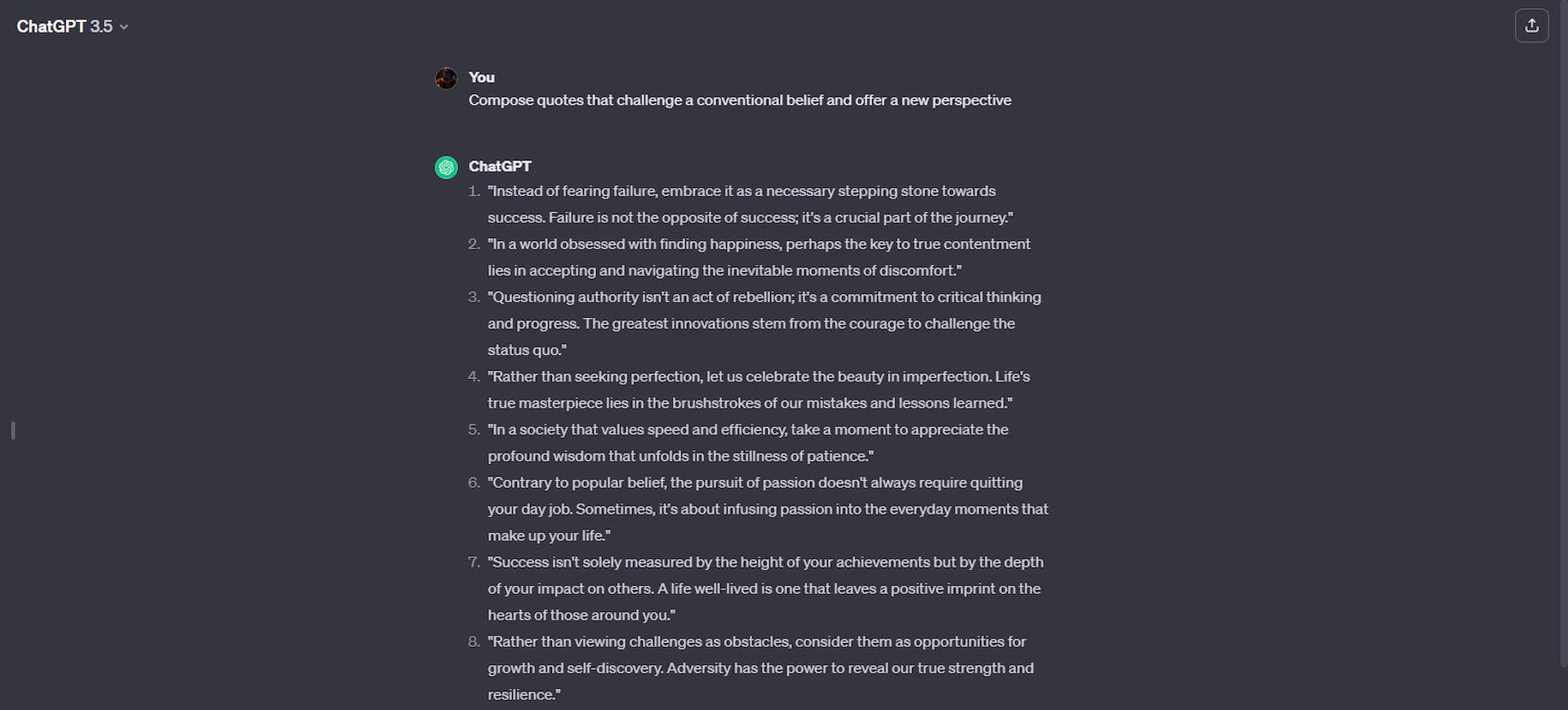
ChatGPT Canva hack
ChatGPT Canva hack involves using both of the platforms’ strongest sides

Get CSV file with Google Sheets

Now that you have generated thousands of quotes using ChatGPT, it’s time to import them into Google Sheets. This will allow you to convert your quotes into a CSV file, which can be easily accessed and shared.
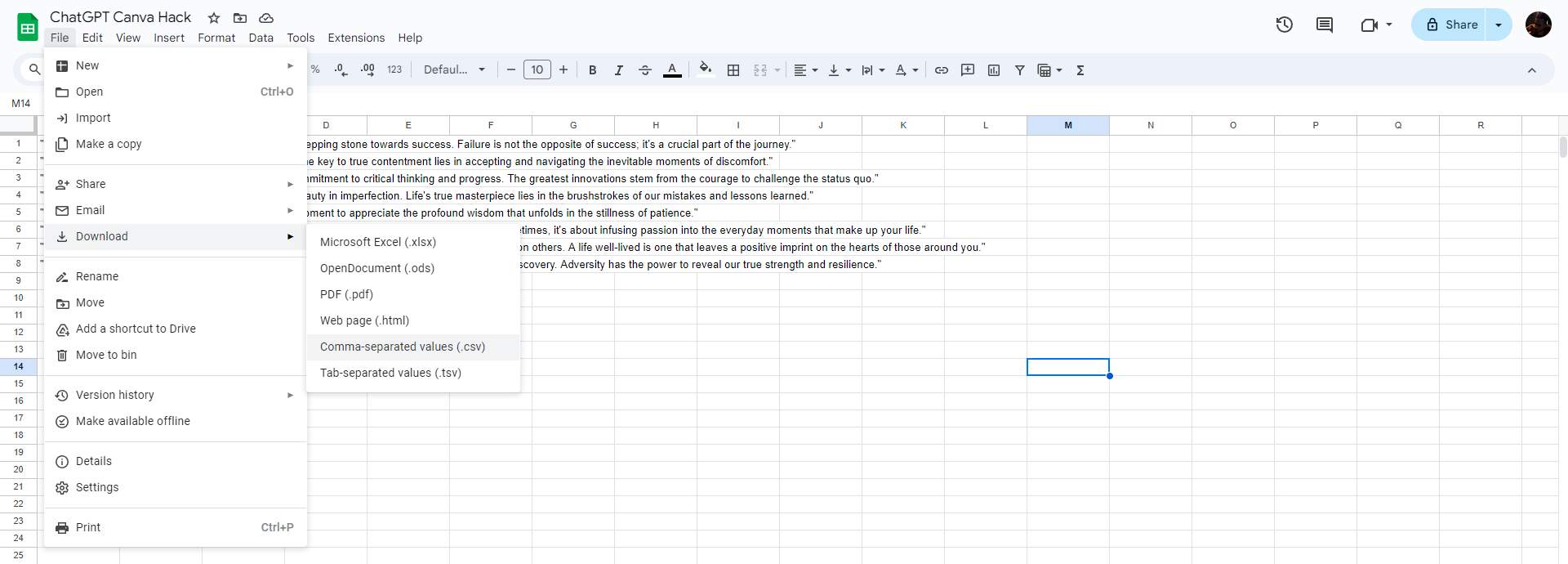
To get started, open Google Sheets and select the first box. Then, paste the values from your ChatGPT quotes into the box. Next, click on the ‘File’ menu and select ‘Download.’ Choose the CSV file type to save your quotes in a format that can be easily imported into other programs.

With your quotes now in a CSV file, you can easily access and share them. You can also use this file to create a quote graphic using Canva.
ChatGPT Canva hack
ChatGPT Canva hack: You can get the CSV file from Google Sheets

Do the Canva magic

Now it’s time to bring your quotes to life with ChatGPT Canva hack! Start by selecting the ‘Your Story’ option on the homepage, then search for ‘quotes’ in the search box and choose a design you like.

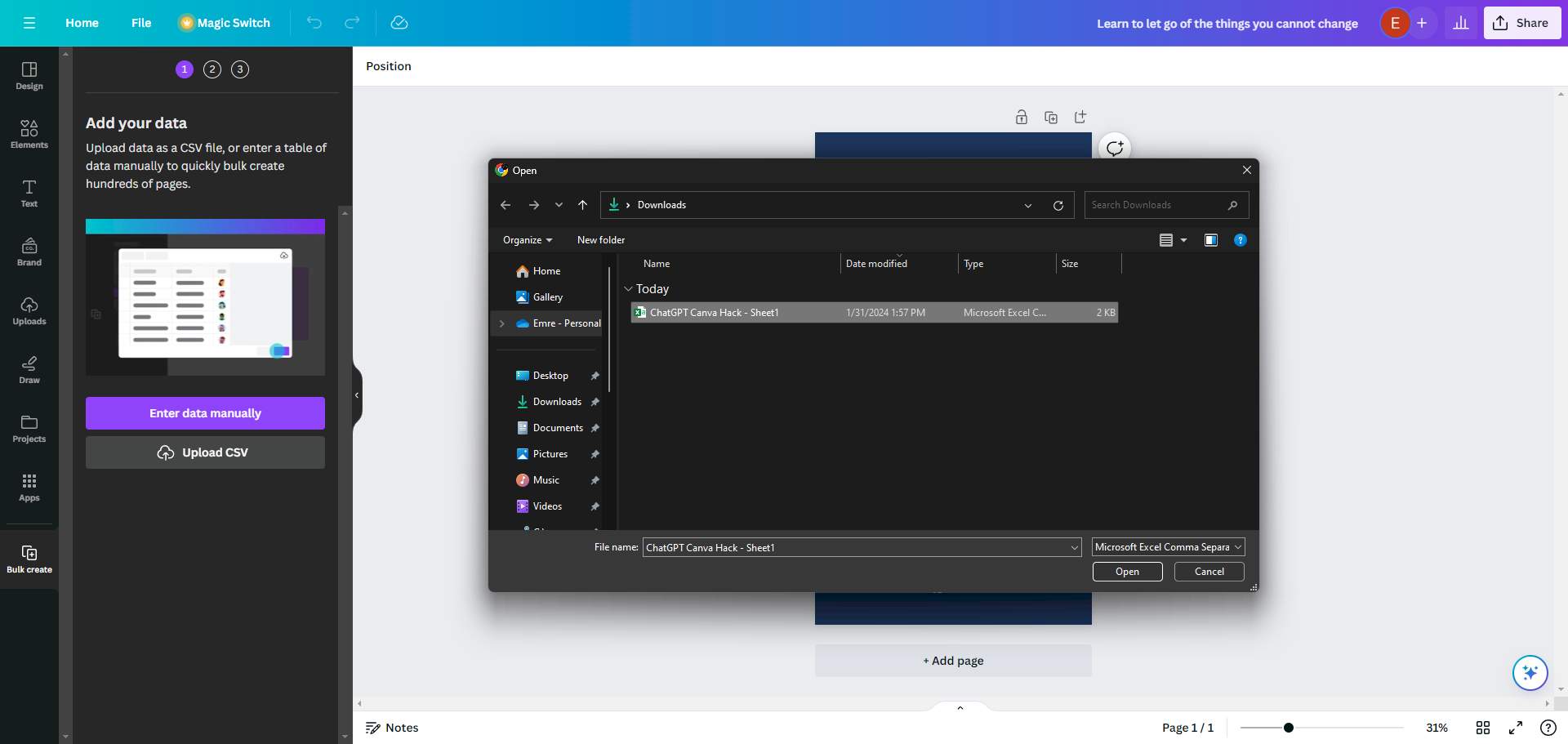
Next, import the CSV file from Google Sheets into Canva. To do this, select Apps from the left side panel, search for ‘Bulk Create,’ and select it. Then, upload your CSV file and click on the part of your design that says ”quote”.

Select ‘Connect data’ and then ‘Generate X designs’ to apply the ChatGPT Canva Hack. Canva will automatically apply the quotes in the CSV file to the design of your choice.
ChatGPT Canva hack
ChatGPT Canva hack: Import your CSV file to Canva

Finally, click the ‘Share’ button in the new window, select ‘Download all,’ and share your content on your favorite social media platforms.

That’s it! You’ve now used the ChatGPT Canva hack to create thousands of quotes in just a few minutes.


Featured image credit: kjpargeter/Freepik.
Tags: canvachatgpthow to

Related Posts

ChatGPT hits 1 billion users as global AI adoption surges despite backlash

ChatGPT hits 1 billion users as global AI adoption surges despite backlash

June 12, 2026
OpenAI Codex referral program rewards users with extra rate resets

OpenAI Codex referral program rewards users with extra rate resets

June 12, 2026
Zuckerberg says small elite teams can drive major AI breakthroughs

Zuckerberg says small elite teams can drive major AI breakthroughs

June 12, 2026
Google says AI Overviews reach 2.5 billion monthly users

Google says AI Overviews reach 2.5 billion monthly users

June 12, 2026
Anthropic apologizes for hidden Fable throttling, pledges transparency

Anthropic apologizes for hidden Fable throttling, pledges transparency

June 11, 2026
Reco builds momentum to secure the enterprise AI agent sprawl

Reco builds momentum to secure the enterprise AI agent sprawl

June 11, 2026

LATEST NEWS

ChatGPT hits 1 billion users as global AI adoption surges despite backlash

Huawei launches HarmonyOS 7 developer beta with upgraded API 26

OpenAI Codex referral program rewards users with extra rate resets

Zuckerberg says small elite teams can drive major AI breakthroughs

Google says AI Overviews reach 2.5 billion monthly users

Final Fantasy 7 Revelation will launch in spring 2027

BEST AI MODELS LEADERBOARD

See the best AI models, ranked by intelligence, benchmark results, speed and token price. Find the most suitable LLMs, Text-to-Image, Image Editing, Text-to-Speech, Text-to-Video and Image-to-Video  artificial intelligence model for your tasks and business.

LATEST TOOLS

Roboto AI

Pickaxe

Pfpmaker

MindPal

Syllaby

ScreenApp

FinanceBrain

GitHub Spark

Hints

VisionStory AI

Dataconomy

COPYRIGHT © DATACONOMY MEDIA GMBH, ALL RIGHTS RESERVED.

  • About
  • Imprint
  • Contact
  • Legal & Privacy

Follow Us

  • News
    • Artificial Intelligence
    • Cybersecurity
    • DeFi & Blockchain
    • Finance
    • Gaming
    • Startups
    • Tech
  • Industry
  • Research
  • Resources
    • Articles
    • Guides
    • Case Studies
    • Whitepapers
    • AI Models Leaderboard
  • AI tools
  • Newsletter
  • + More
    • Glossary
    • Conversations
    • Events
    • About
      • Who we are
      • Contact
      • Imprint
      • Legal & Privacy
      • Partner With Us
No Result
View All Result
Subscribe

This website uses cookies to improve your experience. You can choose to accept or reject them. Visit our Privacy Policy.