Picsart AI GIF Generator is redefining the creative landscape, offering a quirky and inventive way to express yourself in the digital world. Combining the power of artificial intelligence with the popular culture staple of GIFs, this tool brings your wildest imaginings to life in a way that static images simply can’t.
What is Picsart AI GIF generator?
AI technology has transformed many sectors, from self-driving cars to advanced health diagnostics. Not to be outdone, the field of image editing is experiencing its own AI revolution, thanks largely to the introduction of innovative tools like Picsart’s AI GIF generator.
So, what exactly is Picsart AI GIF Generator? In a nutshell, it’s a tool that empowers users to create custom animated GIFs using simple text prompts. If you remember the AI craze of 2022, where text prompts were all the rage for creating whimsical images, you’ll appreciate the nostalgic charm this new tool brings – only with a modern twist.
Where other AI tools of yesteryears, like DALL-E, were renowned for creating static images, Picsart AI GIF generator breaks new ground by producing animated GIFs. Imagine the creative fun of dreaming up scenarios involving your favorite TV characters, pop culture icons, or even everyday objects, and then watching those scenarios come to life in animated GIF form.
Craft your digital ID with AI headshot generators
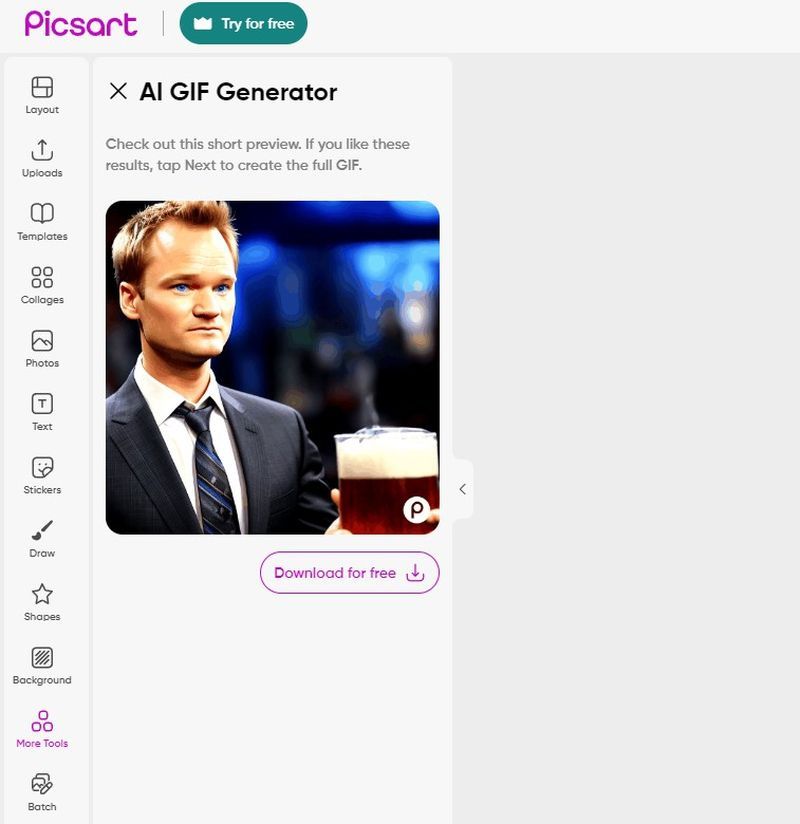
Here’s an example: instead of searching the internet for a GIF of your favorite How I Met Your Mother characters performing outrageous acts, you can now simply create your own. You can be as imaginative as you like, even creating a scenario where two cats are having an arm-wrestling match!
Picsart, the developers of this ingenious tool, have described it as their “most unhinged” platform yet. But don’t let the playful terminology mislead you. This tool’s seamless user interface is simple to navigate. Users simply type their desired scenario into the chatbox, wait a few moments, and then enjoy their unique, and perhaps even “chaotic and eccentric”, animated creation.
Designed with accessibility in mind, the Picsart AI GIF generator is integrated within the existing Picsart app. It’s available on iOS devices, Android devices, and the web. The generated GIFs can be downloaded directly to your device for easy sharing, whether in group chats or across social media platforms.
One aspect to note is that the images created by the Picsart AI GIF generator tend to be more cartoonish rather than photorealistic. But far from being a drawback, this contributes to the tool’s fun and fanciful aesthetic.
How to use Picsart AI GIF generator?
The Picsart AI GIF Generator is a tool designed to be intuitive and straightforward, making it easy for everyone to get in on the fun. Whether you’re on a mobile device or a computer, you’ll be able to create your very own GIFs in no time.
On the web:
If you prefer working on a bigger screen, you can also create your animated GIFs using Picsart AI GIF Generator on the web. Here’s how:
- Start by visiting the AI GIF Generator on the Picsart website.
- Once on the site, you’ll find a box on the left side of your screen. This is where you’ll input your prompt. Try to be as specific as you can for the best results.
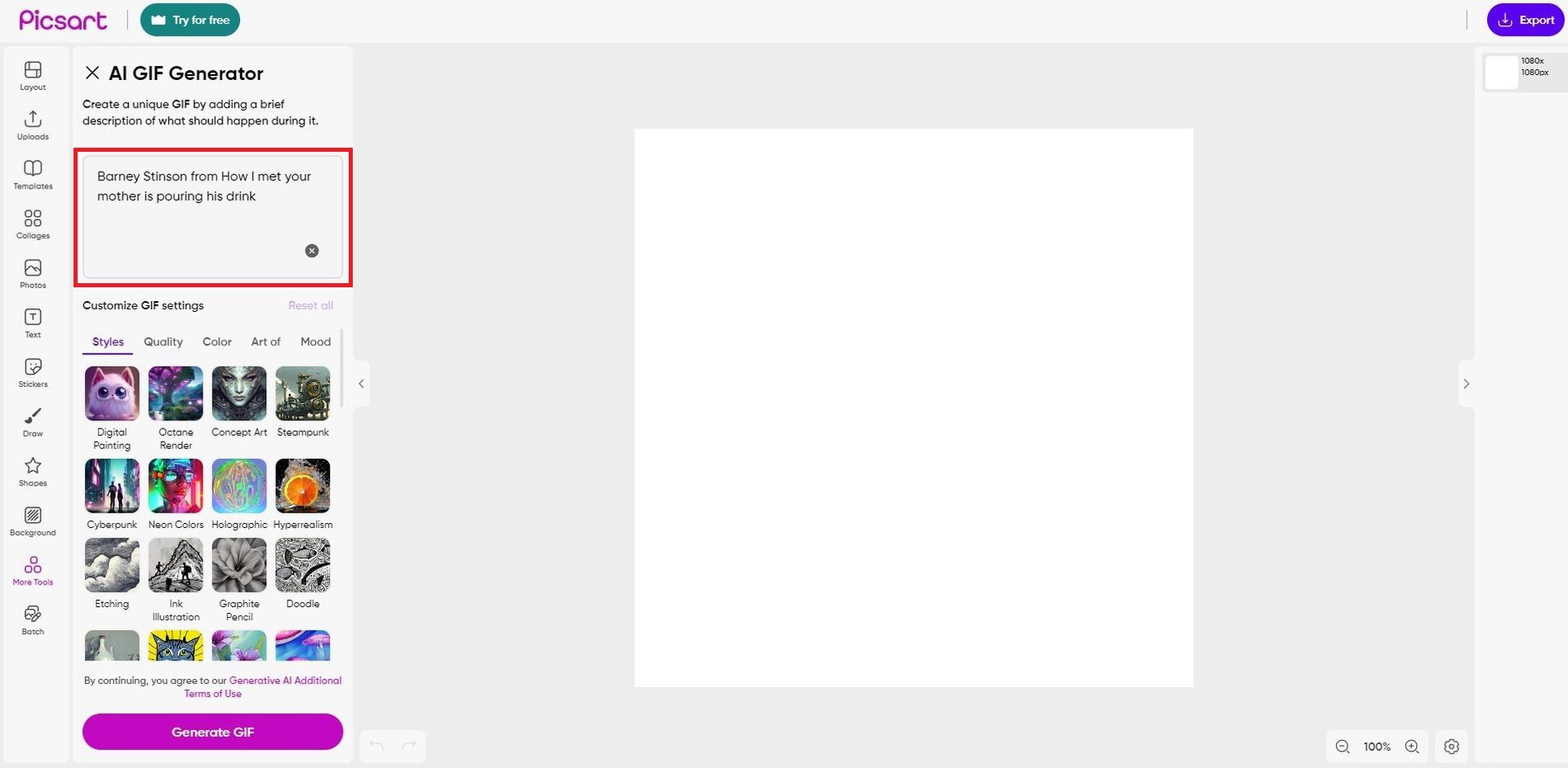
- After typing in your prompt, it’s time to select an artistic style. Pick from any of the styles available to suit your vision.
- With your prompt and style set, all that’s left is to hit “Generate”. Watch as your text prompt transforms into a lively and unique animated GIF right before your eyes!
On mobile devices:
If you’re using an iOS or Android device, here’s a step-by-step guide to creating your unique animations with Picsart AI GIF Generator:
- First, ensure you have the latest version of the Picsart app. Visit your device’s app store (App Store for iOS or Google Play Store for Android) and either download the app or update your existing one to the latest version.
- Once the app is ready, launch it. You’ll notice a “+” symbol at the bottom of your screen. Tap on this to start your creative journey with a blank canvas.
- Now, you’ll need to navigate to the AI GIF Generator. You can find this by tapping on “More tools” at the bottom of your screen, then scrolling until you find the “AI GIF Generator” option.
- With the AI GIF Generator open, it’s time to input your prompt. Be creative and let your imagination run wild. Then, choose your preferred style for your GIF from the available options.
- After setting your prompt and style, hit “Generate”. Wait for a moment, and voilà! Your custom animated GIF will appear, ready for you to marvel at and share.
8 best AI 3D model generators out there
Final words
Picsart AI GIF Generator is a digital game-changer, offering a playful canvas for the imagination. This powerful AI tool invites you to generate animations that tell a story, evoke laughter, or simply spark surprise. With its limitless creative possibilities, the Picsart AI GIF Generator is not only reshaping the landscape of digital expression but also democratizing animation in the most whimsical way possible.
Featured image credit: Kerem Gülen/Midjourney