Viggle AI
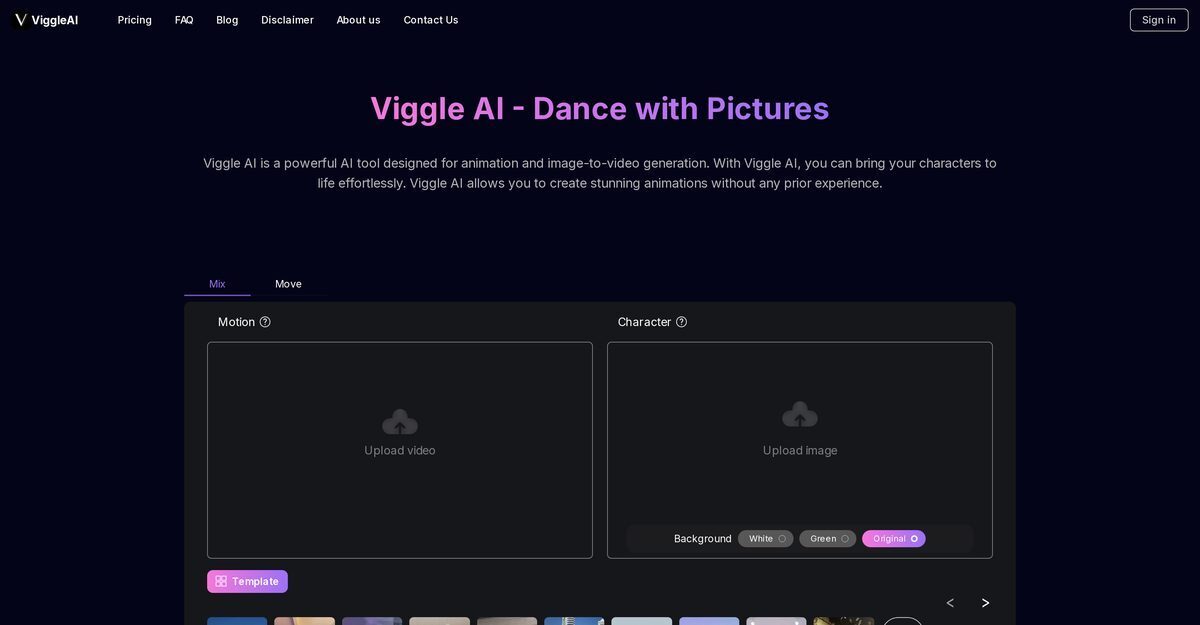
Viggle AI is a browser-based AI animation tool that transforms static images into dynamic animated videos using motion capture technology from uploaded videos or preset templates. Key features include Viggle Mix for combining character images with motion videos, Viggle Move for animating characters while preserving original backgrounds, and upcoming Viggle Animate for template-based animations, making it ideal for creating viral memes, dance videos, and social media content without prior animation experience. It offers a free tier with daily limits and paid plans starting from $9.99/month for faster generation, higher resolutions, unlimited storage, and real-time live features.
Pros
- Animation of static images
- User-friendly interface
- No experience required
- Dynamic character and background animation
- Turn photos into dance videos
- Effortless animation for beginners
- Preset motion templates upcoming
Cons
- Requires clear motion videos
- Dependent on clear image
- Limited background options
- Subscription pricing model
- Storage limit
- Waiting queue for generation
- Lack of full customisation
Viggle AI is an advanced AI-powered animation tool and image-to-video generator. It allows users to create animated videos and images in a user-friendly way, with no prior experience in animation required.
To animate a static image using Viggle AI Mix, first, an image with a clear character is uploaded into the tool. The next step involves uploading a video featuring clear motion that you want your character to follow. Finally, you choose your preferred background in Viggle AI Mix between 'green' and 'white' and the tool transforms your static image into a dynamic, moving character.
The 'Viggle AI Move' feature allows you to animate image characters while keeping the original background intact. It has the capability to animate individuals in photos and virtual characters, transforming them into dynamic dance videos.
To generate dance animations with Viggle AI, you start by uploading an image with a clear character into the tool. Then, you upload a video featuring the clear motion that you want your character to mimic. Viggle AI will then automatically generate your video, seamlessly integrating the character with the original background.
Viggle AI is designed in a way that anyone can use it, whether they are professional animators or first-time users. There is no requirement for a background in animation or video editing.
'Viggle AI Animate' is an upcoming feature that will allow users to animate static characters using preset motion templates. This feature is designed to further simplify the animation process.
Viggle AI simplifies the animation process through its user-friendly interface and intuitive features that do not require any prior experience or advanced skills in animation.
With Viggle AI, a variety of characters can be animated. This includes individuals in photos, virtual characters, and static character images.
Yes, Viggle AI allows you to animate both the character and the background. 'Viggle AI Mix' lets users mix a character image into motion video, and you can also choose a preferred background.
Yes, Viggle AI is designed in such a way that it requires no prior experience in animation or video editing. Its user-friendly features and intuitive process mean anyone can create dynamic, animated characters with ease.
Become a Contributor
Sign in to unlock these features:
- ⭐️ Rate this tool with a 1-5 star score
- ✍️ Write a detailed review for the community
- ❤️ Follow this tool to get important updates
Get started in seconds
[jnews_social_login_form]