Dataconomy
  • News
    • Artificial Intelligence
    • Cybersecurity
    • DeFi & Blockchain
    • Finance
    • Gaming
    • Startups
    • Tech
  • Industry
  • Research
  • Resources
    • Articles
    • Guides
    • Case Studies
    • Whitepapers
  • AI toolsNEW
  • Newsletter
  • + More
    • Glossary
    • Conversations
    • Events
    • About
      • About
      • Contact
      • Imprint
      • Legal & Privacy
      • Partner With Us
Subscribe
No Result
View All Result
  • AI
  • Tech
  • Cybersecurity
  • Finance
  • DeFi & Blockchain
  • Startups
  • Gaming
Dataconomy
  • News
    • Artificial Intelligence
    • Cybersecurity
    • DeFi & Blockchain
    • Finance
    • Gaming
    • Startups
    • Tech
  • Industry
  • Research
  • Resources
    • Articles
    • Guides
    • Case Studies
    • Whitepapers
  • AI toolsNEW
  • Newsletter
  • + More
    • Glossary
    • Conversations
    • Events
    • About
      • About
      • Contact
      • Imprint
      • Legal & Privacy
      • Partner With Us
Subscribe
No Result
View All Result
Dataconomy
No Result
View All Result

Discord unknown session error and rising PFP issues

byEray Eliaçık
August 29, 2024
in Tech
Home News Tech
Share on FacebookShare on TwitterShare on LinkedInShare on WhatsAppShare on e-mail

Are you having trouble with the Discord unknown session or the “There was a problem updating your profile” error? You’re not alone! Many users have reported seeing an “unknown session” error when trying to update their profile picture. Even worse, some have received messages claiming they’re “changing it too fast,” adding to the frustration. If you’re facing this issue, don’t worry—there are several workarounds you can try.

Why you can’t change your Discord PFP?

The Discord unknown session error usually appears due to a problem with the server or a glitch in the platform’s system. This error might also pop up if there’s an issue with your internet connection, or if you’re trying to make too many changes in a short amount of time. The platform’s security system might mistakenly flag your actions as suspicious and temporarily prevent further changes to protect your account.
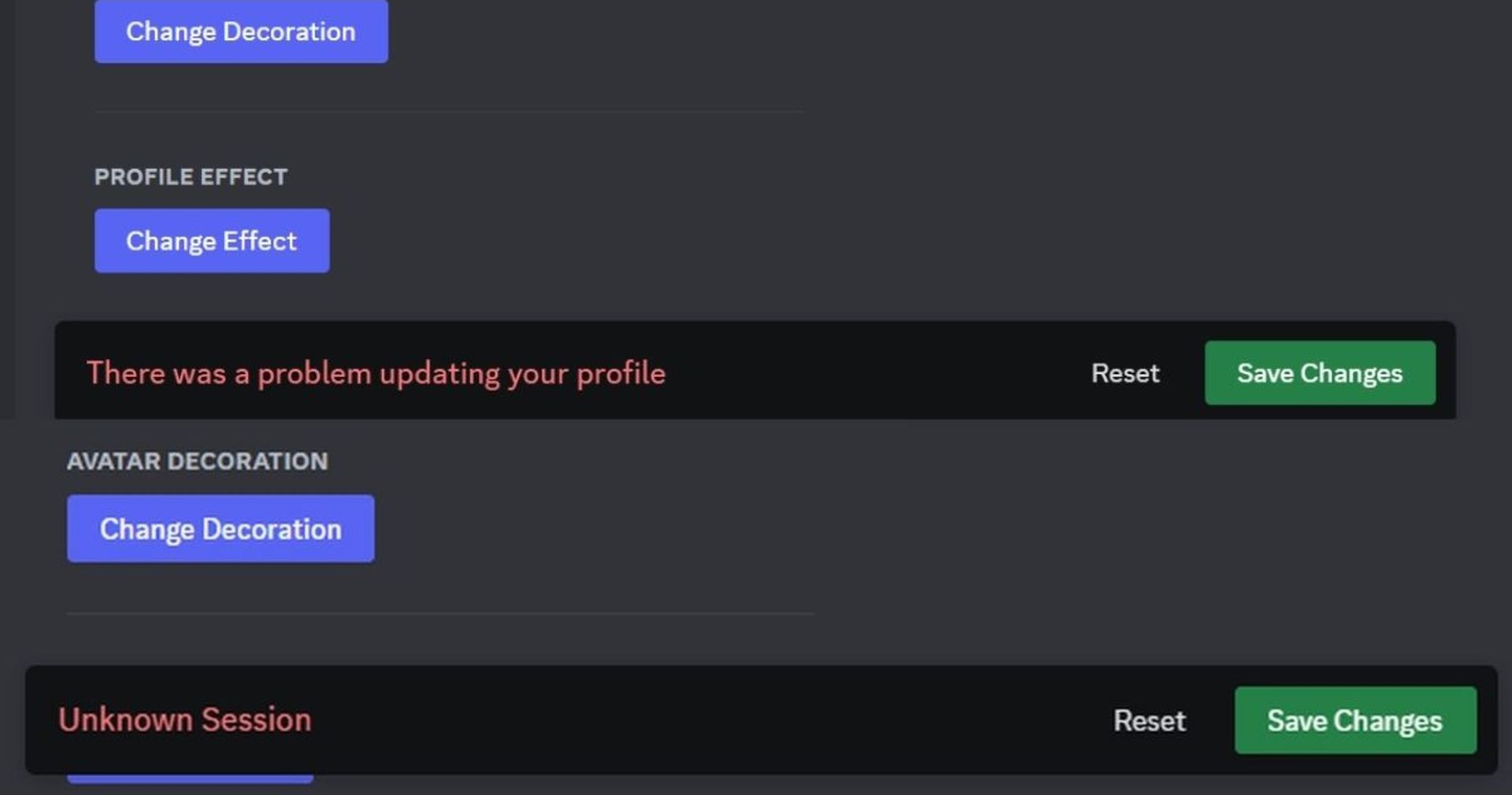
Facing the Discord unknown session error, "there was a problem updating your profile," or 'changing it too fast' while updating your profile?
We also tested it and encountered the Discord unknown session error and the ‘There was a problem updating your profile’ message

How to deal with the Discord unknown session error & other problems when you try updating your profile

While there isn’t an official solution yet, and your best option is to contact Discord support and wait for an update, you can try a few workarounds in the meantime:

Stay Ahead of the Curve!

Don't miss out on the latest insights, trends, and analysis in the world of data, technology, and startups. Subscribe to our newsletter and get exclusive content delivered straight to your inbox.

  • Refresh and re-login: Start by refreshing your browser or app. If the error persists, log out of your account, wait a few minutes, and then log back in. This can help reset the session and clear any temporary glitches.
  • Clear cache and cookies: Sometimes, old cache or cookies can cause problems with how the website functions. Try clearing your browser’s cache and cookies and then attempt to change your profile picture again.
  • Check your Internet connection: Make sure you have a stable internet connection. An unstable connection can interrupt the process and cause errors. Restart your router if necessary.
  • Avoid rapid changes: If you’ve recently changed your profile picture or made other changes to your account, wait for a while before trying again. Rapid changes can trigger the platform’s security measures, leading to the “changing it too fast” warning.
  • Use a different device or browser: If the issue continues, try using a different device or browser to see if the problem persists. This can help determine whether the issue is specific to your device or browser.
  • Update your app or browser: Ensure your app or browser is up to date. Sometimes, an outdated version can cause compatibility issues, leading to errors.
  • Check for platform issues: The platform may be experiencing widespread issues. Check the platform’s status page to see if other users are facing similar problems. 

If none of the above steps work, it might be time to contact the platform’s support team and submit a request now. Please provide them with details about the issue, including any error messages you’ve received. They can offer specific advice or fix the problem from their end.


Discord Amazon Music Listening Party in 3 easy steps


How to change Discord PFP

If you need it, here is how to update your Discord Avatar. To change your Discord profile picture (PFP), follow these simple steps:

On Desktop:

  1. Open Discord: Launch the Discord app on your computer.
  2. Go to Settings: Click the gear icon (User Settings) next to your username at the bottom left.
  3. Select Change Avatar: Click on the three dots next to your current avatar and select “Change Avatar.”
  4. Choose an Image: Upload a new image from your device.
  5. Adjust and Save: Resize or center the image as needed, then click “Apply” and “Save Changes.”
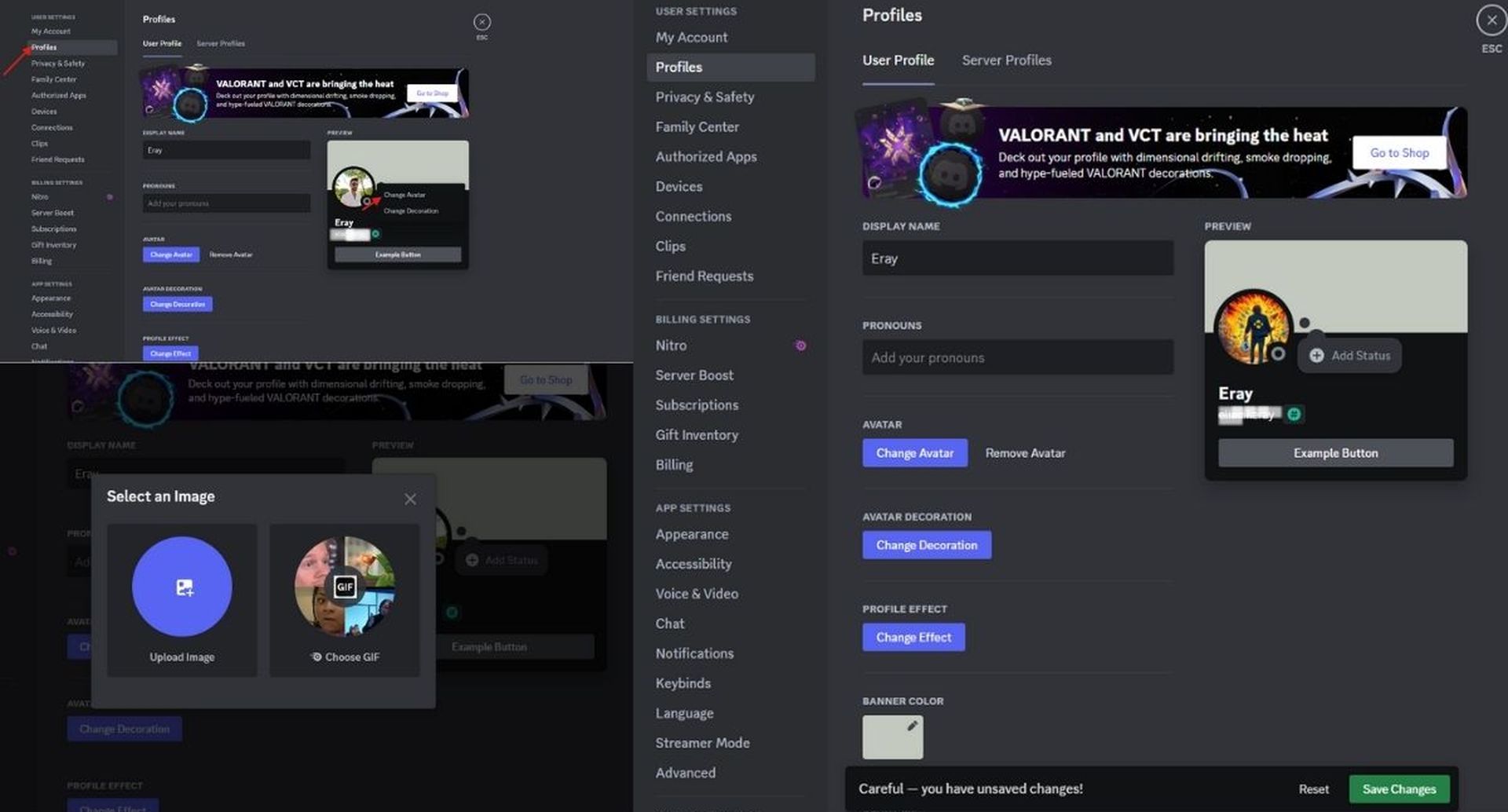
Facing the Discord unknown session error, "there was a problem updating your profile," or 'changing it too fast' while updating your profile?
Contacting Discord support is a recommended step if the Discord unknown session issue still persists

How to stop automatic Discord ducking


On Mobile:

  1. Open Discord: Launch the Discord app on your iPhone or Android device.
  2. Access Your Profile: Tap your profile icon in the bottom right corner.
  3. Tap My Account: Select your current avatar or the placeholder image.
  4. Choose a New Image: Upload a new picture from your gallery.
  5. Adjust and Save: Crop or zoom if needed, then tap the checkmark and “Save” to update your profile picture.

That’s it! Normally, your new Discord avatar should be now set.

Tags: discordfixhow totrends

Related Posts

Dell fixes the XPS: Physical keys return in new 14 and 16 models

Dell fixes the XPS: Physical keys return in new 14 and 16 models

January 13, 2026
Xiaomi eyes total independence with new chip and OS

Xiaomi eyes total independence with new chip and OS

January 12, 2026
FCC authorizes 7,500 more Starlink satellites for SpaceX

FCC authorizes 7,500 more Starlink satellites for SpaceX

January 12, 2026
Musk vows to open source X algorithm in 7 days amid EU scrutiny

Musk vows to open source X algorithm in 7 days amid EU scrutiny

January 12, 2026
iOS 26.4: Apple Health gets a major redesign

iOS 26.4: Apple Health gets a major redesign

January 12, 2026
New ISOCELL sensor leaked for Galaxy S27 Ultra

New ISOCELL sensor leaked for Galaxy S27 Ultra

January 12, 2026

LATEST NEWS

Dell fixes the XPS: Physical keys return in new 14 and 16 models

Zuckerberg launches Meta Compute to build massive AI energy grid

Official: Google Gemini will power Apple Intelligence and Siri

Amazon: 97% of our devices are ready for Alexa+

Anthropic’s Cowork brings developer-grade AI agents to non-coders

Xiaomi eyes total independence with new chip and OS

Dataconomy

COPYRIGHT © DATACONOMY MEDIA GMBH, ALL RIGHTS RESERVED.

  • About
  • Imprint
  • Contact
  • Legal & Privacy

Follow Us

  • News
    • Artificial Intelligence
    • Cybersecurity
    • DeFi & Blockchain
    • Finance
    • Gaming
    • Startups
    • Tech
  • Industry
  • Research
  • Resources
    • Articles
    • Guides
    • Case Studies
    • Whitepapers
  • AI tools
  • Newsletter
  • + More
    • Glossary
    • Conversations
    • Events
    • About
      • About
      • Contact
      • Imprint
      • Legal & Privacy
      • Partner With Us
No Result
View All Result
Subscribe

This website uses cookies. By continuing to use this website you are giving consent to cookies being used. Visit our Privacy Policy.