Putting ads on ChatGPT is no longer just a speculative paid media idea. OpenAI Ads Manager Beta now gives advertisers a real campaign setup flow, ad account structure, creative upload process, and reporting layer for ChatGPT Ads.
That matters because ChatGPT is not a traditional search engine, a social feed, or a display network. Users are not only typing short keywords. They are asking questions, comparing options, planning purchases, researching vendors, and trying to make decisions inside a conversational interface. That makes ChatGPT Ads a new surface for intent-based advertising.
The early version is still limited. It is a beta product. It does not yet feel as mature as Google Ads or Meta Ads. But the direction is clear: advertisers can now build campaigns around conversational context, not only search keywords or audience profiles.
How to put ads on ChatGPT
To put ads on ChatGPT, advertisers use OpenAI Ads Manager Beta. OpenAI describes Ads Manager Beta as the platform for creating, launching, managing, and monitoring campaigns in ChatGPT Ads. It supports campaign creation, bulk upload, performance monitoring, account settings, billing details, permissions, and change logs. OpenAI also states that this is a beta product and that some capabilities are still limited.
The basic setup flow looks like this:
- You create an Ads Manager Beta account.
- You add brand details such as your logo.
- You set up billing and payment.
- You complete account verification.
- You create a campaign.
- You create ad groups.
- You add context hints.
- You upload ads with titles, copy, images, and landing pages.
- You submit the campaign for review.
- You monitor whether the ads are serving.
OpenAI’s quickstart guide says campaign creation and management happen inside Ads Manager Beta, and it breaks the campaign structure into three levels: Campaign, Ad Group, and Ad. A campaign defines the objective, budget, dates, and targeting. An ad group organizes ads around a theme or intent area. An ad is the creative shown in ChatGPT, including title, copy, image, and landing page.
That structure will feel familiar to performance marketers. The difference is not the hierarchy. The difference is how targeting and matching work.
Why ChatGPT ads are different from Google Ads and Meta Ads
The main reason to put ads on ChatGPT is not because it is “another ad placement.” The real difference is user behavior.
On Google, users often search with compressed intent: “best CRM for agencies,” “project management software,” “cheap flights to Miami.” On Meta, advertisers usually rely more on creative, audience signals, interests, lookalikes, and behavioral modeling.
ChatGPT sits somewhere else. A user may ask a long question like:
“What is the best CRM for a 12-person agency that needs pipeline tracking, client notes, and email integration?”
That is not just a keyword. It contains company size, use case, pain point, purchase stage, and evaluation criteria. OpenAI says ChatGPT Ads are designed to help advertisers reach users as they explore, compare, and decide inside a conversational experience.
This is why the phrase put ads on ChatGPT should not be understood as simply placing banners inside an AI product. The strategic question is bigger: how do you show up when users are asking ChatGPT for help with a decision?
That changes the creative strategy. It also changes targeting strategy. Advertisers need to think in terms of user problems, comparison moments, buying criteria, objections, and decision context.
The current ChatGPT ads manager structure
When you put ads on ChatGPT, the campaign structure starts at the campaign level.
A campaign includes the campaign title, objective, budget, start date, end date, and target countries. OpenAI’s campaign documentation says campaigns define the overall advertising objective and budget inside ChatGPT Ads Manager Beta.
Below the campaign, you create ad groups. This is where ChatGPT Ads become more interesting.
Ad groups contain context hints. OpenAI describes context hints as descriptions of the conversations, topics, or keywords where your product or service may be relevant. These hints guide matching, but they are not exact-match targeting rules.
That last part is important. Context hints are not the same as Google Ads exact-match keywords. They are broader thematic signals. You are not bidding on a rigid keyword list. You are giving the system information about the kinds of conversations where your ad may be useful.
Then comes the ad level. OpenAI says an ad is the creative unit shown in ChatGPT and includes brand name, logo, title, copy, landing page, and image.
So the practical structure is:
- Campaign: objective, budget, dates, location targeting.
- Ad group: intent theme and context hints.
- Ad: title, description, image, landing page.
That is the basic framework advertisers need to understand before they put ads on ChatGPT.
Pro tip: You can do more specific geo targeting
Early notes around ChatGPT Ads made geo targeting look extremely limited. The screenshot you shared adds an important correction: you can do more specific geo targeting when you put ads on ChatGPT.
The campaign location interface shows a search for “chic” and returns options such as “Chicago, United States” and “Chico – Redding, United States.” Both are marked as DMA options. This suggests that city/DMA-level targeting is available in at least some cases.
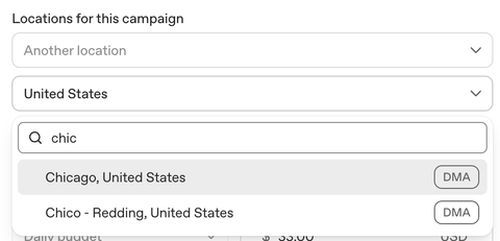 Some postal code options also appear to be available, but not every postal code is supported. That means advertisers should not assume full ZIP code or radius targeting coverage yet.
This matters for local campaigns. A regional agency, clinic, university, franchise, real estate brand, event business, or local service provider may not want to spend across an entire country. DMA targeting makes smaller controlled tests more realistic.
The safest recommendation is this: before you build a local media plan around ChatGPT Ads, manually check the available locations inside Ads Manager Beta. Treat geo targeting as more flexible than country-only targeting, but not yet as mature as Google Ads or Meta Ads.
Context hints are the new strategic layer
The most important concept for anyone trying to put ads on ChatGPT is context hints.
OpenAI says ad groups use context hints to help determine how ads are matched to relevant conversations in ChatGPT. The documentation also says context hints should describe user intent or topic area and should stay closely related to the ad group theme.
This means advertisers need to move beyond short keyword lists.
For example, a B2B project management tool could use context hints like:
- “best project management software for remote teams”
- “how to manage agency workflows”
- “tools for tracking team productivity”
- “compare Asana, Monday, and ClickUp”
- “software for client project collaboration”
A personal finance app could use:
- “how to build a monthly budget”
- “best apps for tracking spending”
- “how to save money as a freelancer”
- “ways to manage subscriptions”
- “budget planner for couples”
A travel brand could use:
- “planning a five-day trip to Italy”
- “best hotels for families in Barcelona”
- “how to compare travel insurance”
- “things to do in Tokyo with kids”
- “affordable honeymoon destinations”
This is where the work gets more strategic. When you put ads on ChatGPT, you are not only asking, “What keywords should we target?” You are asking, “What conversations happen before someone needs our product?” That is a better question.
How to write ads for ChatGPT
OpenAI’s ad creation guidance says creating ads for ChatGPT requires a different approach from keyword-based platforms. Instead of matching ads to simple search queries, ChatGPT matches ads to richer conversational user intent. OpenAI recommends clear, specific, benefit-focused ads that explain what the product offers, who it is for, and when it may be useful.
So do not write generic ad copy.
Weak ad copy:
“Grow faster with our all-in-one platform.”
Better ad copy:
“Plan, assign, and track agency projects in one workspace.”
Weak title:
“Boost Your Business”
Better title:
“Project Tracking for Agencies”
When you put ads on ChatGPT, the user may already be in research mode. They may be comparing vendors. They may be trying to solve a specific problem. The ad should help them evaluate quickly.
A good ChatGPT Ad should answer four questions:
- What is it?
- Who is it for?
- What problem does it solve?
- Why is it relevant now?
This is especially important because ChatGPT is a high-context environment. A vague ad feels more intrusive there than it does in a feed. A useful ad feels more natural.
Landing pages need to match conversational intent
The landing page strategy also changes when you put ads on ChatGPT.
OpenAI recommends sending users to the most relevant destination, such as product pages, collections, or content pages, rather than defaulting to a generic homepage. It also recommends adding tracking parameters directly to destination URLs and making sure landing pages are valid, reachable, and not blocking OpenAI crawlers.
This is practical advice. If a user clicks from a ChatGPT conversation, they probably expect continuity. If they were comparing solutions, send them to a comparison page. If they were researching a category, send them to an educational page. If they were looking for a product, send them to the product page.
For example:
- A SaaS company should test category-specific landing pages.
- An ecommerce brand should test collection pages and buying guides.
- A local business should test city-specific pages where targeting supports it.
- A B2B service provider should test problem-specific service pages.
- A marketplace should test curated lists instead of the homepage.
The key is message match. When you put ads on ChatGPT, the ad and landing page should feel like the next step in the user’s conversation.
Campaign objectives and bidding
OpenAI’s documentation says each campaign includes an objective, budget, start and end dates, and target countries. The ad group documentation also says maximum CPC bid applies to campaigns with a Clicks objective, while Reach campaigns do not use that field.
That gives advertisers two early practical paths.
- Use Reach when you want visibility and learning.
- Use Clicks when you want traffic and stronger intent signals.
For most advertisers, the first testing plan should separate Reach and Clicks. Do not mix objectives and then try to interpret the data as if it came from one clean experiment.
A good first test could look like this:
- Campaign 1: Reach objective, broad intent themes, multiple ad variations.
- Campaign 2: Clicks objective, high-intent themes, tighter landing page match.
- Campaign 3: Clicks objective, comparison-oriented context hints.
- Campaign 4: Reach objective, category education angles.
This lets you see whether ChatGPT Ads works better for awareness, consideration, or direct response in your category.
Measurement: What you can track
When you put ads on ChatGPT, you need to be realistic about measurement.
OpenAI says Ads Manager Beta currently supports reporting across campaign, ad group, and ad levels. Available metrics include impressions, clicks, spend, CTR, average CPC, average CPM, and conversions when conversion measurement is set up.
That is enough to start testing, but it is not enough to assume full-funnel maturity.
Early reporting should focus on:
- Impressions: Are ads eligible and serving?
- Clicks: Is the creative creating enough interest?
- CTR: Which context and creative pairings work best?
- Average CPC: Is traffic cost acceptable?
- Average CPM: Is reach cost acceptable?
- Conversions: Are post-click actions measurable?
- Spend: Are budgets pacing correctly?
OpenAI also says CSV downloads are available for offline analysis. That matters for performance teams that want to compare ChatGPT Ads against Google, Meta, LinkedIn, Reddit, TikTok, or programmatic campaigns.
The first benchmark should not be “Did ChatGPT Ads beat Google Search?” That is too narrow. The better question is: “Did ChatGPT Ads create qualified traffic from decision-stage conversations we could not reach elsewhere?”
Privacy
Privacy is one of the most important parts of this ad product.
OpenAI says it does not share user conversations with advertisers and does not sell user data to advertisers. It also says advertisers do not get access to chats, chat history, memories, or personal details. Advertisers receive aggregated, non-identifying performance information such as total views or clicks.
This distinction matters. If users believe advertisers can read their chats, trust will collapse. OpenAI’s stated model is that advertisers see performance data, not private conversations.
OpenAI also says ads do not appear near sensitive or regulated topics, including personal health, mental health, or politics. It says advertisers in sensitive or regulated verticals such as dating, health, financial services, and politics are excluded from advertising on ChatGPT at this time.
For advertisers, this means some categories may not be eligible. For users, it means ad delivery is supposed to avoid sensitive contexts.
Anyone planning to put ads on ChatGPT should read the policy documents before building campaigns. This is not a platform where every vertical can assume immediate access.
Recommended first campaign setup
A smart first test should be narrow enough to learn but broad enough to give the system room.
If you want to put ads on ChatGPT for a B2B SaaS company, start with three campaign themes:
- Problem-aware users.
- Comparison-stage users.
- Category education users.
For problem-aware users, write context hints around pain points:
- “how to manage remote team projects”
- “client approval workflow software”
- “how to reduce project delays”
For comparison-stage users, write context hints around evaluation:
- “best agency project management tools”
- “Asana vs Monday for agencies”
- “software for client collaboration”
For category education users, write context hints around learning:
- “how agencies organize client work”
- “what is workflow management software”
- “how to choose project management software”
Then create multiple ad variations for each ad group. OpenAI recommends using a high volume and diverse set of ads with distinct title and description variations rather than repeating the same message.
Do not run one generic ad across everything. That will weaken the test.
Budgeting advice for the beta period
Do not overcommit budget in the first test.
The platform is still developing. Targeting, reporting, inventory, and optimization will likely change. OpenAI itself says Ads Manager Beta will continue to evolve and that some capabilities are limited today.
A practical budget plan:
- Start with a controlled test budget.
- Separate campaigns by objective.
- Separate ad groups by intent theme.
- Use clean UTM parameters.
- Compare landing page behavior against other paid channels.
- Watch CTR and CPC, but do not judge only on click cost.
- Review search-style and social-style benchmarks separately.
- Do not scale until you know which context hints, ads, and landing pages are producing meaningful behavior.
The worst way to put ads on ChatGPT is to copy your Google Ads keywords, paste in generic creative, and expect the same performance model.
Who should test ChatGPT ads first?
The best early candidates are brands with high-consideration products or services.
Good fits include:
- B2B SaaS.
- Productivity tools.
- Education platforms.
- Travel companies.
- Ecommerce brands with comparison-heavy products.
- Local services in supported geo areas.
- Marketplaces.
- Professional services.
- Agencies.
- Consumer apps with clear use cases.
The weaker fits are brands that rely heavily on impulse buying, broad demographic targeting, or highly regulated categories.
ChatGPT Ads will likely be strongest where users ask questions before they buy. If your product benefits from explanation, comparison, or decision support, this channel is worth watching.
Common mistakes to avoid:
- Do not assume context hints are exact-match keywords.
- Do not send every click to the homepage.
- Do not build only one ad variation.
- Do not ignore geo availability.
- Do not assume every postal code is targetable.
- Do not treat ChatGPT Ads as mature conversion media on day one.
- Do not use vague ad copy.
- Do not make claims your landing page cannot support.
- Do not expect Meta-style demographic targeting.
- Do not expect Google-style keyword control.The ability to put ads on ChatGPT marks a real shift in paid media. This is not just another placement. It is the beginning of advertising inside AI-assisted decision-making.
The early version has limitations. Ads Manager Beta is still evolving. Geo targeting is more nuanced than early notes suggested, with DMA and some postal code options visible in the campaign interface, but availability is not universal. Context hints are powerful, but they are not exact keywords. Reporting exists, but advertisers still need disciplined testing and clean measurement.
The opportunity is clear: brands can reach users while they are exploring, comparing, and deciding. That is a valuable moment.
The advertisers who win early will not be the ones who simply move their existing Google or Meta campaigns into a new dashboard. They will be the ones who understand conversational intent, write useful ads, build relevant landing pages, and test carefully.