Dataconomy
  • News
    • Artificial Intelligence
    • Cybersecurity
    • DeFi & Blockchain
    • Finance
    • Gaming
    • Startups
    • Tech
  • Industry
  • Research
  • Resources
    • Articles
    • Guides
    • Case Studies
    • Whitepapers
    • AI Models Leaderboard
  • AI toolsNEW
  • Newsletter
  • + More
    • Glossary
    • Conversations
    • Events
    • About
      • Who we are
      • Contact
      • Imprint
      • Legal & Privacy
      • Partner With Us
Subscribe
No Result
View All Result
  • AI
  • Tech
  • Cybersecurity
  • Finance
  • DeFi & Blockchain
  • Startups
  • Gaming
Dataconomy
  • News
    • Artificial Intelligence
    • Cybersecurity
    • DeFi & Blockchain
    • Finance
    • Gaming
    • Startups
    • Tech
  • Industry
  • Research
  • Resources
    • Articles
    • Guides
    • Case Studies
    • Whitepapers
    • AI Models Leaderboard
  • AI toolsNEW
  • Newsletter
  • + More
    • Glossary
    • Conversations
    • Events
    • About
      • Who we are
      • Contact
      • Imprint
      • Legal & Privacy
      • Partner With Us
Subscribe
No Result
View All Result
Dataconomy
No Result
View All Result

Google Photos just turned all your pics Ultra HDR

Google Photos quietly launched Ultra HDR editing, look for it in the Adjust tab if you're lucky.

byKerem Gülen
April 21, 2025
in Tech, News
Home News Tech
Share on FacebookShare on TwitterShare on LinkedInShare on WhatsAppShare on e-mail
Google Preferred Source

Google Photos is now rolling out an “Ultra HDR” editing feature to some users, allowing them to convert standard photos into Ultra HDR after they’ve been taken, according to Android Authority.

This feature has been in development since last September, when signs of it were first spotted in the Google Photos app. It is tied to the Ultra HDR file format introduced with Android 14, which enables capturing and displaying photos with a wider range of light and color, resulting in more vibrant and lifelike images.

Ultra HDR is backward-compatible, meaning it can still display normally on older, non-HDR devices by packing both SDR and HDR versions of the image into a single file. The new editing option will be available in the “Adjust” section of the photo editor, replacing the current “HDR Effect” option, and will allow users to tweak the Ultra HDR strength using a slider.

Stay Ahead of the Curve!

Don't miss out on the latest insights, trends, and analysis in the world of data, technology, and startups. Subscribe to our newsletter and get exclusive content delivered straight to your inbox.

The feature appears to be rolling out with Google Photos app version 7.24.0.747539053, but its availability is dependent on a server-side rollout, so users may not see it immediately. Once available, the converted image will be labeled “Ultra HDR” in its details and will have a noticeably smaller file size due to the use of a gain map that stores luminosity information.
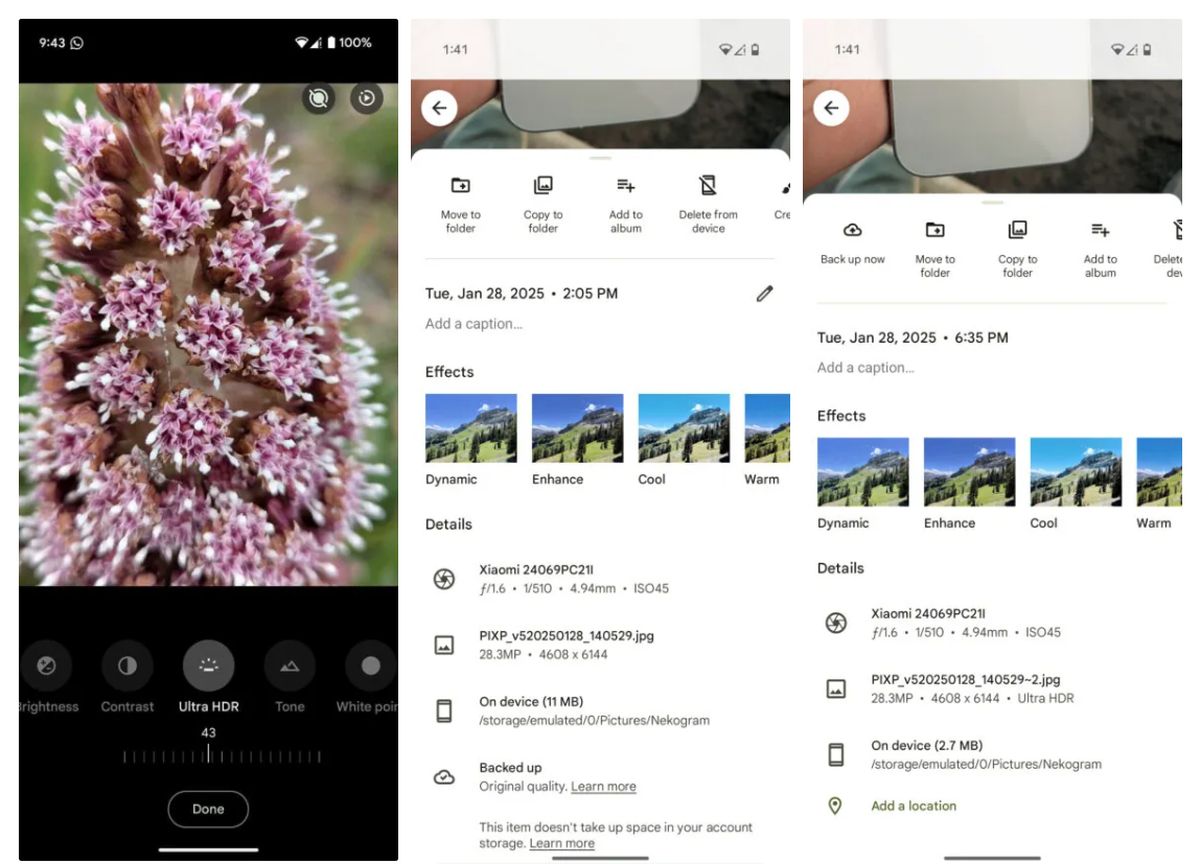
Google Photos just turned all your pics Ultra HDR
Image: Android Authority

The gain map allows devices to render brighter, more colorful images without needing to store as much data as a full-resolution image. This development is significant for photo sharing, as it enables users to upgrade everyday photos to Ultra HDR, making them look their best on supported displays without requiring special hardware or settings.


Featured image credit

Tags: google photos

Related Posts

OpenAI retires Atlas browser to focus on new ChatGPT superapp

OpenAI retires Atlas browser to focus on new ChatGPT superapp

July 14, 2026
Microsoft tests Copilot’s new PC insights feature in Windows 11

Microsoft tests Copilot’s new PC insights feature in Windows 11

July 14, 2026
Xiaomi unveils SkyNomad N90 range-extender SUV

Xiaomi unveils SkyNomad N90 range-extender SUV

July 14, 2026
X algorithm update aims to make replies feel friendlier

X algorithm update aims to make replies feel friendlier

July 14, 2026
Windows 11 Search Box gets less clutter and more control

Windows 11 Search Box gets less clutter and more control

July 14, 2026
Pixel 11 leak shows bold magenta and peach colors

Pixel 11 leak shows bold magenta and peach colors

July 14, 2026

LATEST NEWS

OpenAI retires Atlas browser to focus on new ChatGPT superapp

Microsoft tests Copilot’s new PC insights feature in Windows 11

Xiaomi unveils SkyNomad N90 range-extender SUV

X algorithm update aims to make replies feel friendlier

Windows 11 Search Box gets less clutter and more control

Pixel 11 leak shows bold magenta and peach colors

BEST AI MODELS LEADERBOARD

See the best AI models, ranked by intelligence, benchmark results, speed and token price. Find the most suitable LLMs, Text-to-Image, Image Editing, Text-to-Speech, Text-to-Video and Image-to-Video  artificial intelligence model for your tasks and business.

LATEST TOOLS

Amanda AI

InterviewBot

VernAI

MyLoans

Essay Grader AI

Cover Letter AI

Animate Old Photos

Resume.io

MonAI

AIEngine Plugin

Dataconomy

COPYRIGHT © DATACONOMY MEDIA GMBH, ALL RIGHTS RESERVED.

  • About
  • Imprint
  • Contact
  • Legal & Privacy

Follow Us

  • News
    • Artificial Intelligence
    • Cybersecurity
    • DeFi & Blockchain
    • Finance
    • Gaming
    • Startups
    • Tech
  • Industry
  • Research
  • Resources
    • Articles
    • Guides
    • Case Studies
    • Whitepapers
    • AI Models Leaderboard
  • AI tools
  • Newsletter
  • + More
    • Glossary
    • Conversations
    • Events
    • About
      • Who we are
      • Contact
      • Imprint
      • Legal & Privacy
      • Partner With Us
No Result
View All Result
Subscribe

This website uses cookies to improve your experience. You can choose to accept or reject them. Visit our Privacy Policy.