Dataconomy
  • News
    • Artificial Intelligence
    • Cybersecurity
    • DeFi & Blockchain
    • Finance
    • Gaming
    • Startups
    • Tech
  • Industry
  • Research
  • Resources
    • Articles
    • Guides
    • Case Studies
    • Whitepapers
    • AI Models Leaderboard
  • AI toolsNEW
  • Newsletter
  • + More
    • Glossary
    • Conversations
    • Events
    • About
      • Who we are
      • Contact
      • Imprint
      • Legal & Privacy
      • Partner With Us
Subscribe
No Result
View All Result
  • AI
  • Tech
  • Cybersecurity
  • Finance
  • DeFi & Blockchain
  • Startups
  • Gaming
Dataconomy
  • News
    • Artificial Intelligence
    • Cybersecurity
    • DeFi & Blockchain
    • Finance
    • Gaming
    • Startups
    • Tech
  • Industry
  • Research
  • Resources
    • Articles
    • Guides
    • Case Studies
    • Whitepapers
    • AI Models Leaderboard
  • AI toolsNEW
  • Newsletter
  • + More
    • Glossary
    • Conversations
    • Events
    • About
      • Who we are
      • Contact
      • Imprint
      • Legal & Privacy
      • Partner With Us
Subscribe
No Result
View All Result
Dataconomy
No Result
View All Result

Windows 11 will now roast your PC for being too slow

The FAQ section provides answers to questions regarding low RAM and offers recommendations for systems with GPUs that have less than 4GB of memory

byKerem Gülen
March 20, 2025
in Tech, News
Home News Tech
Share on FacebookShare on TwitterShare on LinkedInShare on WhatsAppShare on e-mail
Google Preferred Source

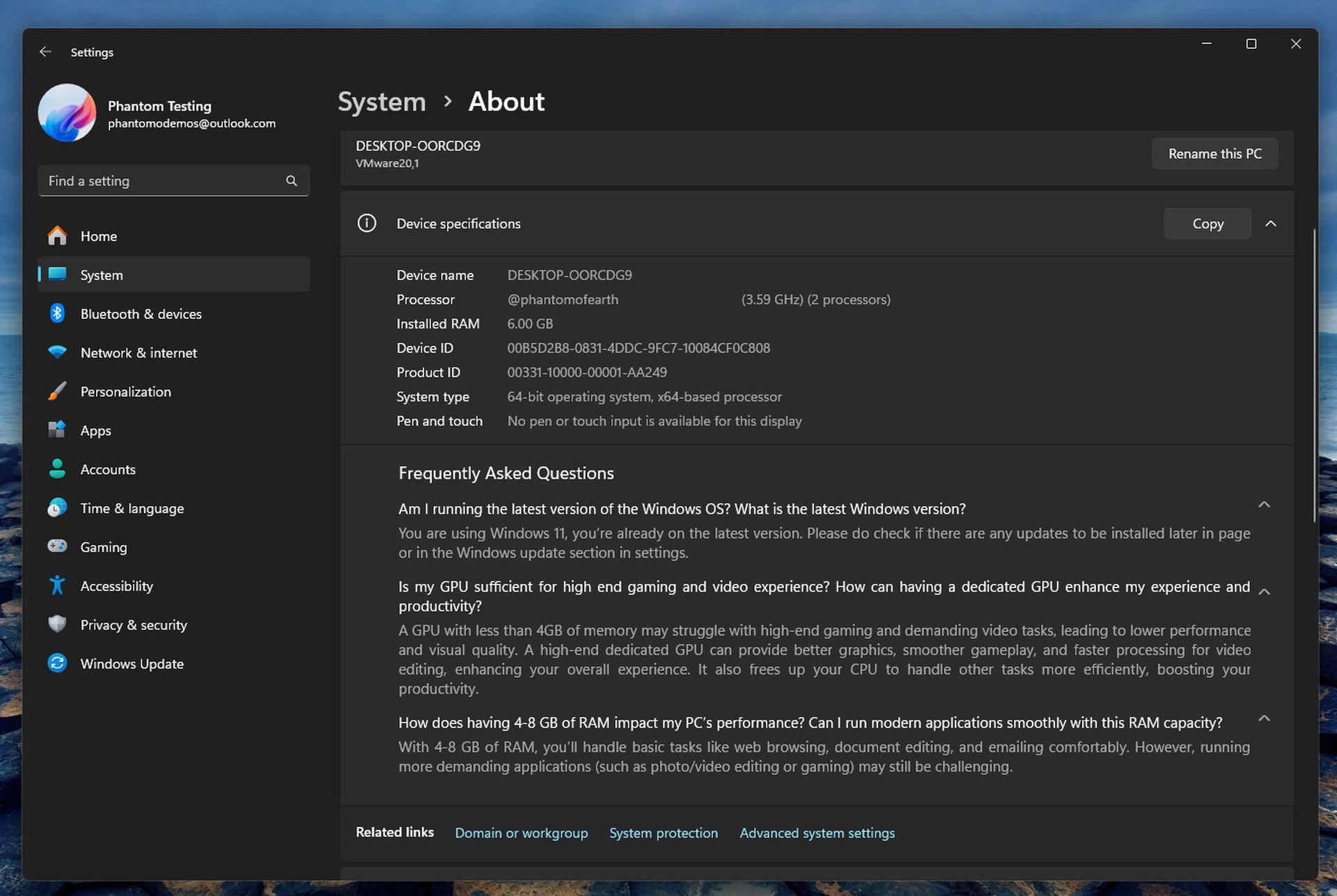
Microsoft is developing a new feature for Windows 11 aimed at explaining how insufficient RAM or a weak GPU can impact PC performance. This feature will include a frequently asked questions section within the system settings, addressing concerns related to GPU memory, system RAM, and operating system versions.

Microsoft’s new Windows 11 feature: FAQ reveals RAM and GPU impact on performance

The feature was discovered by Windows watcher phantomofearth in the latest Dev Channel build of Windows 11, which was released earlier this week. Currently, Microsoft has not officially confirmed the development of this FAQ feature, and it remains hidden by default, requiring manual activation through command line inputs.

The FAQ section provides answers to questions regarding low RAM and offers recommendations for systems with GPUs that have less than 4GB of memory. It will also indicate if a user’s PC is not running the latest version of Windows 11.

Stay Ahead of the Curve!

Don't miss out on the latest insights, trends, and analysis in the world of data, technology, and startups. Subscribe to our newsletter and get exclusive content delivered straight to your inbox.

It remains unclear whether this FAQ list will dynamically adapt to different systems or if it will provide static information based on individual hardware configurations. For instance, users with high-end systems running the latest Windows version might not need this information. Microsoft previously utilized the Windows Experience Index, which rated system components and provided an overall performance score, a method that is no longer used.
Windows 11 will now roast your PC for being too slow
Image: phantomofearth 

The inclusion of the FAQ section in the Dev Channel builds indicates that it could roll out to all Windows 11 users in the coming months, particularly as Microsoft often tests features in this channel ahead of its 24H2 update. However, the company occasionally discontinues features before public release.


Microsoft adds gamepad-friendly keyboard to Windows 11


Phantomofearth reported finding the section located under the About menu in the Settings app, which currently requires specific command line inputs to access. For example, under the FAQ, there is a suggested question: “Is my GPU sufficient for high-end gaming and video experience?” which recommends acquiring a discrete graphics card that has more than 4GB of RAM. The FAQ also notes that 4-8GB of RAM is suitable only for basic tasks, such as web browsing and document editing.

The FAQ’s dynamic nature is still uncertain. For instance, it is unclear whether systems with higher RAM, such as 32GB, would encounter warnings about low performance due to inadequate RAM. As of now, the FAQ feature is hidden in Builds 26120.3576 and 22635.5090, and it can be enabled using the ViVeTool utility with the ID “5530588.” However, enabling the feature early may not yield significant benefits, given the possibility of changes before its official release.

Microsoft faces criticism for the stringent minimum requirements of Windows 11, which could leave millions of PCs on Windows 10 unless users upgrade their hardware or explore alternatives like ChromeOS. There are varying viewpoints on whether users should be forced to adhere to these specifications to ensure a satisfactory experience with Windows 11.

In the FAQ section, questions such as “How can having a dedicated GPU enhance my experience and productivity?” and “Am I running the latest version of the Windows OS?” aim to help users understand their hardware capabilities better.


Featured image credit: Sunrise King/Unsplash

Tags: Microsoftwindows 11

Related Posts

Moonshot pauses Kimi K3 signups amid GPU shortage

Moonshot pauses Kimi K3 signups amid GPU shortage

July 20, 2026
Musk teases next-generation 2T Grok AI model

Musk teases next-generation 2T Grok AI model

July 20, 2026
Alibaba unveils 2.4T-parameter Qwen3.8 AI model

Alibaba unveils 2.4T-parameter Qwen3.8 AI model

July 20, 2026
TikTok tests AI tool to detect deepfake impersonation

TikTok tests AI tool to detect deepfake impersonation

July 20, 2026
Suno brings AI music generation to iMessage

Suno brings AI music generation to iMessage

July 17, 2026
Google renames NotebookLM to Gemini Notebook

Google renames NotebookLM to Gemini Notebook

July 17, 2026

LATEST NEWS

Moonshot pauses Kimi K3 signups amid GPU shortage

Musk teases next-generation 2T Grok AI model

Alibaba unveils 2.4T-parameter Qwen3.8 AI model

TikTok tests AI tool to detect deepfake impersonation

Suno brings AI music generation to iMessage

Google renames NotebookLM to Gemini Notebook

BEST AI MODELS LEADERBOARD

See the best AI models, ranked by intelligence, benchmark results, speed and token price. Find the most suitable LLMs, Text-to-Image, Image Editing, Text-to-Speech, Text-to-Video and Image-to-Video  artificial intelligence model for your tasks and business.

LATEST TOOLS

Amanda AI

InterviewBot

VernAI

MyLoans

Essay Grader AI

Cover Letter AI

Animate Old Photos

Resume.io

MonAI

AIEngine Plugin

Dataconomy

COPYRIGHT © DATACONOMY MEDIA GMBH, ALL RIGHTS RESERVED.

  • About
  • Imprint
  • Contact
  • Legal & Privacy

Follow Us

  • News
    • Artificial Intelligence
    • Cybersecurity
    • DeFi & Blockchain
    • Finance
    • Gaming
    • Startups
    • Tech
  • Industry
  • Research
  • Resources
    • Articles
    • Guides
    • Case Studies
    • Whitepapers
    • AI Models Leaderboard
  • AI tools
  • Newsletter
  • + More
    • Glossary
    • Conversations
    • Events
    • About
      • Who we are
      • Contact
      • Imprint
      • Legal & Privacy
      • Partner With Us
No Result
View All Result
Subscribe

This website uses cookies to improve your experience. You can choose to accept or reject them. Visit our Privacy Policy.