Dataconomy
  • News
    • Artificial Intelligence
    • Cybersecurity
    • DeFi & Blockchain
    • Finance
    • Gaming
    • Startups
    • Tech
  • Industry
  • Research
  • Resources
    • Articles
    • Guides
    • Case Studies
    • Whitepapers
    • AI Models Leaderboard
  • AI toolsNEW
  • Newsletter
  • + More
    • Glossary
    • Conversations
    • Events
    • About
      • Who we are
      • Contact
      • Imprint
      • Legal & Privacy
      • Partner With Us
Subscribe
No Result
View All Result
  • AI
  • Tech
  • Cybersecurity
  • Finance
  • DeFi & Blockchain
  • Startups
  • Gaming
Dataconomy
  • News
    • Artificial Intelligence
    • Cybersecurity
    • DeFi & Blockchain
    • Finance
    • Gaming
    • Startups
    • Tech
  • Industry
  • Research
  • Resources
    • Articles
    • Guides
    • Case Studies
    • Whitepapers
    • AI Models Leaderboard
  • AI toolsNEW
  • Newsletter
  • + More
    • Glossary
    • Conversations
    • Events
    • About
      • Who we are
      • Contact
      • Imprint
      • Legal & Privacy
      • Partner With Us
Subscribe
No Result
View All Result
Dataconomy
No Result
View All Result

How to setup DeepSeek-R1 easily for free (online and local)?

If you’re looking to set up DeepSeek-R1 on macOS, Linux, or Windows 10/11, you’re in the right place!

byKerem Gülen
January 26, 2025
in Artificial Intelligence
Home News Artificial Intelligence
Share on FacebookShare on TwitterShare on LinkedInShare on WhatsAppShare on e-mail
Google Preferred Source

DeepSeek-R1 is dominating tech discussions across Reddit, X, and developer forums, with users calling it the “people’s AI” for its uncanny ability to rival paid models like Google Gemini and OpenAI’s GPT-4o—all while costing nothing.

DeepSeek-R1, a free and open-source reasoning AI, offers a privacy-first alternative to OpenAI’s $200/month o1 model, with comparable performance in coding, math, and logical problem-solving. This guide provides step-by-step instructions for installing DeepSeek-R1 locally and integrating it into projects, potentially saving hundreds of dollars monthly.


Someone stop DeepSeek: Meet Janus-Pro-7B, another free AI model

Stay Ahead of the Curve!

Don't miss out on the latest insights, trends, and analysis in the world of data, technology, and startups. Subscribe to our newsletter and get exclusive content delivered straight to your inbox.


Why DeepSeek-R1 is trending?

Unlike closed models that lock users into subscriptions and data-sharing agreements, DeepSeek-R1 operates entirely offline when deployed locally. Social media benchmarks show it solving LeetCode problems 12% faster than OpenAI’s o1 model while using just 30% of the system resources. A TikTok demo of it coding a Python-based expense tracker in 90 seconds has racked up 2.7 million views, with comments like “Gemini could never” flooding the thread. Its appeal? No API fees, no usage caps, and no mandatory internet connection.

What is DeepSeek-R1 and how does it compare to OpenAI-o1?

DeepSeek-R1 is a revolutionary reasoning AI that uses reinforcement learning (RL) instead of supervised fine-tuning, achieving a 79.8% pass@1 score on the AIME 2024 math benchmark. It outperforms OpenAI-o1 in cost efficiency, with API costs 96.4% cheaper ($0.55 vs. $15 per million input tokens) and the ability to run locally on consumer hardware. DeepSeek-R1 is open-source, offering six distilled models ranging from 1.5B to 671B parameters for diverse applications.
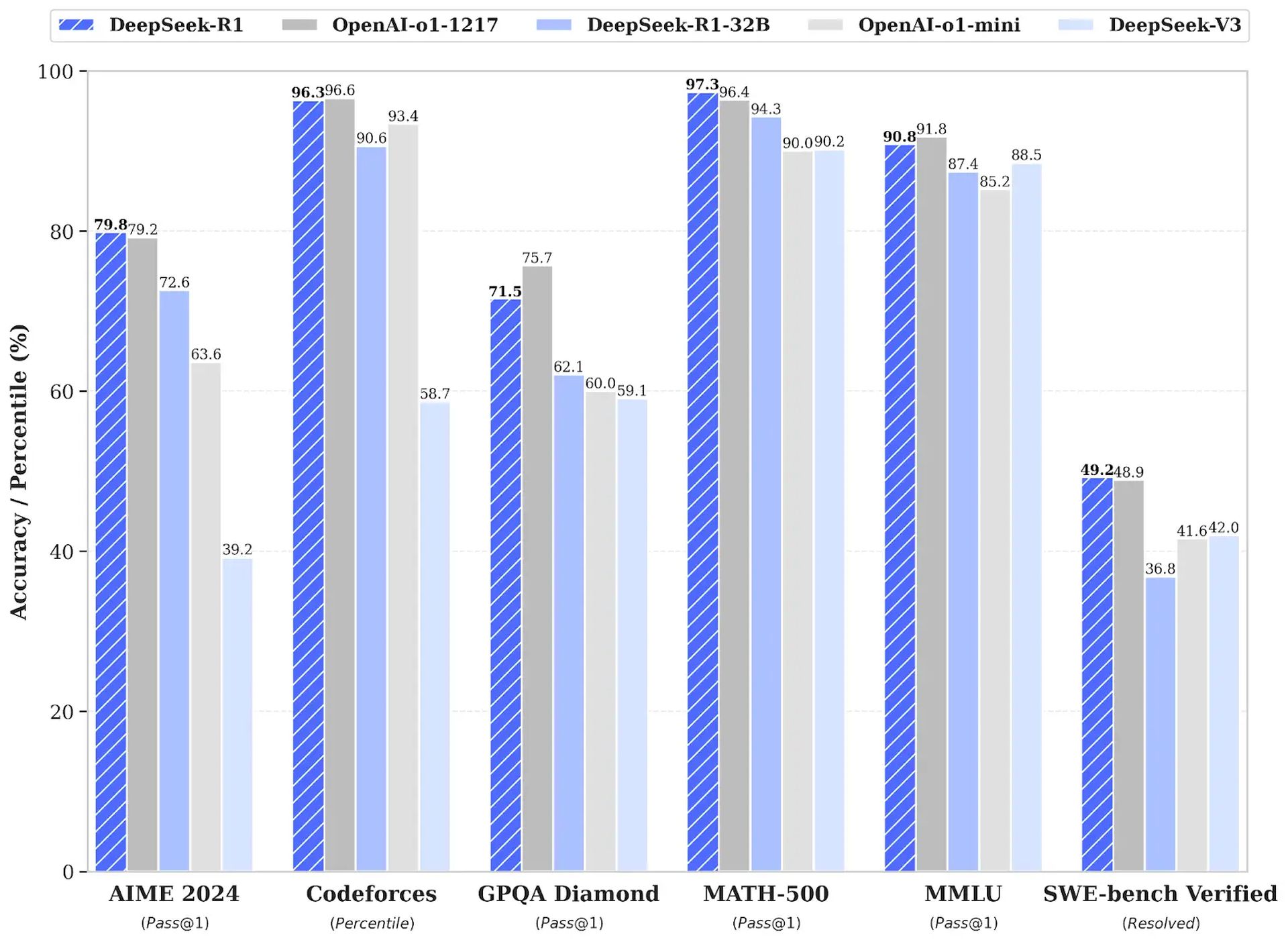
How to setup DeepSeek-R1 easily for free (online and local)
Image: Analytics Vidha

Step-by-step installation guide for DeepSeek-R1 (local)

To install DeepSeek-R1 locally using Ollama and Open Web UI, follow these steps:

Windows 10 and 11

  • Visit https://ollama.com.
  • Click Download and complete the installation process.

How to setup DeepSeek-R1 easily for free (online and local)
  • Right-click Start and open Terminal or PowerShell.
  • Type ollama and press Enter.
  • If you see this message, Ollama is installed correctly:
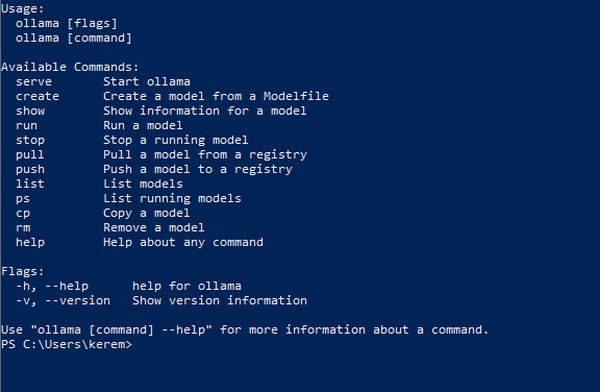
How to setup DeepSeek-R1 easily for free (online and local)
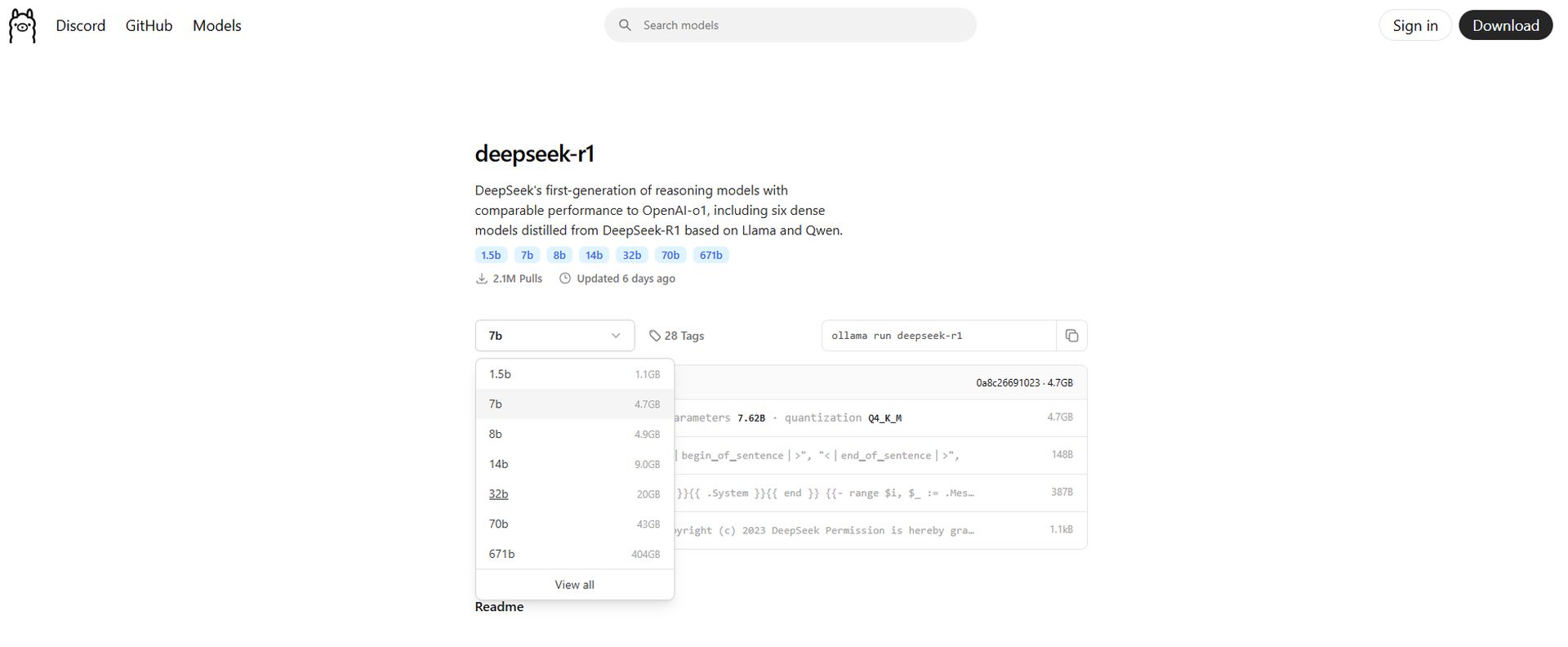
  • Go to https://ollama.com/search and select DeepSeek-R1.
  • Adjust the parameters to match your hardware.

How to setup DeepSeek-R1 easily for free (online and local)
  • Click the Copy button on the right.
How to setup DeepSeek-R1 easily for free (online and local)
  • Return to Terminal/PowerShell, paste the command, and press Enter.
  • Complete the download process.
  • Visit https://chatboxai.app.
  • Download and install the application.
  • In the app settings, set the API Host to Ollama and the Model to DeepSeek-R1, as seen in below image:
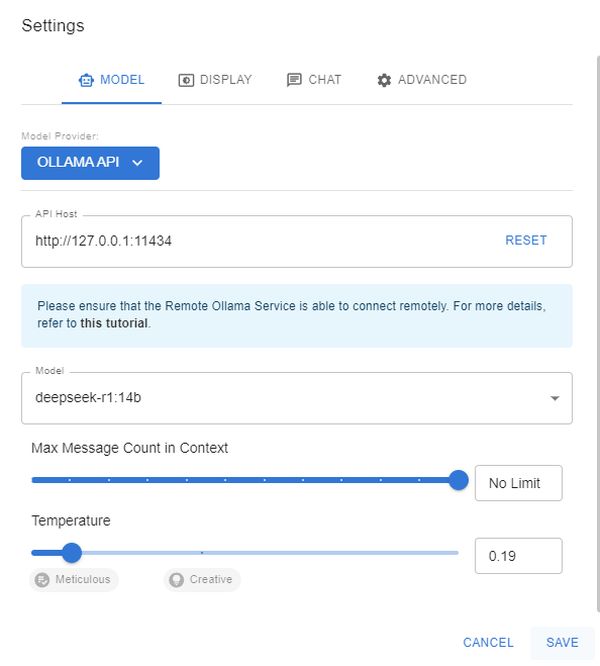
How to setup DeepSeek-R1 easily for free (online and local)
  • Save the settings and start chatting, just like ChatGPT.

macOS and Linux

1. Install Ollama via terminal (macOS/Linux):

curl -fsSL https://ollama.com/install.sh | sh ollama -v #check Ollama version

2. Download a DeepSeek-R1 distilled model via Ollama:

# Default 7B model (4.7GB - ideal for consumer GPUs)
ollama run deepseek-r1

# Larger 70B model (requires 24GB+ VRAM)
ollama run deepseek-r1:70b

# Full DeepSeek-R1 (requires 336GB+ VRAM for 4-bit quantization)
ollama run deepseek-r1:671b

3. Set up Open Web UI for a private interface:

docker run -d -p 3000:8080 \
 --add-host=host.docker.internal:host-gateway \
 -v open-webui:/app/backend/data \
 --name open-webui \
 --restart always \
 ghcr.io/open-webui/open-webui:main

Access the interface at http://localhost:3000 and select deepseek-r1:latest. All data remains on your machine, ensuring privacy.

How to integrate DeepSeek-R1 into your projects

DeepSeek-R1 can be integrated locally or via its cloud API:

1. Local deployment (privacy-first):

import openai
Connect to your local Ollama instance
client = openai.Client(
base_url="http://localhost:11434/v1",
api_key="ollama" # Authentication-free private access
)

response = client.chat.completions.create(
model="deepseek-r1:XXb ", # change the "XX" by the distilled model you choose
messages=[{"role": "user", "content": "Explain blockchain security"}],
temperature=0.7 # Controls creativity vs precision
)

2. Using the official DeepSeek-R1 cloud API:

import openai from dotenv import load_dotenv import os
load_dotenv()
client = openai.OpenAI(
base_url="https://api.deepseek.com/v1",
api_key=os.getenv("DEEPSEEK_API_KEY")
)

response = client.chat.completions.create(
model="deepseek-reasoner",
messages=[{"role": "user", "content": "Write web scraping code with error handling"}],
max_tokens=1000 # Limit costs for long responses
)

DeepSeek-R1 provides a cost-effective, privacy-focused alternative to OpenAI-o1, ideal for developers seeking to save money and maintain data security. For further assistance or to share experiences, users are encouraged to engage with the community.


Featured image credit: DeepSeek

Tags: deepseek-r1Featured

Related Posts

Apple scraps Siri AI launch in the EU over intense regulatory clashes

Apple scraps Siri AI launch in the EU over intense regulatory clashes

June 9, 2026
Being friendly to your AI might be the least eco-friendly thing you can do

Being friendly to your AI might be the least eco-friendly thing you can do

June 8, 2026
Jensen Huang says AI is expanding software demand rather than replacing jobs

Jensen Huang says AI is expanding software demand rather than replacing jobs

June 8, 2026
OpenAI upgrades ChatGPT memory with a new personalization system

OpenAI upgrades ChatGPT memory with a new personalization system

June 5, 2026
Amazon adds AI-generated product previews to search results

Amazon adds AI-generated product previews to search results

June 4, 2026
Meta launches AI business agents on WhatsApp, Instagram and Messenger

Meta launches AI business agents on WhatsApp, Instagram and Messenger

June 4, 2026

LATEST NEWS

Apple scraps Siri AI launch in the EU over intense regulatory clashes

Which devices will support macOS Golden Gate

Everything announced at WWDC26

Advanced SEO services for high impact digital strategies

The 8 best website builders for small businesses on any budget

Why European workloads are leaving US cloud in 2026

BEST AI MODELS LEADERBOARD

See the best AI models, ranked by intelligence, benchmark results, speed and token price. Find the most suitable LLMs, Text-to-Image, Image Editing, Text-to-Speech, Text-to-Video and Image-to-Video  artificial intelligence model for your tasks and business.

LATEST TOOLS

Roboto AI

Pickaxe

Pfpmaker

MindPal

Syllaby

ScreenApp

FinanceBrain

GitHub Spark

Hints

VisionStory AI

Dataconomy

COPYRIGHT © DATACONOMY MEDIA GMBH, ALL RIGHTS RESERVED.

  • About
  • Imprint
  • Contact
  • Legal & Privacy

Follow Us

  • News
    • Artificial Intelligence
    • Cybersecurity
    • DeFi & Blockchain
    • Finance
    • Gaming
    • Startups
    • Tech
  • Industry
  • Research
  • Resources
    • Articles
    • Guides
    • Case Studies
    • Whitepapers
    • AI Models Leaderboard
  • AI tools
  • Newsletter
  • + More
    • Glossary
    • Conversations
    • Events
    • About
      • Who we are
      • Contact
      • Imprint
      • Legal & Privacy
      • Partner With Us
No Result
View All Result
Subscribe

This website uses cookies to improve your experience. You can choose to accept or reject them. Visit our Privacy Policy.