Stable Diffusion Online is setting a new standard in the AI image generation world, combining sophisticated capabilities with an accessible and intuitive user experience. Historically, the deployment steps associated with Stable Diffusion posed significant challenges, particularly for those new to the technology. However, Stable Diffusion Online eradicates these barriers, offering a cool interface that caters to both novices and seasoned professionals.
What is Stable Diffusion Online?
Stable Diffusion Online is an online AI image generator that stands out by providing integration of advanced features within a user-friendly environment. This platform empowers users to craft unique and highly detailed images without the cumbersome setup previously required. With customizable prompts, negative prompts, and a range of sampling methods, users can exercise precise control over their creative outputs.
Features of Stable Diffusion Online
Stable Diffusion Online is not merely a tool but a comprehensive solution designed for a diverse array of applications.
- txt2img: The txt2img mode allows users to generate images directly from text descriptions. This feature leverages the capabilities of advanced AI to interpret and visualize textual input, creating highly detailed and contextually relevant images.
- img2img: The img2img mode allows users to transform an existing image into a new creation while retaining some of the original characteristics. This feature is particularly useful for refining or reimagining images, offering creative freedom to make significant adjustments or subtle enhancements.
- PNG Info: The PNG Info feature provides detailed metadata about PNG images generated or uploaded to the platform. This can include information such as generation parameters, seed values, and other technical details that are crucial for reproducibility and further tweaking.
Stable Diffusion 3 Medium: Meet not-so-stable SD3
How to generate images on Stable Diffusion Online?
Here’s a step-by-step guide:
- Navigate to the Stable Diffusion Online platform where you can generate images.
- Make sure you are on the txt2img tab, which allows you to generate images from text prompts.
- In the upper field labeled, enter your desired description of the image you want to generate.
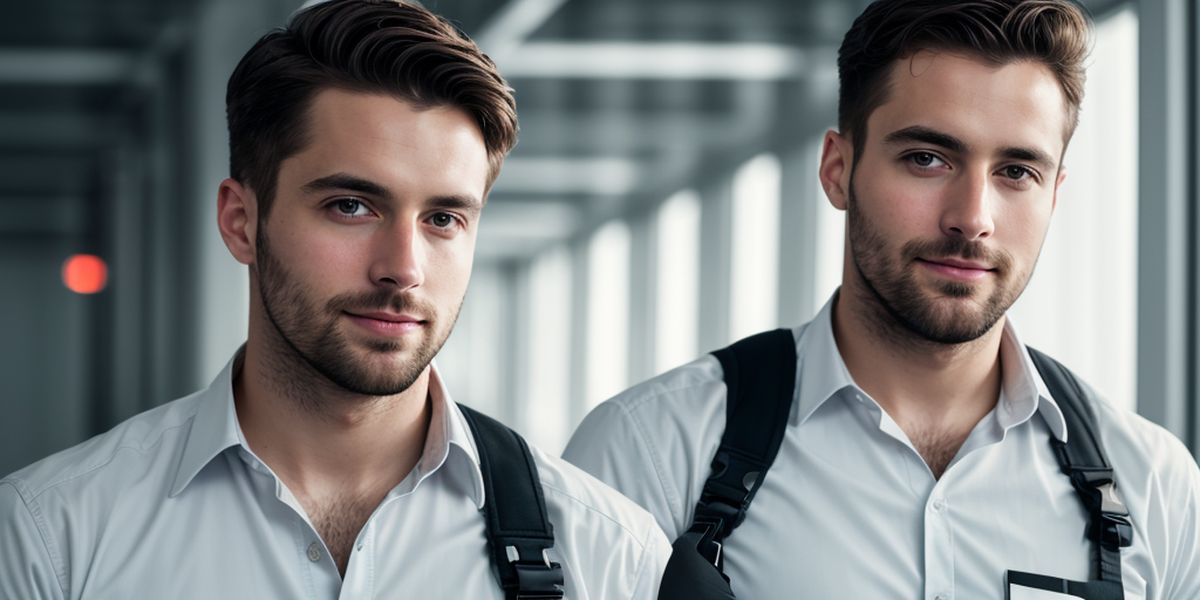
We tried: “Data scientist, handsome, male, ultrarealistic, soft lighting, 8k”
- In the bottom field, enter descriptions of elements you want to avoid in your generated image.
We entered: “cartoon, anime, (deformed eyes, nose, ears, nose), bad anatomy, ugly”
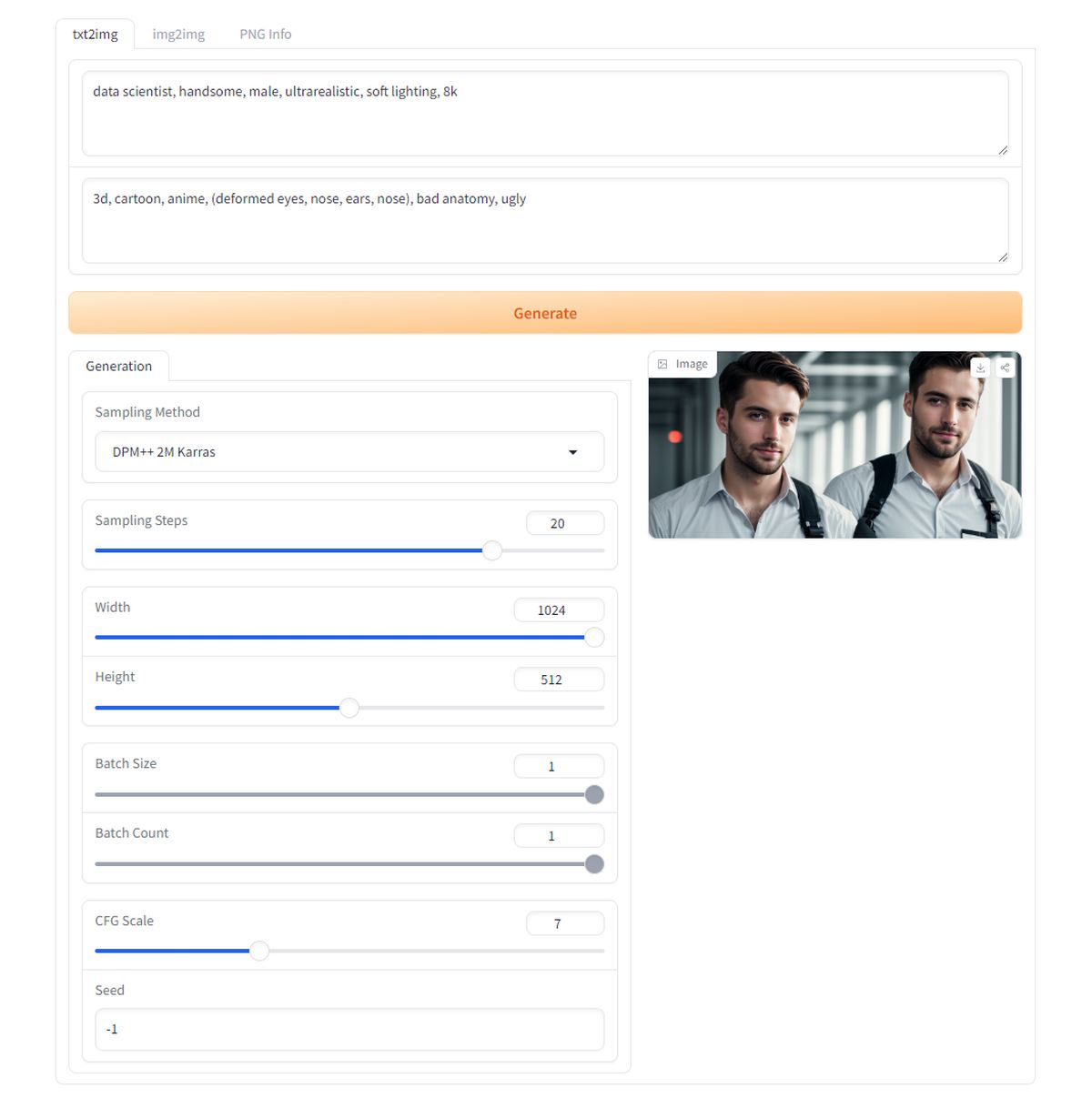
Then you can configure the following settings:
- Sampling method: DPM++ 2M Karras is a specific algorithm used for denoising and refining the image during generation.
- Sampling steps: Determines the number of iterations the model uses to generate the image. More steps can improve detail and quality.
- Width and height: The dimensions of the generated image. Higher values produce larger images but may require more computational resources.
- Batch size: Number of images generated simultaneously.
- Batch count: Number of batches generated. Multiplying batch size by batch count gives the total number of images generated.
- CFG scale: Controls the strength of the prompt’s influence on the generated image. A higher scale means a closer match to the prompt but may reduce creativity.
- Seed: Determines the randomness of the generation process. A fixed seed will always generate the same image, while -1 randomizes each generation.
>>>Once all the fields are filled out and settings configured, click the Generate button to create your image.
Review and save:
- After the image is generated, review the output. You can make adjustments to the prompt or settings if needed and regenerate the image.
- Save the generated image if you are satisfied with the result.
The output of ours:
Tips for better outputs
When crafting your prompt, include as many relevant details as possible. Instead of saying “a person,” specify characteristics like “a young woman with curly red hair, wearing a blue dress, standing in a sunlit garden.” The more descriptive your prompt, the better the AI can visualize and generate the desired image.
Keywords are crucial in guiding the AI to focus on particular elements. Prioritize the most important aspects of your image and list them early in the prompt. For instance, “ultrarealistic portrait of a businessman, sharp suit, office background, evening lighting” clearly highlights the primary features and setting.
Enhance your prompt with adjectives and adverbs to provide depth and context. Descriptions like “vibrant, dynamic, intricately detailed” help the AI understand the desired style and mood. This can significantly improve the quality and relevance of the generated image.
Negative prompts are powerful tools to exclude unwanted elements. Use them to refine your results by specifying what you do not want in the image. For example, “negative prompt: cartoon, anime, (deformed eyes, nose, ears), bad anatomy, ugly” helps ensure the generated image avoids these undesirable traits.
Don’t hesitate to generate multiple images and refine your prompts based on the results. Small adjustments can lead to significant improvements. Experiment with different combinations of keywords, descriptions, and settings to discover what works best for your specific needs.
Featured image credit: Kerem Gülen/Midjourney