Dataconomy
  • News
    • Artificial Intelligence
    • Cybersecurity
    • DeFi & Blockchain
    • Finance
    • Gaming
    • Startups
    • Tech
  • Industry
  • Research
  • Resources
    • Articles
    • Guides
    • Case Studies
    • Whitepapers
    • AI Models Leaderboard
  • AI toolsNEW
  • Newsletter
  • + More
    • Glossary
    • Conversations
    • Events
    • About
      • Who we are
      • Contact
      • Imprint
      • Legal & Privacy
      • Partner With Us
Subscribe
No Result
View All Result
  • AI
  • Tech
  • Cybersecurity
  • Finance
  • DeFi & Blockchain
  • Startups
  • Gaming
Dataconomy
  • News
    • Artificial Intelligence
    • Cybersecurity
    • DeFi & Blockchain
    • Finance
    • Gaming
    • Startups
    • Tech
  • Industry
  • Research
  • Resources
    • Articles
    • Guides
    • Case Studies
    • Whitepapers
    • AI Models Leaderboard
  • AI toolsNEW
  • Newsletter
  • + More
    • Glossary
    • Conversations
    • Events
    • About
      • Who we are
      • Contact
      • Imprint
      • Legal & Privacy
      • Partner With Us
Subscribe
No Result
View All Result
Dataconomy
No Result
View All Result

Piktochart AI is a one-man design team

byEray Eliaçık
June 18, 2024
in Artificial Intelligence
Home News Artificial Intelligence
Share on FacebookShare on TwitterShare on LinkedInShare on WhatsAppShare on e-mail
Google Preferred Source

Imagine a tool that transforms your ideas into stunning visuals with just a few clicks, and now meet with it. Piktochart AI is an innovative platform designed to revolutionize how we create infographics, posters, banners, and more. Powered by artificial intelligence, Piktochart AI helps users generate professional-grade designs from simple text descriptions or uploaded documents effortlessly.

What is Piktochart AI?

Piktochart AI is an advanced tool designed to simplify and enhance the process of creating visual content such as infographics, posters, banners, flyers, and more. It leverages artificial intelligence to generate designs quickly from text descriptions or uploaded documents. It can transform ideas into visually appealing graphics within seconds, making it ideal for users who need to create professional visuals without extensive design skills. For example, let’s generate an infographics about the top 5 trending topics on X:
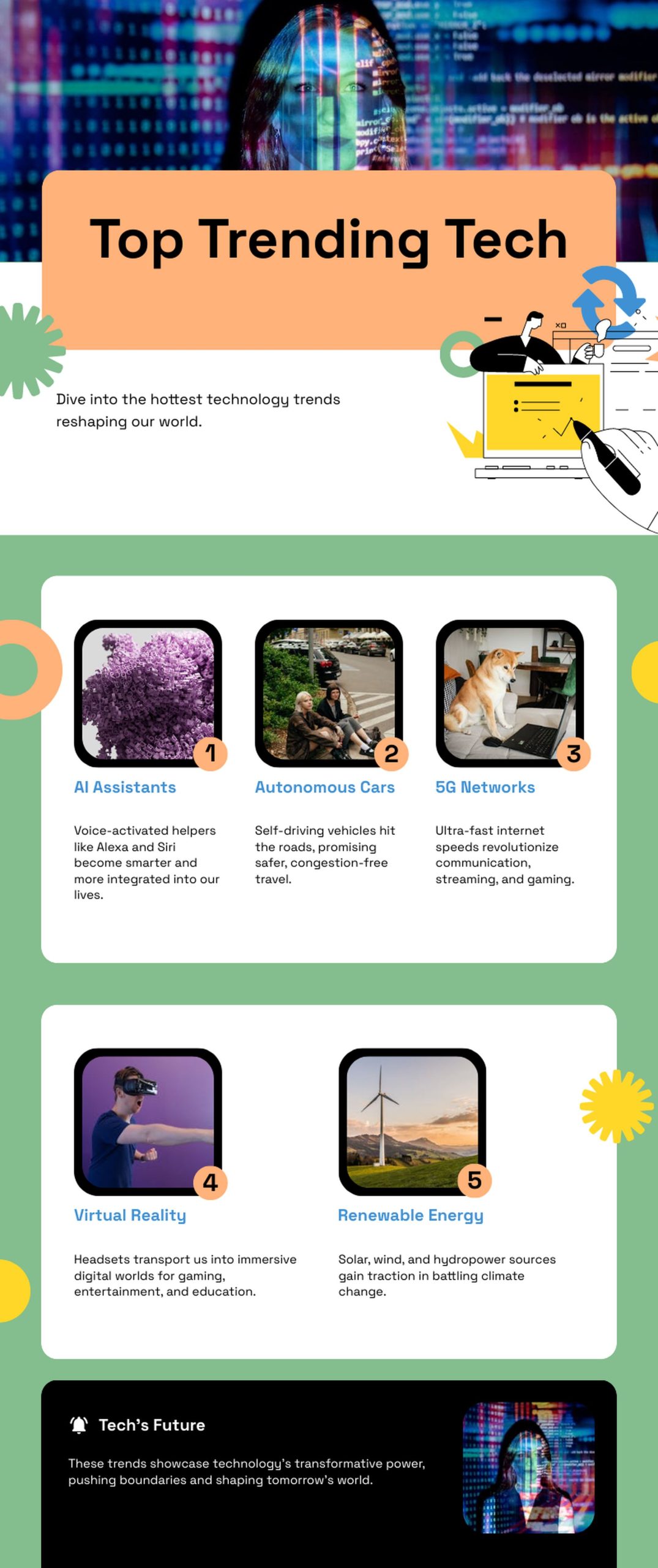
What is Piktochart AI and how to use it: Transform ideas into visuals instantly. Create infographics, posters & more with AI-powered design simplicity.
Piktochart AI supports various file formats, including PDF, DOCX, and TXT

Users can input a brief description or topic (up to 120 characters) and Piktochart AI generates multiple design options. This feature is particularly useful for generating ideas visually in a short amount of time.

Stay Ahead of the Curve!

Don't miss out on the latest insights, trends, and analysis in the world of data, technology, and startups. Subscribe to our newsletter and get exclusive content delivered straight to your inbox.

It supports various file formats including PDF, DOCX, and TXT, allowing users to upload documents directly to create visuals. This versatility ensures compatibility with different types of content and facilitates seamless integration into existing workflows.

One of its standout features is the AI image generator, which creates high-quality images based on text prompts. Users can specify their vision, and Piktochart AI translates it into stunning visual representations, ranging from complex landscapes to abstract designs.

What is Piktochart AI and how to use it: Transform ideas into visuals instantly. Create infographics, posters & more with AI-powered design simplicity.

Piktochart offers over 100 customizable templates designed by professionals. These templates cover a wide range of formats such as posters, social media graphics, newsletters, and more. Users can choose templates that align with their content needs and customize them to reflect their brand identity.

Alongside with Piktochart AI, here is what the platform offers:

  • Visual Tools
    • Infographic Maker
    • Banner Maker
    • Brochure Maker
    • Card Maker
    • Diagram Maker
    • Flowchart Maker
    • Flyer Maker
    • Graph Maker
    • Invitation Maker
    • Map Maker
    • Pitch Deck Creator
    • Poster Maker
    • Presentation Maker
    • Report Maker
    • Resume Maker
    • Social Media Graphic Maker
    • Timeline Maker
    • Venn Diagram Maker
  • Video Tools
    • Screen Recorder
    • Social Media Video Maker
    • Video Cropper
    • Video to Text Converter
    • Video Views Calculator
  • AI Design Generator
    • AI Banner
    • AI Brochure Maker
    • AI Document Generator
    • AI Flyer Generator
    • AI Image Generator
    • AI Infographic
    • AI Instagram Post Generator
    • AI Newsletter Generator
    • AI Poster
    • AI Quote Generator
    • AI Report Generator
    • AI Summarizer
    • AI Timeline Generator
  • Solutions
    • For Communications
    • For Education
    • For eLearning
    • For Financial Services
    • For Healthcare
    • For Human Resources
    • For Marketing
    • For Nonprofits

The platform provides intuitive editing tools that allow users to personalize their designs effortlessly. From adjusting colors and fonts to adding charts, graphs, and images, Piktochart AI enables users to create visually cohesive and branded content.

How to use Piktochart AI

Using Piktochart AI involves a straightforward process:

  • Go to Piktochart AI
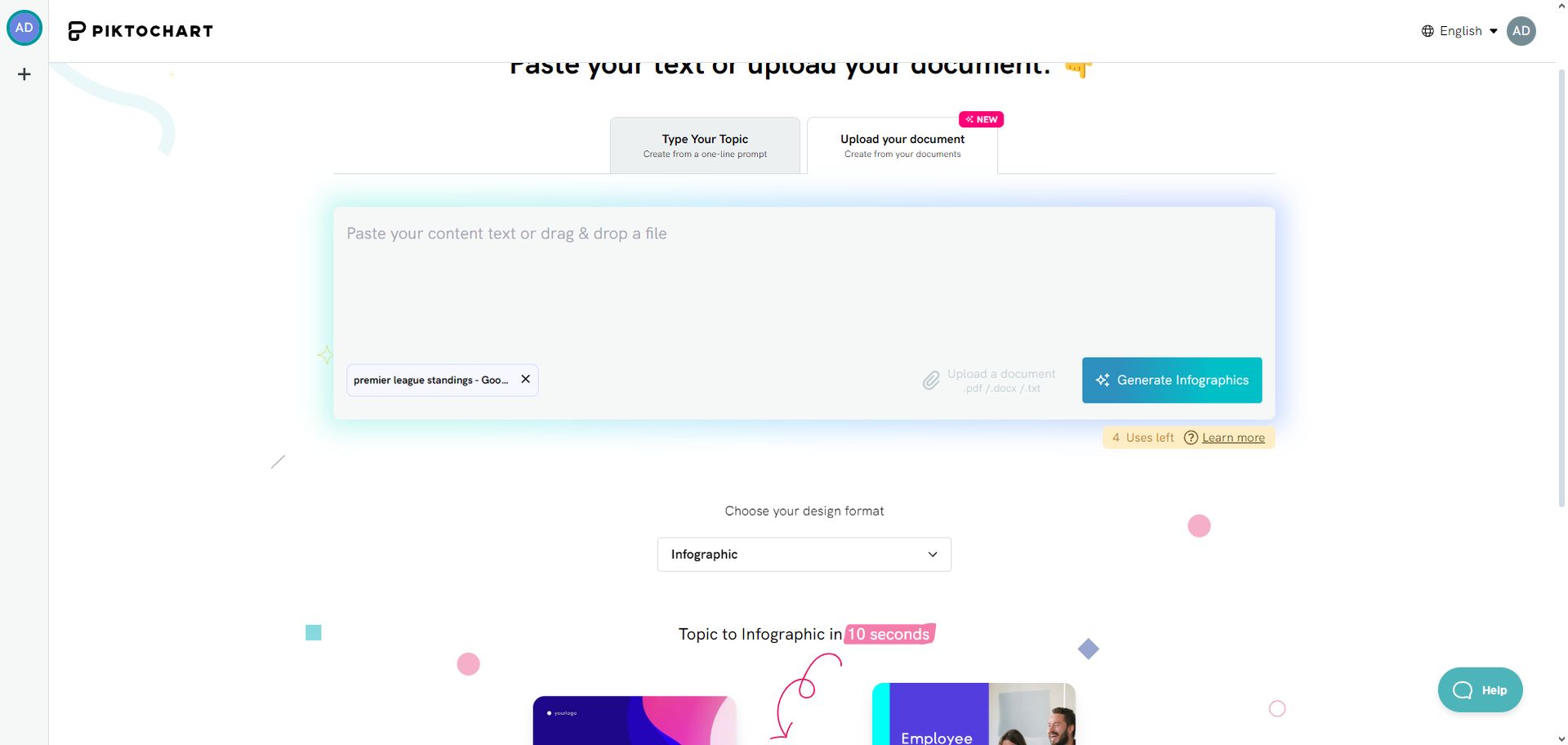
  • Begin by entering a brief description of your idea or uploading a document.
What is Piktochart AI and how to use it: Transform ideas into visuals instantly. Create infographics, posters & more with AI-powered design simplicity.
Users can generate infographics, posters, banners, and more with just a few clicks
  • Choose from the AI-generated templates that best fit your content and style preferences.
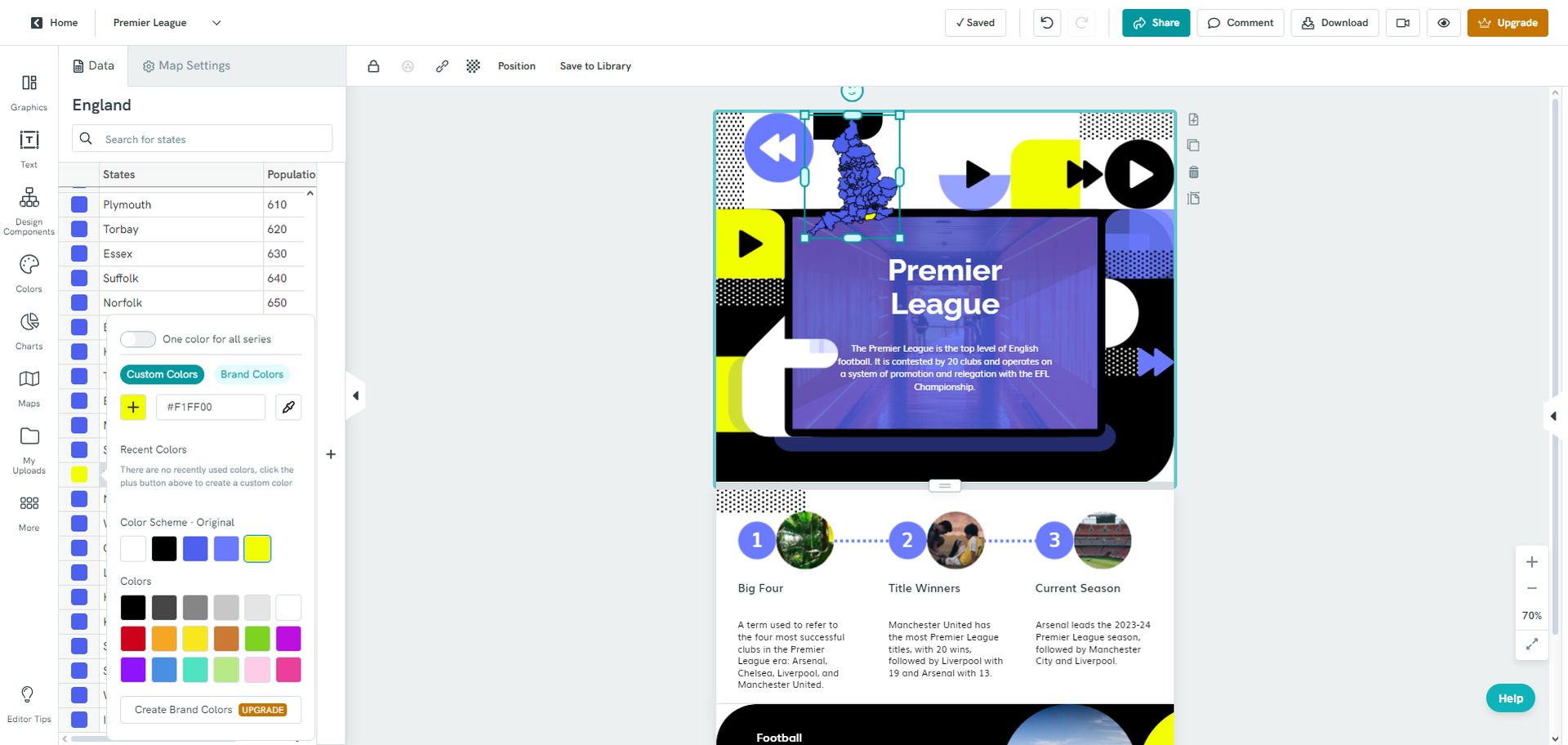
  • Personalize the template by editing text, adjusting visuals, and modifying layout elements to create a customized visual.
What is Piktochart AI and how to use it: Transform ideas into visuals instantly. Create infographics, posters & more with AI-powered design simplicity.
Piktochart AI leverages artificial intelligence to transform text descriptions into stunning graphics
  • However, be careful about what it generates. In our example, even though we gave the data as a PDF, it says Arsenal leads the league. However, the season already finished, and Man City won the Premier League. Always double check. Once satisfied with the design, download it in popular formats like JPG, PNG, or PDF for sharing across various platforms.

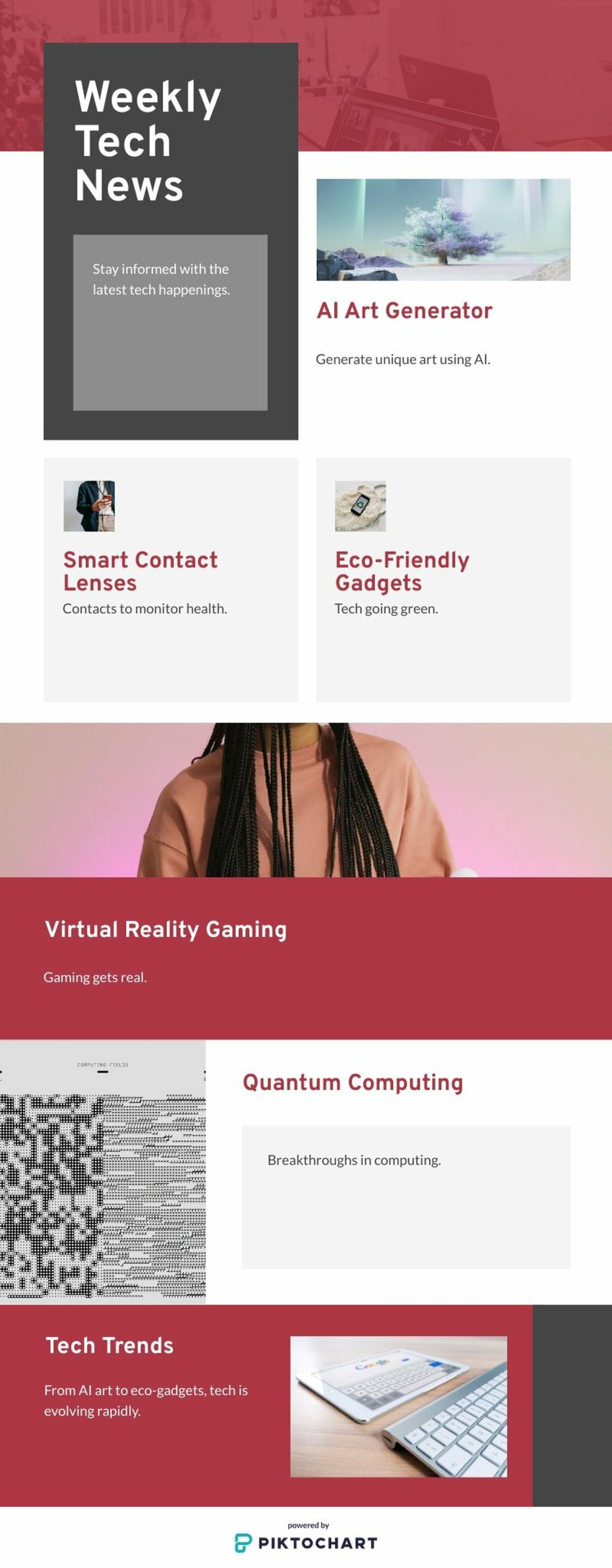
Here is a tech news template that Piktochart AI generated:
What is Piktochart AI and how to use it: Transform ideas into visuals instantly. Create infographics, posters & more with AI-powered design simplicity.
Piktochart AI is a cutting-edge tool designed to simplify visual content creation

Is Piktochart AI free?

Piktochart AI is accessible to all users, offering up to 4 creations per day on the free plan. It provides a seamless user experience with clear guidance on how to use its features effectively. Customer support is available to assist users with any questions or issues they may encounter. If you want more, here are Piktochart’s pricing plans:

Free Plan

  • Cost: $0 (Free forever)
  • Ideal for: Users looking to try out Piktochart’s basic features.
  • Features:
    • 2 PNG downloads per month.
    • Unlimited visual projects.
    • Up to 10 AI visual generations monthly.
    • Access to all templates and formats.
    • Ability to invite up to 3 team members.
    • 100MB storage.

Pro Plan

  • Cost: $14 per member/month (billed annually, $29 regular price)
  • Best for: Professionals and small teams needing more features and flexibility.
  • Includes everything in Free, plus:
    • Unlimited PNG downloads.
    • Access to 5M+ premium icons, illustrations & 3D graphics.
    • Up to 100 AI visual generations monthly.
    • Transparent background downloads.
    • Ability to invite up to 10 team members.
    • 100GB storage.

Business Plan

  • Cost: $24 per member/month (billed annually, $49 regular price)
  • Best for: Teams requiring advanced brand controls and more extensive visual generation capabilities.
  • Includes everything in Pro, plus:
    • Unlimited PNG, PDF, PPT downloads.
    • Brand Kit – Unlimited brand color schemes, custom fonts, logos.
    • Up to 300 AI visual generations monthly.
    • On-brand templates with Branded Templates feature.
    • Ability to invite up to 10 team members.
    • 250GB storage.

Enterprise Plan

  • Custom Pricing: Contact Piktochart for personalized pricing.
  • Best for: Large enterprises needing enhanced security, extensive support, and tailored solutions.
  • Includes everything in Business, plus:
    • Dedicated account manager & training.
    • Advanced security review & MSA support.
    • Custom on-demand templates.
    • Workspace management control.
    • Ability to invite 11+ team members.
    • 1TB storage.
    • Custom sub-domain & SSO/SAML integration.

Tags: AI

Related Posts

OpenAI limits ChatGPT 5.6 access to government-approved users first

OpenAI limits ChatGPT 5.6 access to government-approved users first

June 26, 2026
Meta debuts AI-powered Creator Studio app to help Facebook creators grow

Meta debuts AI-powered Creator Studio app to help Facebook creators grow

June 25, 2026
Figma adds code layers to collaborative design canvas

Figma adds code layers to collaborative design canvas

June 25, 2026
US reportedly urges Meta to submit AI models

US reportedly urges Meta to submit AI models

June 25, 2026
OpenAI upgrades GPT-5.5 Instant for stronger context awareness

OpenAI upgrades GPT-5.5 Instant for stronger context awareness

June 25, 2026
ByteDance launches Doubao 2.1 Pro language model

ByteDance launches Doubao 2.1 Pro language model

June 24, 2026

LATEST NEWS

Apple touchscreen MacBook could launch with M5 Pro chips

Apple touchscreen MacBook could launch with M5 Pro chips

OpenAI limits ChatGPT 5.6 access to government-approved users first

Apple to skip M6 Pro and Max chips and launch M7 in 2027

IBM unveils world’s first sub-1nm chip with new nanostack architecture

Apple raises prices across Macs, iPads and home devices

BEST AI MODELS LEADERBOARD

See the best AI models, ranked by intelligence, benchmark results, speed and token price. Find the most suitable LLMs, Text-to-Image, Image Editing, Text-to-Speech, Text-to-Video and Image-to-Video  artificial intelligence model for your tasks and business.

LATEST TOOLS

Autoppt

Otter.ai

Slideoo

Disney Pixar AI Generator

Codebay

Newo

BlackInk.AI

WatchMyCompetitor

TokkingHeads

Fellow.app

Dataconomy

COPYRIGHT © DATACONOMY MEDIA GMBH, ALL RIGHTS RESERVED.

  • About
  • Imprint
  • Contact
  • Legal & Privacy

Follow Us

  • News
    • Artificial Intelligence
    • Cybersecurity
    • DeFi & Blockchain
    • Finance
    • Gaming
    • Startups
    • Tech
  • Industry
  • Research
  • Resources
    • Articles
    • Guides
    • Case Studies
    • Whitepapers
    • AI Models Leaderboard
  • AI tools
  • Newsletter
  • + More
    • Glossary
    • Conversations
    • Events
    • About
      • Who we are
      • Contact
      • Imprint
      • Legal & Privacy
      • Partner With Us
No Result
View All Result
Subscribe

This website uses cookies to improve your experience. You can choose to accept or reject them. Visit our Privacy Policy.