Dataconomy
  • News
    • Artificial Intelligence
    • Cybersecurity
    • DeFi & Blockchain
    • Finance
    • Gaming
    • Startups
    • Tech
  • Industry
  • Research
  • Resources
    • Articles
    • Guides
    • Case Studies
    • Whitepapers
    • AI Models Leaderboard
  • AI toolsNEW
  • Newsletter
  • + More
    • Glossary
    • Conversations
    • Events
    • About
      • Who we are
      • Contact
      • Imprint
      • Legal & Privacy
      • Partner With Us
Subscribe
No Result
View All Result
  • AI
  • Tech
  • Cybersecurity
  • Finance
  • DeFi & Blockchain
  • Startups
  • Gaming
Dataconomy
  • News
    • Artificial Intelligence
    • Cybersecurity
    • DeFi & Blockchain
    • Finance
    • Gaming
    • Startups
    • Tech
  • Industry
  • Research
  • Resources
    • Articles
    • Guides
    • Case Studies
    • Whitepapers
    • AI Models Leaderboard
  • AI toolsNEW
  • Newsletter
  • + More
    • Glossary
    • Conversations
    • Events
    • About
      • Who we are
      • Contact
      • Imprint
      • Legal & Privacy
      • Partner With Us
Subscribe
No Result
View All Result
Dataconomy
No Result
View All Result

KREA AI enhancer could be your go-to choice if you are looking to upscale an image

A new AI-powered image tool emerges

byEmre Çıtak
April 15, 2024
in Artificial Intelligence
Home News Artificial Intelligence
Share on FacebookShare on TwitterShare on LinkedInShare on WhatsAppShare on e-mail
Google Preferred Source

Ever taken a photo that’s almost perfect, but just a touch blurry or lacking in detail?

Maybe you have a cherished family picture that’s a bit outdated in resolution.

KREA AI enhancer is a web-based tool that tackles these problems with the power of artificial intelligence and does all that for free!

Stay Ahead of the Curve!

Don't miss out on the latest insights, trends, and analysis in the world of data, technology, and startups. Subscribe to our newsletter and get exclusive content delivered straight to your inbox.

What is KREA AI enhancer?

KREA AI enhancer uses clever algorithms to enhance your images. In simpler terms, it takes your photo and analyzes it to understand what’s in the scene.

Then, it uses its knowledge to fill in missing details, sharpen blurry areas, and make your photo look crisper and clearer.

How does KREA AI enhancer work?

While the exact inner workings are a closely guarded secret, we can shed some light on the general process. KREA enhancer likely uses a technique called deep learning. Deep learning involves training computers on vast amounts of data, in this case, countless images.

The computer learns to recognize patterns and details in photos. When you upload your image, KREA’s AI enhancer uses this knowledge to “see” what’s missing or unclear and fills in the gaps with quite okay accuracy.

One of the most interesting features of KREA AI enhancer is real-time generation. This allows you to not just enhance existing photos, but also to spark your creativity. Imagine you have a sketch of a mountain range. With KREA AI enhancer, you can input your sketch and the program will use its knowledge to generate a realistic-looking mountain scene based on your simple drawing.

This feature lets you play around with ideas and explore different creative possibilities. It’s like having a powerful artistic assistant at your fingertips, helping you bring your concepts to life.

How to use Krea AI enhancer

Impressed by what you see? Here is what you need to do to get a first-hand experience with this tool for free:

  1. Head to the KREA AI website
  2. Sign up for a free account
  3. Upload your photo
  4. Adjust the upscaling factor (optional)
  5. Add context with prompts (optional)
  6. Once you’re happy with your settings, click the “Enhance” button

After processing, you’ll see the improved version of your photo. Simply click the download button to save it to your device.

Keep in mind that the format of your uploaded photo must be either JPG or PNG.

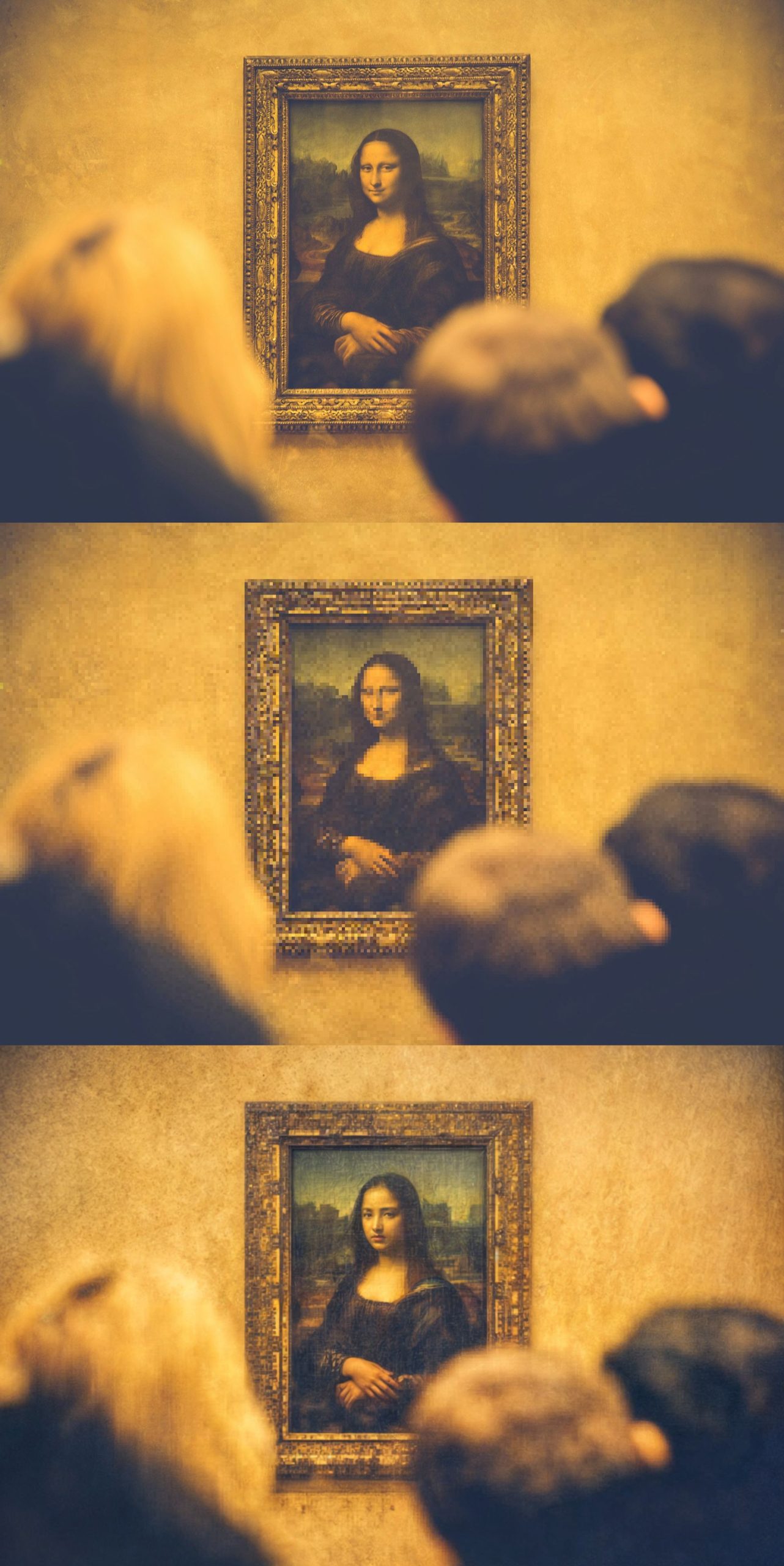
To test the limits of the tool, we have pixellated a photo and then ran KREA AI enhancer with two times upscaling factor to see if it was able to restore it, and here is the result:
Krea AI Enhancer
Images: Original (top), downscaled (middle), KREA AI output (bottom) (Image credit)

It seems like KREA AI’s algorithm doesn’t know what the famous painting of the Mona Lisa is but the upscaling capabilities it showcased are pretty impressive.

The ability to enhance images with artificial intelligence is a powerful tool. KREA AI enhancer showcases both the potential and the current limitations of this technology, offering solutions for photographers, casual users, and potentially even creative professionals.

As KREA’s AI enhancer and similar technologies continue to develop, it will be exciting to see how they shape the way we create, edit, and interact with images in the future.


Featured image credit: KREA

Related Posts

ChatGPT hits 1 billion users as global AI adoption surges despite backlash

ChatGPT hits 1 billion users as global AI adoption surges despite backlash

June 12, 2026
OpenAI Codex referral program rewards users with extra rate resets

OpenAI Codex referral program rewards users with extra rate resets

June 12, 2026
Zuckerberg says small elite teams can drive major AI breakthroughs

Zuckerberg says small elite teams can drive major AI breakthroughs

June 12, 2026
Google says AI Overviews reach 2.5 billion monthly users

Google says AI Overviews reach 2.5 billion monthly users

June 12, 2026
Anthropic apologizes for hidden Fable throttling, pledges transparency

Anthropic apologizes for hidden Fable throttling, pledges transparency

June 11, 2026
Reco builds momentum to secure the enterprise AI agent sprawl

Reco builds momentum to secure the enterprise AI agent sprawl

June 11, 2026

LATEST NEWS

“Free robots are an illusion”: Why we’ll pay for system intelligence, not delivery workers

How Henrique Schmaiske led Meteor.js through its biggest transformation

Proven privacy: Why ‘no-log’ claims need real evidence today

ChatGPT hits 1 billion users as global AI adoption surges despite backlash

Huawei launches HarmonyOS 7 developer beta with upgraded API 26

OpenAI Codex referral program rewards users with extra rate resets

BEST AI MODELS LEADERBOARD

See the best AI models, ranked by intelligence, benchmark results, speed and token price. Find the most suitable LLMs, Text-to-Image, Image Editing, Text-to-Speech, Text-to-Video and Image-to-Video  artificial intelligence model for your tasks and business.

LATEST TOOLS

Roboto AI

Pickaxe

Pfpmaker

MindPal

Syllaby

ScreenApp

FinanceBrain

GitHub Spark

Hints

VisionStory AI

Dataconomy

COPYRIGHT © DATACONOMY MEDIA GMBH, ALL RIGHTS RESERVED.

  • About
  • Imprint
  • Contact
  • Legal & Privacy

Follow Us

  • News
    • Artificial Intelligence
    • Cybersecurity
    • DeFi & Blockchain
    • Finance
    • Gaming
    • Startups
    • Tech
  • Industry
  • Research
  • Resources
    • Articles
    • Guides
    • Case Studies
    • Whitepapers
    • AI Models Leaderboard
  • AI tools
  • Newsletter
  • + More
    • Glossary
    • Conversations
    • Events
    • About
      • Who we are
      • Contact
      • Imprint
      • Legal & Privacy
      • Partner With Us
No Result
View All Result
Subscribe

This website uses cookies to improve your experience. You can choose to accept or reject them. Visit our Privacy Policy.