ScreenApp
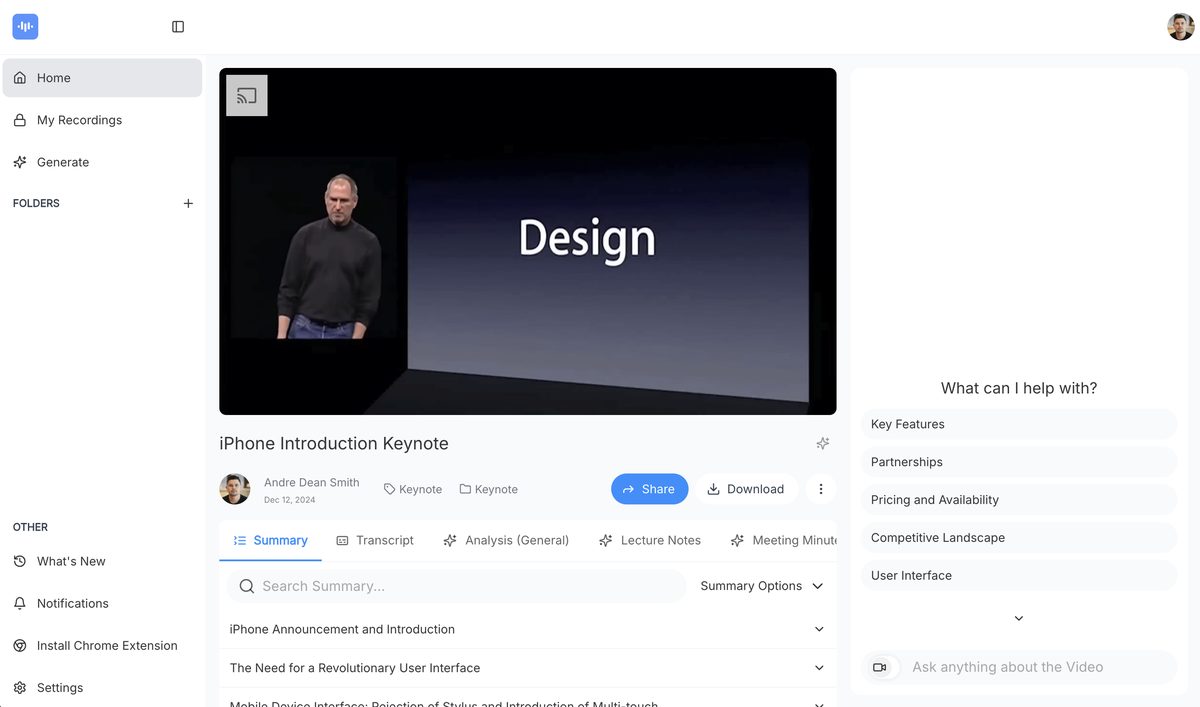
ScreenApp is a free online tool that allows users to record and transcribe screen activity, audio, and webcam footage. It is designed for professionals and teams who need to capture meetings, lectures, and tutorials efficiently. With advanced AI-powered transcription and summarization features, users can extract key insights and create structured notes from their recordings. The platform also supports cloud storage and sharing capabilities, making it a versatile choice for enhancing productivity.
Pros
- Free online tool with a generous free tier
- Cross-platform support including Windows, MAC, and Ubuntu
- Select recording area with options for full screen or specific windows/tabs
- Includes webcam footage in recordings for a personalized touch
- Secure cloud storage for recordings with shareable links
- Collaboration-friendly with editing capabilities for team members
- High transcription accuracy with GPT AI technology
- Fast video downloads without lag
- No software downloads required, browser-based functionality
- Used and trusted by major brands for professional needs
Cons
- Limited to online use with no local storage option
- Dependent on internet speed for recording quality
- Potential privacy issues with cloud storage
- No multi-language transcription support
- Limited to certain browsers like Google Chrome, Opera, and Firefox
- May not record accurately under poor audio conditions
- No offline version available
- Specific OS requirements for optimal performance
- Subscription model may lead to unexpected charges for trial users
- Limited customization options for the free tier
ScreenApp is a free online screen recording tool that specializes in capturing screen activity and transcribing it.
ScreenApp supports recording on multiple platforms, including Windows, MAC, and Ubuntu.
Yes, ScreenApp allows for recording both video and audio simultaneously.
Yes, ScreenApp can capture webcam footage as part of the recording.
ScreenApp uses GPT AI technology to convert spoken content into written text.
ScreenApp offers secure storage options for recordings, but specific security details are not disclosed.
Yes, recordings can be edited by collaborators with the owner's permission.
ScreenApp is ideal for tech tutorials, training sessions, meetings, and presentations.
Yes, ScreenApp can record meetings and transcribe the contents for documentation.
No, ScreenApp is a web-based tool that requires no downloads.
Become a Contributor
Sign in to unlock these features:
- ⭐️ Rate this tool with a 1-5 star score
- ✍️ Write a detailed review for the community
- ❤️ Follow this tool to get important updates
Get started in seconds
[jnews_social_login_form]