Step into a world where words not only speak but come alive with the magic of Azure AI Speech. In this exploration of Microsoft’s groundbreaking suite, we’re not just talking about voice interaction; we’re diving into the realm of creating digital avatars that breathe life into your words.
It’s not just about what you say; it’s about the avatars that say it for you.
Key components of Azure AI Speech
Azure AI Speech is a comprehensive suite of services provided by Microsoft that leverages artificial intelligence (AI) and machine learning (ML) technologies to enhance and customize voice experiences. It empowers developers to integrate advanced speech capabilities into applications, making them more engaging, interactive, and accessible. This suite encompasses various features, including speech recognition, synthesis, translation, and speaker recognition.
- Speech recognition: Converts spoken language into written text, enabling applications to understand and respond to user voice commands.
- Use cases: Voice-controlled applications, transcription services, voice assistants.
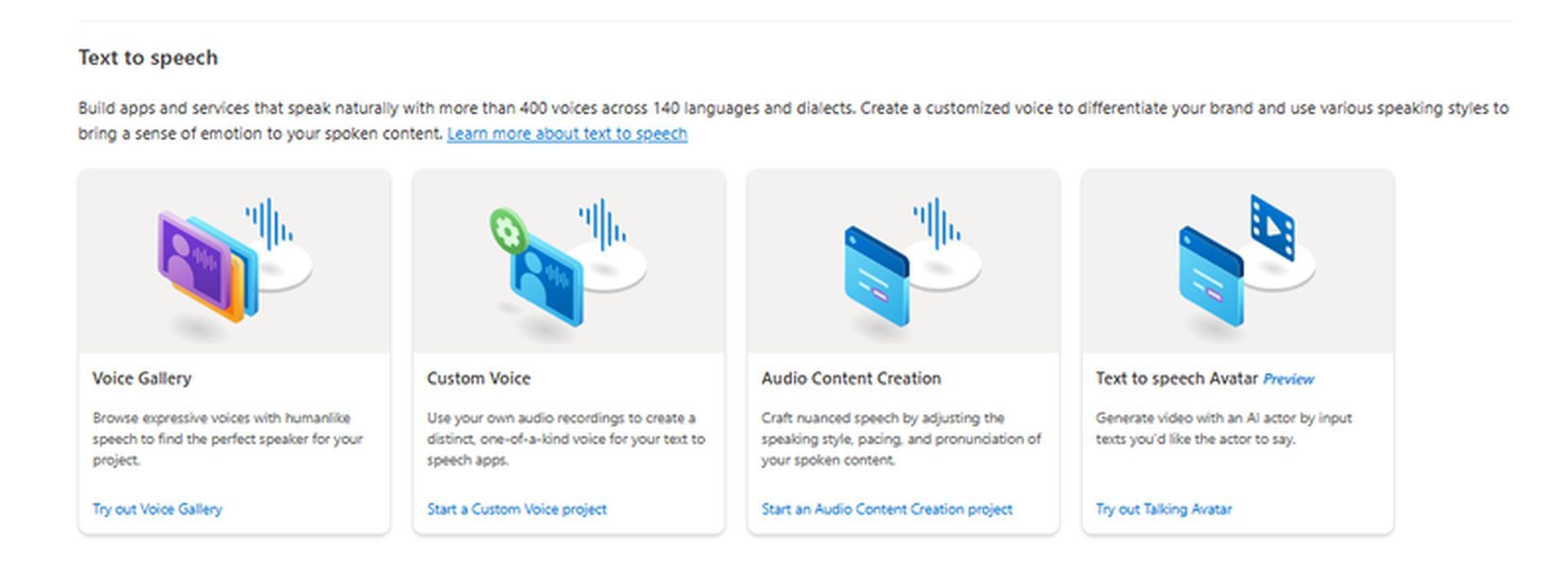
- Speech synthesis (Text-to-speech): Generates lifelike, natural-sounding speech from written text, allowing developers to create interactive and dynamic voice applications.
- Use cases: Virtual assistants, customer support bots, accessibility features.
- Speech translation: Translates spoken language into another language in real-time, facilitating multilingual communication.
- Use cases: Cross-language communication apps, translation services.
- Speaker recognition: Identifies and verifies individuals based on their unique voice characteristics, enhancing security and personalization.
- Use cases: Biometric security applications, personalized user experiences.
How to use Azure AI Speech
Using Azure AI Speech involves several steps, from setting up an Azure account to integrating the speech services into your applications. Here’s a detailed guide on how to use Azure AI Speech:
- Create an Azure Account: If you don’t have an Azure account, sign up for one at Azure Portal.
- Access Azure AI Speech: Once logged in, navigate to the Azure Portal.
- Create a speech resource: In the Azure Portal, create a new Speech resource. This resource acts as a container for your speech-related assets and configurations.
- Get subscription key and region: Once the Speech resource is created, obtain the subscription key and region information. These are crucial for authenticating and connecting to Azure AI Speech services.
- Choose SDK or REST API: Decide whether to use Azure SDKs for your preferred programming language or the REST API directly.
- For Azure SDKs:
- Install the Azure SDK for your programming language. SDKs are available for languages like Python, C#, Java, Node.js, etc.
- Use SDK in Your Code:
- Include the Azure Speech SDK in your project and use the provided classes and methods to interact with Azure AI Speech.
- For REST API:
- In your code, use the subscription key obtained earlier to authenticate your requests to the Azure AI Speech API.
- Use the endpoint URL associated with your Speech resource to make requests to the Azure AI Speech services.
- For Azure SDKs:
- Choose a speech service: Azure AI Speech offers different services like Speech Recognition, Speech Synthesis (Text-to-Speech), Speech Translation, and Speaker Recognition. Choose the service that fits your application’s requirements.
- Speech recognition: If using Speech Recognition, send audio files or real-time audio data to the Speech API to convert spoken language into text.
- Text-to-speech: For Text-to-Speech, send text input to the API, and it will return an audio file containing the synthesized speech.
- Speech translation: When using Speech Translation, send spoken language in one language, and the API will return the translated text or spoken language in another language.
- Speaker recognition: If implementing Speaker Recognition, send audio samples for enrollment and verification to identify and verify speakers.
- Handle responses: Capture and handle the responses from the Azure AI Speech services based on your application’s needs.
- Optimize and scale: Fine-tune your application based on performance needs. Azure AI Speech is designed to scale, allowing your application to handle varying workloads.
- Explore Speech Studio (Optional): Azure Speech Studio provides a graphical interface to design and test speech applications without extensive coding. Explore this tool for a more visual approach.
- Monitor and analyze: Utilize Azure’s monitoring and analytics tools to track usage, performance, and errors.
If working with features like Personal Voice or Text-to-Speech Avatar, ensure adherence to responsible AI practices, including obtaining explicit consent for voice replication. By following these steps, you can successfully integrate and leverage the power of Azure AI Speech services in your applications, enhancing the voice experience for your users.
Check out the best AI avatar generators
Azure AI Speech and avatars
The integration of Azure AI Speech with avatars introduces a revolutionary dimension to digital interaction. The Text-to-Speech Avatar feature, as part of Azure AI Speech, allows users to create realistic, talking avatars by combining text input and visual elements. This feature is particularly impactful for various applications, including video content creation, virtual assistants, and interactive chatbots.
Here is a workflow of text-to-speech Avatar:
- Text input: Users provide a script or text input, specifying what the avatar should say.
- Text analysis: The text is analyzed to generate a phoneme sequence, capturing the nuances of pronunciation and expression.
- Audio synthesis: A Text-to-Speech (TTS) audio synthesizer predicts the acoustic features of the input text and synthesizes the voice.
- Visual synthesis: The Neural Text-to-Speech Avatar model predicts lip sync images based on acoustic features, generating a realistic video of the avatar speaking.
Features of Text-to-Speech Avatar
- Prebuilt avatars: Ready-made avatars are available for Azure subscribers, offering convenience and accessibility for a variety of applications.
- Custom avatars: Users can upload their own video recordings to train the system and create personalized avatars, enhancing brand representation and customization.
Microsoft, recognizing the potential for misuse, restricts access to custom avatars to ensure responsible AI practices, aligning with broader ethical considerations in AI development.
In essence, Azure AI Speech stands as a powerful toolset, not only facilitating advanced voice functionalities but also extending into the realm of visual interaction through the innovative Text-to-Speech Avatar feature. This integration opens new possibilities for creating engaging, personalized, and dynamic digital experiences across various domains.