Search interest for is Gemini down spiked as users reported widespread access issues with Google’s popular AI service.
Many users are unable to start new chats or send prompts, with repeated connection errors appearing across both web and mobile versions.
The disruption has been confirmed by Google through its Workspace status updates, although no full resolution timeline has been provided.
Is Gemini down for everyone?
Users began reporting failures when sending prompts, often receiving system messages instead of responses.
The most common issues include:
- Chat requests failing to send or immediately resetting
- New conversations not loading properly
- Repeated error prompts blocking input
Reports indicate the issue affects multiple regions and is not tied to a specific device type or browser.
When the Gemini outage started
The first major spike in reports appeared early morning hours in US time zones, followed by rapid increases across Europe.
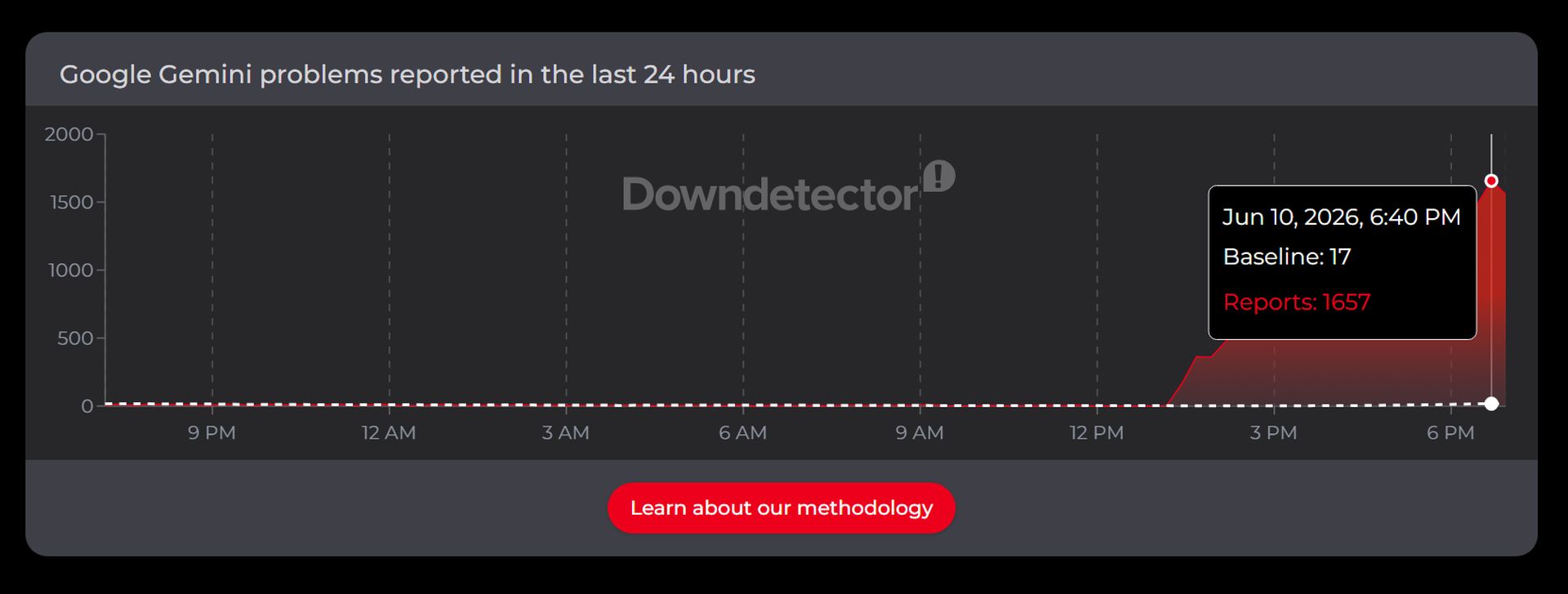
Tracking platforms showed hundreds of simultaneous reports within a short time window, suggesting a backend service disruption rather than isolated user errors.
What is Gemini error 1076 and error 1099
Two error codes have been widely reported:
- Error 1076 is commonly associated with connection timeouts during chat initialization. In practice, it appears when a session fails to establish properly.
- Error 1099 is typically linked to server-side instability, where the request reaches Google systems but cannot be processed.
Users report that both errors can appear interchangeably depending on the request type and session state.
Google status updates and current situation
Google has acknowledged an ongoing incident affecting Gemini services and stated that engineering teams are actively investigating. However, the company has not provided an estimated fix time.
While some users report partial recovery, others continue to experience failures when submitting new prompts, keeping search interest around is Gemini down elevated.
Temporary fixes users are trying
No official workaround has been confirmed, but several short-term methods appear to help in some cases:
- Resubmitting the same prompt immediately after failure
- Starting a new chat session instead of continuing an existing thread
- Logging out and logging back into the account
- Using private or incognito browser windows
These methods do not guarantee stability but may reduce repeated errors during the outage window.
Nowadays, even short service interruptions can block basic tasks like drafting text, searching, or coding assistance.
For now, users are advised to monitor Google’s status dashboard and retry requests periodically as systems stabilize.