Modern enterprise technology strategies are heavily anchored to the promise of automation. Organizations have integrated artificial intelligence into software development, customer operations, and data analytics. Yet, a massive bottleneck remains inside corporate offices: the manual process of technical and strategic presentation building.
Think about the workflow required to build an executive pitch or a quarterly project review. A product manager or data analyst typically acts as a manual data coordinator. They extract performance telemetry from an observability platform, draft summaries in a document editor, build charts in a spreadsheet app, and then manually import those assets into legacy slide software.
This process represents an inefficient method of information management. When separate, disconnected applications are used to handle data gathering, analysis, and visual design, an organization pays a heavy cognitive tax. The data loses its contextual alignment, technical details get lost across application boundaries, and teams spend the majority of their time fixing misaligned layout boxes, text overflows, and element collisions.
The solution to this operational drag is a structural transition away from disjointed software tools and toward an integrated AI Agent Workspace. Efficiency is unlocked when the barriers between research, data processing, and visual production are dissolved into a continuous, state-aware ecosystem. By moving from single-purpose bots to a comprehensive multi-agent environment, enterprises can shift from managing isolated tasks to directing unified pipelines that execute complex projects from concept to final delivery.
The automation evolution: Beyond the “Single-Pass” generation trap
Early iterations of AI slide creation relied on a highly transactional model. A user filled out rigid configuration forms, submitted a text prompt, and a machine generated an unalterable static layout. If the technical metrics were slightly misaligned, or if the visual output missed the target, the workflow broke down. The user was forced to throw away the deck or spend hours manually rebuilding the file in an external editor. This approach failed because it treated asset production as a single-pass transaction rather than an iterative, collaborative loop.
Modern technical operations demand an evolutionary leap: upgrading the presentation pipeline from simple automated templates to autonomous agent execution. In an agent-driven architecture, the system maintains continuous task awareness, independent planning capabilities, and structural resilience.
By leveraging a unified environment like the HIX AI presentation maker, the creation of professional collateral shifts away from superficial designs and enters an end-to-end framework. This execution layer introduces critical capabilities that redefine how data is compiled and visualized:
- Interrupted execution states: Unlike primitive tools that fail if interrupted, modern agent infrastructure supports a pause-and-resume framework. Users can pause the active generation loop, input real-time modification instructions, and command the system to resume generation with the new constraints perfectly integrated.
- One-sentence execution: For explicitly defined technical topics, the system completely removes disruptive setup forms. The platform automatically maps out target page lengths, stylistic parameters, audience demographics, and core technical pillars behind the scenes, diving straight into the professional-grade presentation generation process.
- Adaptive resource planning: The system automatically calculates optimal web crawling and asset retrieval cycles based on the complexity of the objective. Instead of executing a hardcoded, fixed number of search rounds, the workspace dynamically scales its information gathering to match the technical depth of the prompt.
- Dynamic resource metering: To ensure alignment with actual infrastructure usage, the platform utilizes dynamic token-consumption billing. This approach accurately maps costs directly to real-time computational resource usage during intensive research and rendering cycles, providing a much fairer model for the enterprise.
Phase 1: High-fidelity data extraction and structural layout compilation
A presentation is only as reliable as the underlying evidence supporting it. In data-heavy industries, the greatest barrier to automation has always been the information deficit caused by document omission and model hallucinations. When processing long-form technical whitepapers or system logs, standard tools often dump the entire text into a limited context window, leading to forgotten sections and fabricated claims.
Segmented slice retrieval mechanics
To ensure absolute fidelity to your reference materials, the advanced workspace completely redesigns how files are parsed. When an attachment—such as a complex financial report, system architecture blueprint, or compliance log—is uploaded, the workspace executes a segmented slice retrieval process.
Instead of treating the document as an unstructured text block, the system slices the material into semantically indexed vectors and references data on a page-by-page basis. The primary objective is to anchor every individual slide layout to an explicit section of the original text. This precision mapping minimizes technical data errors, prevents the omission of critical chapters, and eliminates the fabrication of data points.
Dynamic 16:9 boundary enforcement
Once the data is securely extracted, it must be compiled into a visual space without sacrificing information density. The platform features an automated layout inspector and live correction loop designed to enforce strict 16:9 aspect ratio boundaries.
The system analyzes element spacing in real-time, calculating margins and text boundaries. If a text block or code snippet threatens to breach the display container, the layout compiler automatically restructures the visual elements, adjusts padding, or modifies typography scaling. This continuous verification loop drastically reduces common automated presentation defects, such as overlapping text boxes, misaligned design blocks, and information overcrowding. The initial output is clean, balanced, and ready for immediate business reviews.
Phase 2: Enterprise data visualization and editable chart engineering
Data visualization is the core of any high-impact technical presentation. However, most automated tools output graphs as flat, unchangeable images. If a single metric changes during an active project lifecycle, the engineer is forced to export the dataset, rebuild the visual graphic in an external spreadsheet, and manually re-align the asset in the deck.
The professional chart rendering standard
 To solve the visual limitations of automated reporting, the workspace establishes a comprehensive, design-driven chart rendering standard. The platform moves completely away from low-quality visual graphics by defining precise layout rules across multiple visualization formats, including column charts, bar graphs, line plots, pie diagrams, and area charts.
The system utilizes clean, modern design foundations: rounded bar structures, explicit data node markers, gradient fills, and a clear five-tier typography hierarchy. The workspace automatically scans the underlying dataset and selects the ideal chart type to represent the metrics, moving data visualization from a basic utility to an authoritative, boardroom-ready asset.
Fully ınteractive embedded Excel charts
The true breakthrough in this visualization architecture is the preservation of data editability. When the workspace compiles a chart, it does not create a flat visual image.
Instead, the system utilizes an industry-leading infrastructure that outputs fully interactive, embedded Excel data components. This architecture allows professionals to open and manipulate the underlying tabular data directly within the native presentation suite. If a financial forecast updates or a performance metric changes, the user alters the numbers inside the embedded sheet, and the visual graphics update automatically without breaking the layout or requiring a complete re-render of the slide.
Phase 3: Post-generation modification and the Dual-Engine editing strategy
Even the most accurate automated presentation requires human adjustments before it enters a boardroom. To maintain a truly continuous pipeline, a professional workspace must allow users to refine, reshape, and edit assets without ever forcing them to export the file to an external editor.
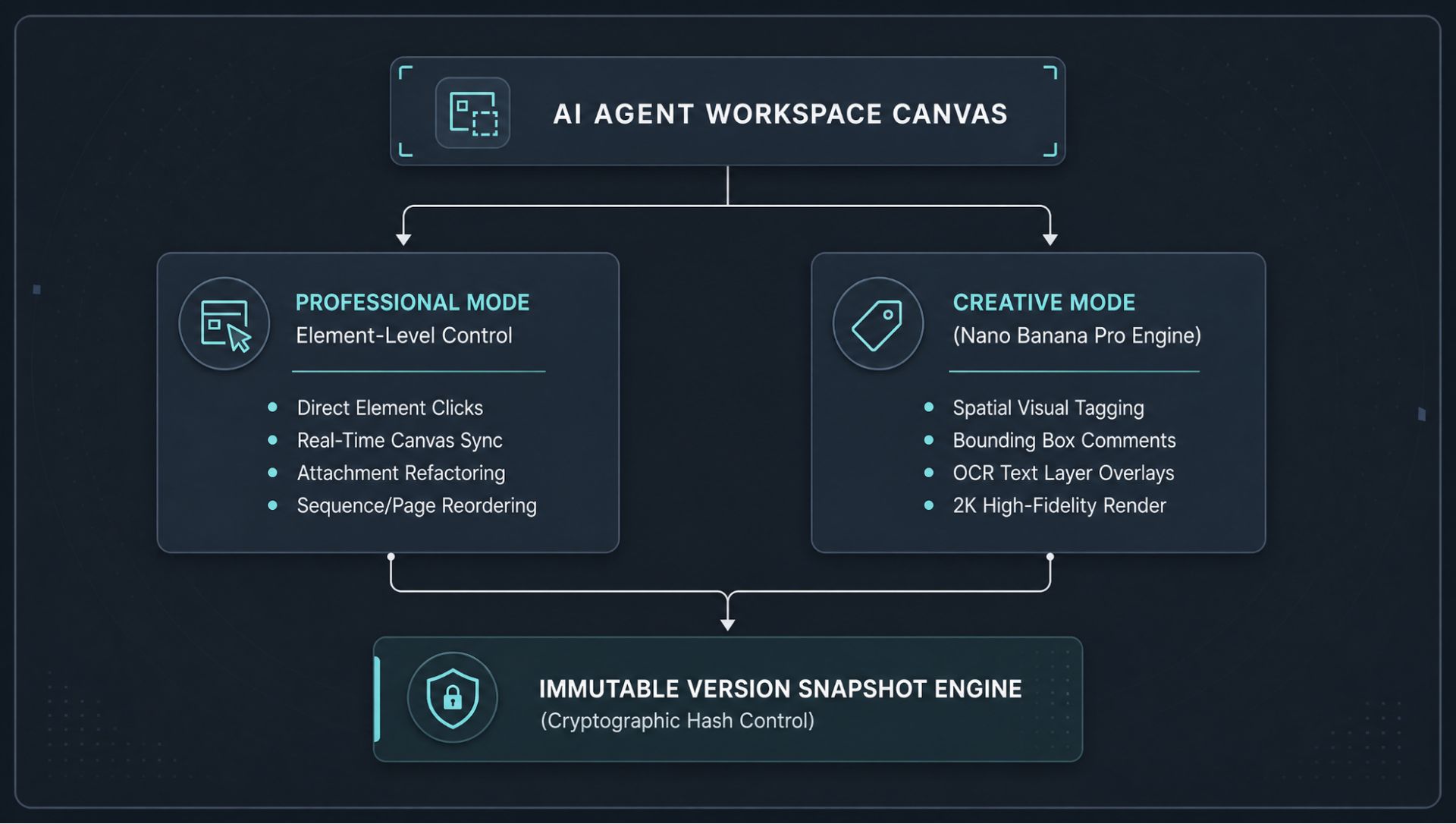
By utilizing an integrated AI slides generator, the platform introduces a dual-engine editing workflow that balances precision control with creative freedom.
The professional mode: Element-level precision
When working under the Professional Mode layer, users can execute highly specific, controllable modifications through a conversational dialogue track.
- Element reference and control: Users can click directly on any individual text frame, image asset, data chart, or structural block on the slide canvas. The dialogue system instantly displays a visual thumbnail of the selected element within the chat interface, letting the user issue a precise modification command (e.g., “Convert this bulleted list into a three-column layout, and align it with the primary data label”). The canvas reflects these changes in real-time.
- Incremental attachment updates: If an individual slide requires deep content refactoring based on fresh reference data, users can upload external attachments directly into that specific element’s edit session. The workspace processes the new material and updates the targeted design element while preserving the rest of the presentation architecture.
- Page-level structural controls: This mode provides comprehensive canvas operations, allowing users to remove single pages, adjust presentation sequences, and swap slide orders through simple natural language directives.
The creative mode: Spatial context and graphic text modification
For broad artistic updates, layout restructuring, or complex visual modifications, the workspace activates a flexible Creative Mode powered by an advanced layout rendering model.
- Visual box selection and comments: Users are no longer limited to standard text editing. In Creative Mode, you can use a cursor to draw a bounding box around any region of the presentation preview and type a natural language comment directly onto that area. The system converts these spatial comments into a structured command, allowing the underlying AI to execute layout shifts, color adjustments, or asset changes across the targeted zone in one single pass.
- Text editing within graphics: The creative engine leverages an advanced Optical Character Recognition (OCR) system to identify text layers embedded within complex graphics, overlaying them as editable input frames over the preview layout. Users can double-click and modify copy directly on the graphics layer. The system processes these changes and outputs a high-fidelity final render across over 50 global languages with clear text edges and zero graphical distortion.
Phase 4: Failsafe execution and version history snapshots
Iterative design cycles require an organized, safe environment where users can experiment with different presentation layouts without the fear of losing progress or corrupting data.
Snapshot version control and rollbacks
To ensure absolute safety throughout the post-generation editing phase, the workspace runs a continuous snapshot version control engine. The system automatically creates a clean history snapshot whenever an automated modification is processed.
By hovering over the history timeline, users can view an organized list of preservation markers, each containing a real-time timestamp and a unique identifier. Users can instantly preview past iterations and execute a complete version rollback. Once a rollback is finalized, all subsequent updates are applied as clean, incremental modifications built directly on top of the restored version state, making the entire creation process fully traceable.
Protecting intellectual property through Digital Sovereignty
As automation layers take over the processing of primary enterprise data, information security has evolved from a basic IT compliance requirement to a core matter of competitive survival. Organizations cannot afford to risk leaking their product roadmaps, source metrics, or strategic pitches into public commercial training datasets through consumer-grade tools.
An enterprise-ready agent workspace completely resolves this vulnerability by ensuring total Digital Sovereignty. By executing every layer of research, copywriting, data calculation, and visual editing inside a highly secure, sandboxed perimeter, your corporate data remains completely protected.
More importantly, as your teams collaborate with the platform over time, the system undergoes localized learning. It captures your specific industry parameters, brand tone, and institutional logic. This transforms the workspace into an exclusive private knowledge base, building a distinct intellectual property moat that competitors using disconnected public utilities simply cannot match.
Conclusion: Embracing the role of the Strategic Director
The definitive takeaway for technology leaders is that operational leverage is no longer a function of manual output—it is a function of clear strategic intent. The era of the digital laborer spending hours alignment-checking text frames, moving data between windows, and fighting rigid graphics software is drawing to a close.
By transitioning to an integrated workspace architecture and leveraging advanced, editable visualization systems, professionals protect their collective cognitive bandwidth. Human talent can finally step away from mechanical application coordination and focus entirely on the core values that drive business growth: critical logic, systems strategy, and persuasive human leadership. The presentation lifecycle is no longer a tedious chore to be managed; it is an optimized system to be directed. It is time to take command of the workspace.