Dataconomy
  • News
    • Artificial Intelligence
    • Cybersecurity
    • DeFi & Blockchain
    • Finance
    • Gaming
    • Startups
    • Tech
  • Industry
  • Research
  • Resources
    • Articles
    • Guides
    • Case Studies
    • Whitepapers
  • AI toolsNEW
  • Newsletter
  • + More
    • Glossary
    • Conversations
    • Events
    • About
      • About
      • Contact
      • Imprint
      • Legal & Privacy
      • Partner With Us
Subscribe
No Result
View All Result
  • AI
  • Tech
  • Cybersecurity
  • Finance
  • DeFi & Blockchain
  • Startups
  • Gaming
Dataconomy
  • News
    • Artificial Intelligence
    • Cybersecurity
    • DeFi & Blockchain
    • Finance
    • Gaming
    • Startups
    • Tech
  • Industry
  • Research
  • Resources
    • Articles
    • Guides
    • Case Studies
    • Whitepapers
  • AI toolsNEW
  • Newsletter
  • + More
    • Glossary
    • Conversations
    • Events
    • About
      • About
      • Contact
      • Imprint
      • Legal & Privacy
      • Partner With Us
Subscribe
No Result
View All Result
Dataconomy
No Result
View All Result

ChatGPT temporary chat feature keeps your conversations confidential

Looking for confidential conversations with chatbots? ChatGPT temporary chat update allows just that

byEmre Çıtak
May 2, 2024
in Artificial Intelligence
Home News Artificial Intelligence
Share on FacebookShare on TwitterShare on LinkedInShare on WhatsAppShare on e-mail

OpenAI’s ChatGPT has carved a niche for itself with its constant updates and the ChatGPT temporary chat feature is the latest addition to the most popular chatbot of all time.

Known for its ability to generate human-quality text and carry on conversations, ChatGPT is a popular tool for writers, researchers, and anyone curious about the potential of AI. However, some users might desire a space for conversations that are confidential and don’t contribute to the model’s learning process.

This is where the ChatGPT temporary chat feature comes in, offering a unique way to interact with the popular chatbot.

Stay Ahead of the Curve!

Don't miss out on the latest insights, trends, and analysis in the world of data, technology, and startups. Subscribe to our newsletter and get exclusive content delivered straight to your inbox.

What is ChatGPT temporary chat feature?

Temporary Chat is a feature within ChatGPT that allows users to have conversations that vanish without a trace. Unlike standard interactions, these chats are not saved in the history and don’t influence the model’s future responses. This creates a “forgetful zone” where users can discuss sensitive topics, brainstorm freely, or simply explore ideas without leaving a digital footprint. So if you were asking yourself “Is it impossible to stop your data being used to train AI“, there is now a way!

Technically, temporary chat disables ChatGPT’s memory function for the duration of the conversation. This means the model won’t remember anything discussed previously in the session or any information gleaned from past interactions with other users. It essentially starts with a clean slate for each ChatGPT Temporary Chat session, ensuring the conversation remains isolated and confidential.

How to use ChatGPT temporary chat feature

As we mentioned before OpenAI’s recent update empowers users with greater control over their ChatGPT experience, particularly regarding data privacy.

Here’s a step-by-step guide to utilizing this feature:

  1. Go to the ChatGPT website
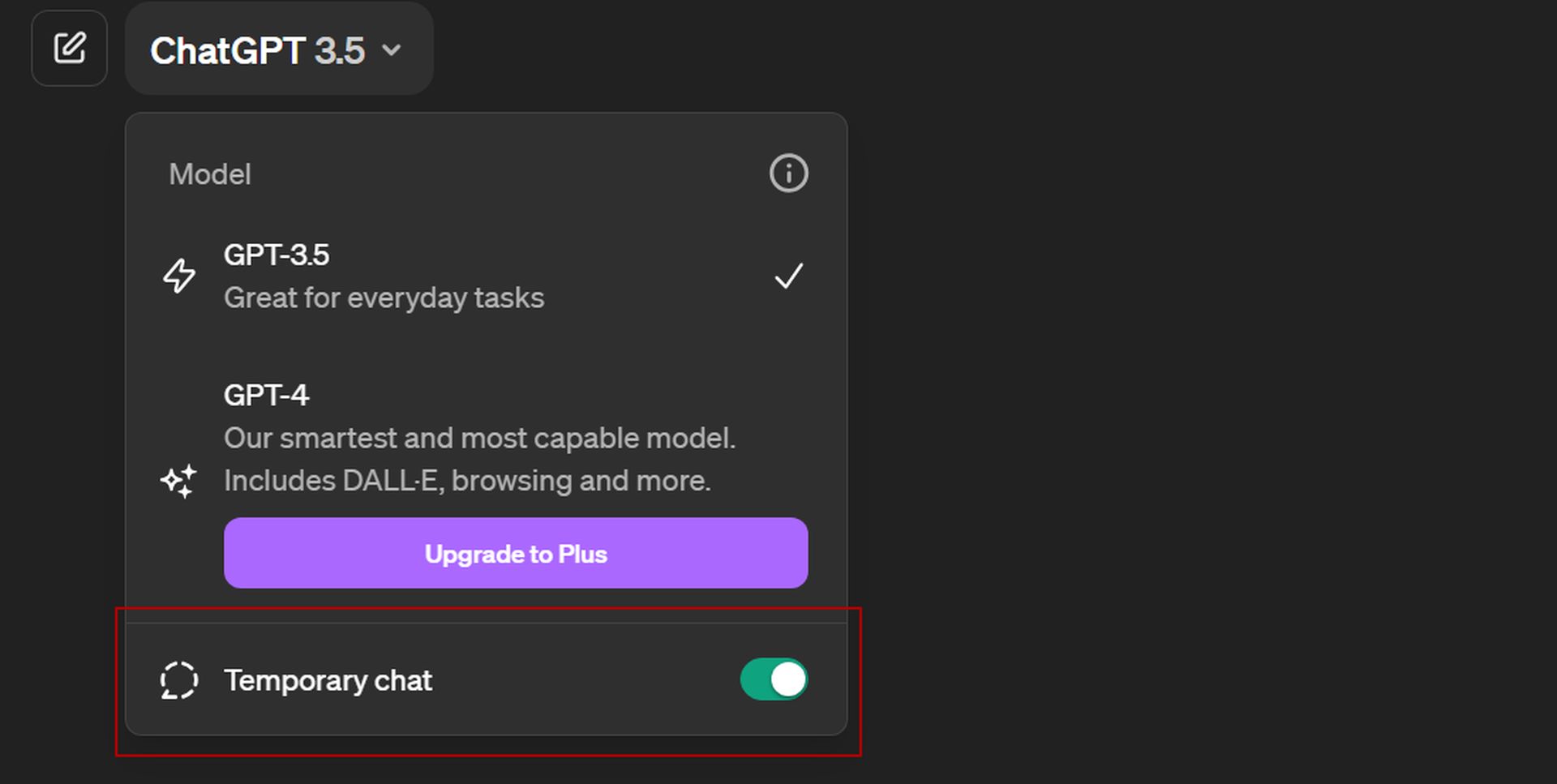
  2. Click the model selection drop-down menu on the top-left corner of your screen
  3. Enable “Temporary chat”
How to use ChatGPT Temporary Chat
Personal information shared during the ChatGPT temporary chat sessions will not be used for the training of the chatbot

Feel free to discuss sensitive topics, brainstorm freely, or simply explore ideas without leaving a digital footprint.

Remember, anything you type will be processed by ChatGPT in real-time, but it won’t be stored for future reference, but OpenAI states:

“For safety purposes, we may keep a copy of this chat for up to 30 days.”

Once you’ve finished your private conversation, simply close the chat window. Your next interaction with ChatGPT will function in the standard mode, where conversations are saved in the chat history and contribute to the model’s learning process.

Currently, the update is only live on the ChatGPT web version, with the mobile app rollout coming soon. This update is a testament to OpenAI’s commitment to user-centricity, offering greater control over chat history and introducing features like Temporary Chats for enhanced privacy.


Featured image credit: Emre Çıtak

Tags: chatgpthow to

Related Posts

Beyond the Hallucination: How AI is Rebuilding AAA Production Pipelines from a Vacuum

Beyond the Hallucination: How AI is Rebuilding AAA Production Pipelines from a Vacuum

January 8, 2026
Google Classroom turns lessons into podcasts with Gemini

Google Classroom turns lessons into podcasts with Gemini

January 8, 2026
Skylight unveils Calendar 2 with AI organization tools at CES 2026

Skylight unveils Calendar 2 with AI organization tools at CES 2026

January 8, 2026
OpenAI launches dedicated ChatGPT Health space

OpenAI launches dedicated ChatGPT Health space

January 8, 2026
Ford announces AI assistant and next-gen BlueCruise at CES 2026

Ford announces AI assistant and next-gen BlueCruise at CES 2026

January 8, 2026
Lenovo and Motorola introduce Qira cross-device AI assistant

Lenovo and Motorola introduce Qira cross-device AI assistant

January 7, 2026

LATEST NEWS

CES 2026: Samsung Display announcements in a nutshell

Bluetti unveils Charger 2 with dual engine-solar inputs at CES 2026

Tone Outdoors unveils silent T1 leaf blower at CES 2026

Roblox mandates facial verification for global chat access

Spotify challenges YouTube with easier video monetization

Spotify adds real-time listening activity to Messages

Dataconomy

COPYRIGHT © DATACONOMY MEDIA GMBH, ALL RIGHTS RESERVED.

  • About
  • Imprint
  • Contact
  • Legal & Privacy

Follow Us

  • News
    • Artificial Intelligence
    • Cybersecurity
    • DeFi & Blockchain
    • Finance
    • Gaming
    • Startups
    • Tech
  • Industry
  • Research
  • Resources
    • Articles
    • Guides
    • Case Studies
    • Whitepapers
  • AI tools
  • Newsletter
  • + More
    • Glossary
    • Conversations
    • Events
    • About
      • About
      • Contact
      • Imprint
      • Legal & Privacy
      • Partner With Us
No Result
View All Result
Subscribe

This website uses cookies. By continuing to use this website you are giving consent to cookies being used. Visit our Privacy Policy.